Windows 7 Forums Search
Welcome to Windows 7 Forums. Our forum is dedicated to helping you find solutions with any problems, errors or issues you are experiencing with Windows 7. The Windows 7 forum also covers news and updates and has an extensive Windows 7 tutorial section that covers a wide range of tips and tricks.


Windows 7 - How can I keep all folders from changing?

 
04-03-2010   #1


Windows 7


How can I keep all folders from changing?

What I mean is, when I set Documents as Small Icons, how can I keep folders inside Documents from doing the same thing? Like when I go into My Received Files, I don't want the pictures to be small icons. I want them to be medium/large. But any change I make in a folder applies itself to every other folder as well.

My System SpecsSystem Spec
04-03-2010   #2


Windows 7 Ultimate x64 SP1


Hello Andrew and welcome to Seven Forums.

If you access that folder from the C:\Users\(User-name)\My Documents location, then you can set each folder to have it's own separate folder views by default.

The Documents button on the dark right side of the Start Menu however opens to the Documents Library instead. These folder share the same folder views at this location and cannot be changed.

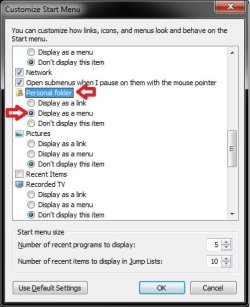
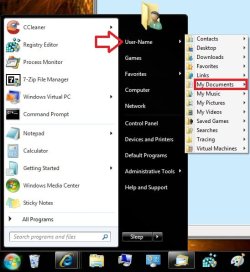
As a workaround, you can open My Documents from your User Folder button on the dark right side of the Start Menu instead. This opens to the C:\Users\(User-name)\My Documents location. To make it easier to select and open, have the Personal Folder (your user folder) set to Display as a menu.

Hope this helps,
Shawn
My System SpecsSystem Spec
04-03-2010   #3


Quote   Quote: Originally Posted by JustAndrew View Post
What I mean is, when I set Documents as Small Icons, how can I keep folders inside Documents from doing the same thing? Like when I go into My Received Files, I don't want the pictures to be small icons. I want them to be medium/large. But any change I make in a folder applies itself to every other folder as well.

If you set for example large icons in a subfolder but not on the folder one level above it, then it should not apply itself upwards or downwards.

You could be experiencing a corrupt profile. Try creating another Windows 7 account and then try to set small icons to documents folder and then make you other settings within that folder the way you want and then back out and go back in to see if your prefs are keeping.
My System SpecsSystem Spec
.


04-03-2010   #4


Windows 7 x64 pro/ Windows 7 x86 Pro/ XP SP3 x86


Hello JustAndrew,
What you have described will happen only if, for any particular folder, you go to Organize-FolderOptions-View tab and click on "Apply to Folders". If you dont like that setting, click on "Reset Folders" in the View tab. Then you can set individual view settings for folders and subfolders.
My System SpecsSystem Spec
04-03-2010   #5


Windows 7


Thank you for the welcome, Brink.

Well, I'd like to put My Documents in place of Documents, but it's nowhere on the list. I can only remove Documents.
My System SpecsSystem Spec
04-03-2010   #6


Windows 7 Ultimate x64 SP1


You can remove the Documents button in the Start Menu.
How can I keep all folders from changing?-docs.jpg
Next, set your Personal Folder like this to have it that way if you like.
How can I keep all folders from changing?-start1.jpgHow can I keep all folders from changing?-start2.jpg
My System SpecsSystem Spec
04-03-2010   #7


Windows 7


Ah, that makes sense. Thank you again.

And thanks to everyone else for their help and welcomes.
My System SpecsSystem Spec
04-03-2010   #8


Windows 7 Ultimate x64 SP1


You're most welcome Andrew.
My System SpecsSystem Spec
Reply

 How can I keep all folders from changing? problems?


Thread Tools


Similar Threads for: How can I keep all folders from changing?
Thread Forum
Slow changing between folders Browsers & Mail
Changing Picture Folders Display. Music, Pictures & Video
Changing One Folder Changes All Folders General Discussion
Changing Default Folders? Customization
Icon Packager Not Changing Folders Customization


All times are GMT -5. The time now is 04:02 AM.


Windows 7 Forums is an independent web site and has not been authorized,
sponsored, or otherwise approved by Microsoft Corporation.
"Windows 7" and related materials are trademarks of Microsoft Corp.
© Designer Media Ltd
  

1 2 3 4 5 6 7 8 9 10 11 12 13 14 15 16 17 18 19 20 21 22 23 24 25 26 27 28 29 30