Windows 7 Forums Search
Welcome to Windows 7 Forums. Our forum is dedicated to helping you find solutions with any problems, errors or issues you are experiencing with Windows 7. The Windows 7 forum also covers news and updates and has an extensive Windows 7 tutorial section that covers a wide range of tips and tricks.


Windows 7 - Unlocking Computer - prompt for User Selection

 
04-06-2010   #1


7 x32


Unlocking Computer - prompt for User Selection

Hi all,

I'm using W7x32 Enterprise in a domain and this only started happening recently so it must be a security update or a gpo pushed setting I suppose.

Incl. screenshots here's what happens.
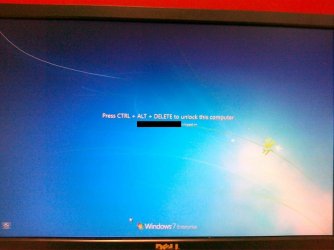
1. I lock my computer using "Windows + L" or "ctrl+alt+del + lock computer"
2. I see the screen in attachment 1 (01042010001.jpg)
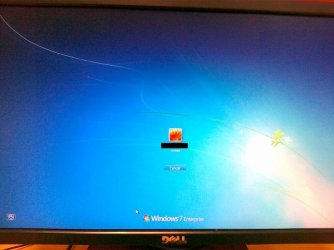
3. I press ctrl+alt+del to unlock the computer and instead of being prompted to enter my password, I have to select what user I want to use (and since only one option is listed this screen is absolutely senseless) - see attachment 2 (01042010002.jpg)
4. I hit enter or click on the user icon
5. I get to the "enter password" screen to unlock the computer - this is what I would expect to see after hitting "ctrl+alt+del" in the first place - see attachment 3 (01042010003.jpg).

Is there any way to remove this "user selection" screen in step 3/4? I know it's just an extra "enter" to hit but it's completely void in my opinion...

Any help is appreciated! Thanks!

Attached Thumbnails
Unlocking Computer - prompt for User Selection-01042010001.jpg   Unlocking Computer - prompt for User Selection-01042010002.jpg   Unlocking Computer - prompt for User Selection-01042010003.jpg  
My System SpecsSystem Spec
04-06-2010   #2


Windows 7 Home Premium SP1, clean install, upgrade disc


Welcome

The easy approach may be to try system restore

System Restore
My System SpecsSystem Spec
04-06-2010   #3


Windows 7 x64 pro/ Windows 7 x86 Pro/ XP SP3 x86


Well, somewhat unconventional situation, but try disabling fast user switching.

Open gp editor by typing gpedit.msc in "Run" box and hitting enter.

Navigate to the following:
Computer Configuration
-> Administrative Templates
-> System -> Logon
-> Hide Entry Points for Fast User Switching. Enable this setting.
My System SpecsSystem Spec
.


04-06-2010   #4


7 x32


Thanks Bill - unfortunately that has already been enabled.

Richard - I have System Restores disabled so this won't do. I would have to rebuild which I would currently like to avoid.
My System SpecsSystem Spec
04-06-2010   #5


Quote   Quote: Originally Posted by pasusu View Post
Thanks Bill - unfortunately that has already been enabled.

Richard - I have System Restores disabled so this won't do. I would have to rebuild which I would currently like to avoid.
I would do this. Try creating a new user account, and then login to Windows with that account. Then perform the same steps you have done here to see if you get this same prompting.

If still happening, I would perform a sfc /scannow in DOS and see what happens.
My System SpecsSystem Spec
04-06-2010   #6


XP Pro SP3 X86 / Win7 Pro X86


Quote   Quote: Originally Posted by pasusu View Post
Hi all,

I'm using W7x32 Enterprise in a domain and this only started happening recently so it must be a security update or a gpo pushed setting I suppose.

Incl. screenshots here's what happens.
1. I lock my computer using "Windows + L" or "ctrl+alt+del + lock computer"
This may not be exactly what you want but....

Open REGEDIT... WinKey+R->REGEDIT->OK

Now path your way into...

HKEY_LOCAL_MACHINE\Software\Microsoft\Windows NT\CurrentVersion\Winlogon

Change --or create-- the dword setting "DisableCAD" to a 1.

This should disable the Ctrl-Alt-Del step leaving you to enter a password to unlock the desktop.
My System SpecsSystem Spec
04-06-2010   #7


7 x32


Actually the registry key removed the CAD prompt but I still had to pick the user afterwards.

Funny enough, I added one of my colleague's domain user accounts as a local admin on the system and had him log in: he didn't have the issue. Had him log out and logged back in myself and now it's gone.

Very weird one but by the looks of things it was profile related.

Thanks for all your help guys!
My System SpecsSystem Spec
04-06-2010   #8


Quote   Quote: Originally Posted by pasusu View Post
Actually the registry key removed the CAD prompt but I still had to pick the user afterwards.

Funny enough, I added one of my colleague's domain user accounts as a local admin on the system and had him log in: he didn't have the issue. Had him log out and logged back in myself and now it's gone.

Very weird one but by the looks of things it was profile related.

Thanks for all your help guys!
Don't forget the rep button. Glad things have been narrowed down.
My System SpecsSystem Spec
04-06-2010   #9


7 x32


already done
My System SpecsSystem Spec
04-06-2010   #10


XP Pro SP3 X86 / Win7 Pro X86


Quote   Quote: Originally Posted by pasusu View Post
Actually the registry key removed the CAD prompt but I still had to pick the user afterwards.

Funny enough, I added one of my colleague's domain user accounts as a local admin on the system and had him log in: he didn't have the issue. Had him log out and logged back in myself and now it's gone.

Very weird one but by the looks of things it was profile related.

Thanks for all your help guys!
Ahhh... my bad... I forgot to mention that you'd have to reboot to activate the change....

Glad you got it as you like!
My System SpecsSystem Spec
Reply

 Unlocking Computer - prompt for User Selection problems?


Thread Tools


Similar Threads for: Unlocking Computer - prompt for User Selection
Thread Forum
Strange Defult Login User Prompt - Local Admin, Not Domain User General Discussion
Unlocking user and Sleep problem General Discussion
User Selection Screen Wallpaper Customization
Can not see user selection screen, but can log in. General Discussion


All times are GMT -5. The time now is 04:03 AM.


Windows 7 Forums is an independent web site and has not been authorized,
sponsored, or otherwise approved by Microsoft Corporation.
"Windows 7" and related materials are trademarks of Microsoft Corp.
© Designer Media Ltd
  

1 2 3 4 5 6 7 8 9 10 11 12 13 14 15 16 17 18 19 20 21 22 23 24 25 26 27 28 29 30