|
Welcome to Windows 7 Forums. Our forum is dedicated to helping you find solutions with any problems, errors or issues you are experiencing with Windows 7. The Windows 7 forum also covers news and updates and has an extensive Windows 7 tutorial section that covers a wide range of tips and tricks.
Windows 7 - Why don't folders expand when I click like in XP |
04-07-2010
|
#1 | | Windows 7 Enterprise Edition 32-bit |
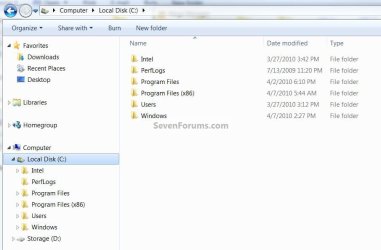
Why don't folders expand when I click like in XP When in Windows Explorer in XP, when you click on a folder in the left-hand pane, it would expand.
How do I make it do this in Windows 7?
Thanks,
Ken
| My System Specs | | System Manufacturer/Model Number Dell Vostro 200 OS Windows 7 Enterprise Edition 32-bit CPU Pentium Dual Core 2.4 GHz Memory 4Gb Graphics Card ATI Radeon HD 3400 Sound Card On board Monitor(s) Displays 2 Dell flatscreen Hard Drives WD 160Gb Internal (Containing OS & Installed Programs)
Seagate 1Tb Internal (DATA, MUSIC, PHOTOS, VIDEOS, DOWNLOADS)
Various external HDs 500Gb & 1Tb for backups |
04-07-2010
|
#2 | | W7x64 Pro, SuSe 12.1/** W7 x64 Pro, XP MCE |
| My System Specs | | System Manufacturer/Model Number DIY OS W7x64 Pro, SuSe 12.1/** W7 x64 Pro, XP MCE CPU Phenom II 1090T w/Noctua NH-D14 /**4400+ X2 w/CM Hyper TX 3 Motherboard ASRock 890FX Deluxe 4/**A8N-SLI Memory 2 x 2GB Patriot PGS34g1600LLKA/**4x1GB Corsair VS Graphics Card EVGA GTX460 SC/**EVGA 8800GTS Sound Card Asus Xonar D2X/**Xonar D1 Monitor(s) Displays Acer X233H, Dell E152FPc /**LG M237-WD Screen Resolution 1920x1080 & 1024x768/**1980x1080 Keyboard Logitech Media USB/**Saitek Eclipse Mouse Cordless Trackman Wheel/**Ditto PSU CM RS600 w/ APC BX1000G/**Antec 500 TP w/ APC BX1000 Case HAF922/**Antec 1040IIB Cooling 3x200mm, 1x140 and 1x120mm/**5x80mm fans Hard Drives WDC 2TB, 1.5TB, 1TB, 500GB,Seagate 500GB , Maxtor 80GB /**500GB Seagate & WDC 1TB Black Internet Speed 3.3Mbps Other Info SB 560 5.1 w/ Sennheiser RS140/**Creative T20 speakers, Dvico FusionHDTV7 Gold RT, Cisco E3000, HP 5510V AIO, Linksys E3000, Belkin F5U237 hub and **F5D8055 adapter
(** = 2nd rig) |
04-07-2010
|
#3 | | |
Hello KenY7744, welcome to Seven Forums!
You have to (double) click the little triangle to expand it. | My System Specs | | System Manufacturer/Model Number * BFK Customs * OS W 7 64-bit Ultimate CPU Intel Q9550 Yorkfield Motherboard ASUS P5Q Pro Memory 8GB Dominator 8500C5D Graphics Card ATI : XFX 5870 Sound Card Realtek HD Audio 7-1 Monitor(s) Displays 1x 47" LCD HDMI & 3x 26" LCD HDMI Screen Resolution 1920x1080P & 1920x1200 Keyboard Microsoft 500 Mouse Razer Diamondback 3G PSU Corsair 620HX Case Cooler Master RC-690 Cooling Tuniq Tower 120, 2x 140mm and 3x 120mm case fans Hard Drives 1x 80GB Intel X25-M G2 SSD : 1x 500GB & 1x 640GB WD Caviar Black(s) Internet Speed 14 Mb/s Other Info 1x Koutech 3Gb/s SATA HDD Hot Swap Rack |
04-07-2010
|
#4 | | MS Windows 7 Ultimate SP1 64-bit |
BareFootKid,
Help me out here. Is there some configuration setting that I've chosen because all I ever need to do is to single-click to expand. Or do i completely misunderstand?
Am running Windows 7 Ultimate 32-bit version. | My System Specs | | System Manufacturer/Model Number Toshiba Satellite L305D laptop OS MS Windows 7 Ultimate SP1 64-bit CPU AMD Athlon X2 Dual-Core QL-64, 2100 Mhz, 2 Cores Motherboard TOSHIBA Portable PC (Socket M2/S1G1) Memory 4.0GB (2x2GB) DDR2 @ 333MHz 5-5-5-15 Graphics Card ATI Radeon 3100 Graphics (Toshiba) Sound Card Realtek High Definition Audio Monitor(s) Displays Generic PnP Monitor @ 1280x800 Screen Resolution 1280 x 800 Keyboard standard PS/2 Keyboard Mouse HP Wireless Optical Mobile Mouse Model FHA-3410 Hard Drives 125.03GB Corsair CSSD-V128GB2 ATA Device (IDE)
Depending upon testing, organized as 1,2, or 3 partitions with/without a 100mb system partition at the front. Internet Speed What the local pub, local coffee shop offers. Other Info Optical Drives HL-DT-ST DVDRAM GSA-T50N ATA Device
Synaptics PS/2 Port TouchPad
Speakers (Realtek High Definition Audio)
Atheros AR5007EG Wireless Network Adapter
Also have an Asus ha1002xp netbook with Win 7 Ultimate installed. |
04-07-2010
|
#5 | | |

Quote: Originally Posted by karlsnooks BareFootKid,
Help me out here. Is there some configuration setting that I've chosen because all I ever need to do is to single-click to expand. Or do i completely misunderstand?
Am running Windows 7 Ultimate 32-bit version.
Do you (like me) have "single click" enabled?
Control pane, folder option under the general tab. | My System Specs | | System Manufacturer/Model Number * BFK Customs * OS W 7 64-bit Ultimate CPU Intel Q9550 Yorkfield Motherboard ASUS P5Q Pro Memory 8GB Dominator 8500C5D Graphics Card ATI : XFX 5870 Sound Card Realtek HD Audio 7-1 Monitor(s) Displays 1x 47" LCD HDMI & 3x 26" LCD HDMI Screen Resolution 1920x1080P & 1920x1200 Keyboard Microsoft 500 Mouse Razer Diamondback 3G PSU Corsair 620HX Case Cooler Master RC-690 Cooling Tuniq Tower 120, 2x 140mm and 3x 120mm case fans Hard Drives 1x 80GB Intel X25-M G2 SSD : 1x 500GB & 1x 640GB WD Caviar Black(s) Internet Speed 14 Mb/s Other Info 1x Koutech 3Gb/s SATA HDD Hot Swap Rack |
04-07-2010
|
#6 | | XP Pro SP3 X86 / Win7 Pro X86 |

Quote: Originally Posted by karlsnooks BareFootKid,
Help me out here. Is there some configuration setting that I've chosen because all I ever need to do is to single-click to expand. Or do i completely misunderstand?
Am running Windows 7 Ultimate 32-bit version. Control Panel -> Folder Options -> Navigation Pane -> Automatically expand
Control Panel -> Folder Options -> Click items -> Single click | My System Specs | | System Manufacturer/Model Number Homebrew OS XP Pro SP3 X86 / Win7 Pro X86 CPU Amd 64 x2 4200 (2.4ghz) Motherboard Asus M2N-MX SE Plus Memory Kingston DDR2 800 2gb Graphics Card Nvidia GF-8400 Sound Card Realtek on Motherboard Monitor(s) Displays Acer x-193bw Screen Resolution 1440 x 900 Keyboard yes Mouse yes PSU 350watt In-Win Case In-Win Cooling Air Hard Drives Western Digital 500g Internet Speed 5mpbs Other Info Also ASRock ION 330 as HTPC (on XP).
Acer Aspire as GP netbook (on XP). |
04-07-2010
|
#7 | | |
Double click the folder name, or single click the little triangle. | My System Specs | | System Manufacturer/Model Number HP ENVY 17-1150eg OS Windows 7 x64 Ultimate CPU 1.6 GHz Intel Core i7-720QM Processor Memory 6 GB Graphics Card ATI Mobility Radeon HD 5850 Graphics Sound Card Beats sound system with integrated subwoofer Monitor(s) Displays 17" laptop display, 22" LCD and 32" Full HD TV through HDMI Screen Resolution 1600*900, 1680*1050 and 1920*1080 Keyboard Logitech diNovo Media Desktop Laser (bluetooth) Mouse Logitech MX1000 Laser (Bluetooth) Hard Drives Internal: 2 x 500 GB SATA Hard Disk Drive 7200 rpm
External: 2TB for backups, 3TB USB3 network drive for media Internet Speed 50/10 Mbps VDSL Other Info Windows 7 Ultimate Retail Full in English, additional Guest-user accounts in Finnish, German and Swedish (Working languages English & Swedish, Family language German, my own language, mother tongue, Finnish. I really need Ultimate to get to use Language Packs!) Why don't folders expand when I click like in XP problems? All times are GMT -5. The time now is 04:06 AM. |  |