JavaScript is disabled. For a better experience, please enable JavaScript in your browser before proceeding.
You are using an out of date browser. It may not display this or other websites correctly.
You should upgrade or use an
alternative browser .
Master of Technology
Power User
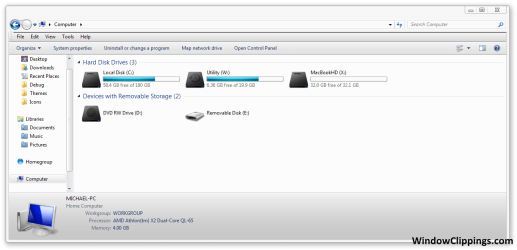
I just opened explorer, and noticed that there was a menu bar that wasnt there before. How can I remove it.
Windows 7 Home Premium x64, Mac OS X 10.6.2 x64 AMD Athlon X2 Dual-Core 2.1 GHz 4 GB DDR2 800 MHz ATI Radeon HD Mobility 3100 Graphics 256MB to... Toshiba Satellite L505D-S9565 Windows 7 Home Premium x64, Mac OS X 10.6.2 x64 AMD Athlon X2 Dual-Core 2.1 GHz Toshiba Built-In with Insyde H20 BIOS 1.40 4 GB DDR2 800 MHz ATI Radeon HD Mobility 3100 Graphics 256MB to 1468 MB Shared Realtek Mobile ALC272 HD Audio 15.6" TFT LCD with TruBrite, Samsung 1080p HDTV 1366x768, 1920x1080 ❶:Main: Toshiba 250 GB SATA 5400 RPM N/A N/A Built-in/Open window in winter :P Built-in Build-in Symantics SmartTouch Pad 55 MB/sec Down, 9 MB/sec Up ❷:Backup: Seagate FreeAgent Desk USB 2.0 5400 RPM
מעשוגע פ
Guru
http://www.sevenforums.com/tutorials/517-menu-bar-turn-off.html
Open Explorer
Click Organize (Top Left Under Menu Bar)
Expand Layout
Uncheck Menu Bar
OR
Open Explorer
Click Organize (Top Left Under Menu Bar)
Click Folder & Search Options
View Tab
Under Advanced Settings, Uncheck "Always show menus"
You can also temporarily view this bar by pressing Alt when in Explorer.
Last edited by a moderator: Apr 7, 2010
W7 Ult. x64 | OS X Intel Mobile Core 2 Duo 2.93Ghz [T9800 Penryn] 4096MB Samsung DDR3 Dual Channel [PC3-8500F 1... NVIDIA GeForce 9600M GT 512MB [G96M Rev. C1] Apple Macbook Pro (April 2009) W7 Ult. x64 | OS X Intel Mobile Core 2 Duo 2.93Ghz [T9800 Penryn] NVIDIA nForce 730i Rev. B1 [Mac-F2268EC8 (U2E1)] 4096MB Samsung DDR3 Dual Channel [PC3-8500F 1066Mhz] NVIDIA GeForce 9600M GT 512MB [G96M Rev. C1] SB X-Fi Surround 5.1 USB | Onboard Realtek (Disabled) Acer x223wbd 22" | Apple Anti-Glare 17" (Disabled) {Current} 1440x900 {Acer} 1680x1050 {Apple} 1920x1200 {Internal} Magsafe Aluminum/Unibody (MBP52) 2 x 6000 RPM Fans Logitech G-15v2 [PN 920-000379] Logitech G-9 [PN 910-000338] 12Mbps/2.5Mbps w/ 24Mbps Speed Boost [Comcast] Logitech X-540 Speakers [PN 970223-0122]
New member
Guru
Gold Member
VIP
I just opened explorer, and noticed that there was a menu bar that wasnt there before. How can I remove it.
View attachment 65824
Whish bar do you want to remove? File Edit View or
Organise etc
Microsoft Windows 7 Home Premium 64-bit 7601 ... Intel(R) Core(TM) i7-3770 CPU @ 3.40GHz 8.00 GB Intel(R) HD Graphics 4000 PC/Desktop Microsoft Windows 7 Home Premium 64-bit 7601 Multiprocessor Free Service Pack 1 Intel(R) Core(TM) i7-3770 CPU @ 3.40GHz ASUSTeK COMPUTER INC. P8H77-M 8.00 GB Intel(R) HD Graphics 4000 On Board Dell 24" 1920 x 1080 (1) INTEL SSDSC2CT180A3 ATA Device (2) ST500DM002-1BD142 ATA Device (3) WDC WD3200AAKS-75L9A0 ATA Device (4) Generic- Compact Flash USB Device (5) Generic- MS/MS-Pro USB Device (6) Generic- SD/MMC USB Device (7) Generic- SM/xD-Picture USB 500w Corsair Cooler Master 3 Fans Logitech MK300 Logitech WOM 75Mb Norton 360 Firefox, Opera, IE
Master of Technology
Power User
Thread Starter
The one that has File, edit, view ect.
Windows 7 Home Premium x64, Mac OS X 10.6.2 x64 AMD Athlon X2 Dual-Core 2.1 GHz 4 GB DDR2 800 MHz ATI Radeon HD Mobility 3100 Graphics 256MB to... Toshiba Satellite L505D-S9565 Windows 7 Home Premium x64, Mac OS X 10.6.2 x64 AMD Athlon X2 Dual-Core 2.1 GHz Toshiba Built-In with Insyde H20 BIOS 1.40 4 GB DDR2 800 MHz ATI Radeon HD Mobility 3100 Graphics 256MB to 1468 MB Shared Realtek Mobile ALC272 HD Audio 15.6" TFT LCD with TruBrite, Samsung 1080p HDTV 1366x768, 1920x1080 ❶:Main: Toshiba 250 GB SATA 5400 RPM N/A N/A Built-in/Open window in winter :P Built-in Build-in Symantics SmartTouch Pad 55 MB/sec Down, 9 MB/sec Up ❷:Backup: Seagate FreeAgent Desk USB 2.0 5400 RPM
The one that has File, edit, view ect.
That link above will show you how.
Win 10 Pro x64 Intel I5-2500K @3.3GHz 16GB G.Skill Ripjaws X (4x4GB) EVGA GeForce 750 Ti SC 2GB PC/Desktop Self Built Win 10 Pro x64 Intel I5-2500K @3.3GHz Asrock P67 Extreme4 16GB G.Skill Ripjaws X (4x4GB) EVGA GeForce 750 Ti SC 2GB ASUS Xonar DG 5.1 Channels 24-bit 96KHz PCI Interface Sound auria eq2367 1920 x 1080 250GB Samsung 850 EVO SSD SeaSonic X 650W 80 Plus Gold Corsair Obsidian 750D Corsair H60, Three 140mm case fans Logitech Wireless Keyboard K520 Logitech Wireless Mouse M310 Wave Broadband ~ 100 dn 5 up Windows Defender, Malwarebytes Premium Edge, IE11, Chrome Laptop specs: HP g7-1365dx /