Windows 7 Forums Search
Welcome to Windows 7 Forums. Our forum is dedicated to helping you find solutions with any problems, errors or issues you are experiencing with Windows 7. The Windows 7 forum also covers news and updates and has an extensive Windows 7 tutorial section that covers a wide range of tips and tricks.


Windows 7 - Seven : Drag&Drop problem on Classic Theme

 
04-09-2010   #1


Seven


Seven : Drag&Drop problem on Classic Theme

Hi.

When using Windows Seven with Windows Classic Theme, I don't have any icons outline during drag&drop on the desktop ? The only way for me to see that i'm drag&dropping is the mouse cursor that changes...
Of course, no problem with Aero.

Has anybody a suggestion to correct this ?

Thanks.

My System SpecsSystem Spec
04-09-2010   #2


You wont get that graphic effect with a basic theme... this is exclusive to Aero As far as I know...
My System SpecsSystem Spec
04-09-2010   #3


Seven


Thanks for the reply.
But i'm not speaking about the big preview icons seen during drag&drop....Only the simple drag&drop half-visible icons, that were already in Windows XP & Windows Vista.
(attached screen-shoot)

Thanks.
Attached Images
 
My System SpecsSystem Spec
.


04-09-2010   #4


Windows 7 Home Premium 64bit


Quote   Quote: Originally Posted by MathieuM68 View Post
Thanks for the reply.
But i'm not speaking about the big preview icons seen during drag&drop....Only the simple drag&drop half-visible icons, that were already in Windows XP & Windows Vista.
(attached screen-shoot)

Thanks.
In classic theme I get exactly what you show in your screenshot. What do you want to see that is not there now?Or if i read it right are you saying that the semi transparent image in your screenshot does not show?
My System SpecsSystem Spec
04-09-2010   #5


Seven


Yes exactly ! I have only the mouse cursor. Not the semi-transparent image.....

I've tried on several PC, same thing...

What I mean with classic theme is the Windows Classic Theme that is displayed in the same list as the Aero Theme. It's the theme with all windows border, titles, et, looking like Windows 98.
My System SpecsSystem Spec
04-09-2010   #6
jav


Windows 7 Ultimate x86 SP1


ok, try this.

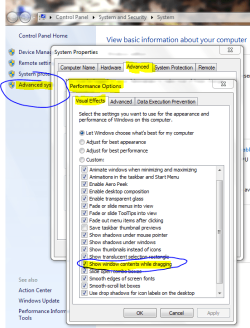
Show Window Contents or Outline While Dragging

Right click "My Compyuter" go to "Properties"
then on left side go to "Advanced system Settings"
then go to "Perfomance Settings"

And tick option "Show windows contents while dragging"

Like in this pic:
Seven : Drag&Drop problem on Classic Theme-capture.png

Last edited by Brink; 04-09-2010 at 11:31 AM.. Reason: added link
My System SpecsSystem Spec
04-09-2010   #7


Seven


Thanks....But the tick is already ticked.....(And when I move windows, I get the full window content moving too)
My System SpecsSystem Spec
04-09-2010   #8


Windows 7 Home Premium 64bit


I'm clutching at straws now as I can't replicate this but one thing worth trying, Rt click on the desktop, Click "Personalise" the on the left click "Change Desktop items" at the bottom left if the "Allow themes to change icons" box is checked, uncheck it. If it is not checked then check it. See if that helps
I have everything crossed for you
My System SpecsSystem Spec
04-09-2010   #9


Seven


Still no changes.....

If anybody else have a suggestion....
My System SpecsSystem Spec
04-09-2010   #10


Windows 7 Home Premium 64bit


Quote   Quote: Originally Posted by MathieuM68 View Post
Still no changes.....

If anybody else have a suggestion....
Think I have the answer. Not good news. It seems that if you choose any theme from the "Basic and High Contrast Themes" then the semi-trans. icons don't appear. That's just the way it is I'm afraid. You either use one of the themes and not have the semi-trans icons or choose another theme.
This does sound a bit retrograde of Windows 7 though as the feature is there in XP classic. But "they" do say that Aero is so much faster, better, more robust etc etc etc so perhaps we should get "modern"
My System SpecsSystem Spec
Reply

 Seven : Drag&Drop problem on Classic Theme problems?


Thread Tools


Similar Threads for: Seven : Drag&Drop problem on Classic Theme
Thread Forum
Windows 7 Theme Problem(Unable to use any theme other than classic) Themes and Styles
Drag and Drop Problem Windows 7 General Discussion
Drag and Drop problem General Discussion
Drag & Drop Problem Music, Pictures & Video
Drag & Drop - Problem General Discussion


All times are GMT -5. The time now is 04:07 AM.


Windows 7 Forums is an independent web site and has not been authorized,
sponsored, or otherwise approved by Microsoft Corporation.
"Windows 7" and related materials are trademarks of Microsoft Corp.
© Designer Media Ltd
  

1 2 3 4 5 6 7 8 9 10 11 12 13 14 15 16 17 18 19 20 21 22 23 24 25 26 27 28 29 30