
Hi
I have a 250Gb HDD that is partitioned into two parts. I run W7 32bit. I have alwyas had the second partition as D drive and the first partition containing my boot as C drive. I recently added an external hdd and this is shown as E drive - my DVD is set as G drive.
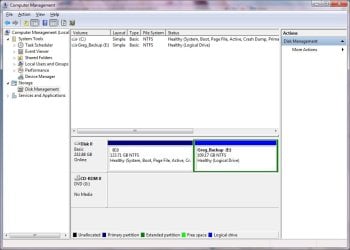
When I go into EXplorer, Disk Mgt I cannot see the D drive partition and the C drive shows as only 123.xxGb - see attachment. I have tried allocating different drive letters, BIOS is up to date. Tried some partitioning software but the system ony allows them to scan C drive (123.xxGb).
If I unplug the external hdd and re-start the system the external hdd still shows.
I am yet to try a 6kg hammer but it's getting to that point - I'm missing something simple here I hope - please help!
I have a 250Gb HDD that is partitioned into two parts. I run W7 32bit. I have alwyas had the second partition as D drive and the first partition containing my boot as C drive. I recently added an external hdd and this is shown as E drive - my DVD is set as G drive.
When I go into EXplorer, Disk Mgt I cannot see the D drive partition and the C drive shows as only 123.xxGb - see attachment. I have tried allocating different drive letters, BIOS is up to date. Tried some partitioning software but the system ony allows them to scan C drive (123.xxGb).
If I unplug the external hdd and re-start the system the external hdd still shows.
I am yet to try a 6kg hammer but it's getting to that point - I'm missing something simple here I hope - please help!
Attachments
My Computer
At a glance
Windows 7 ProQuad core2GBON BOARD
- OS
- Windows 7 Pro
- CPU
- Quad core
- Motherboard
- ASUS P5QPL-AM
- Memory
- 2GB
- Graphics Card(s)
- ON BOARD
- Sound Card
- ON BOARD
- Monitor(s) Displays
- ACER 17"
- Hard Drives
- SEAGATE 250GB



 .
. 
