Windows 7 Forums


Windows 7: browse in software showing folders but not files

13 Apr 2010   #1

Windows 7
 
 
browse in software showing folders but not files

When I click on browse to search for a file to open in some software that I am using the only thing that will show is folders. I can't get the browse for folders and files to show files.

In other words I click on (c:) then Program Files and only folders will show. I cannot get the files to show under Program Files. I need to be able to select a file in that folder. They will show up when I do the same using Windows Explorer.

What am I doing wrong?

Thanks,
Yeto

My System SpecsSystem Spec

13 Apr 2010   #2

XP Pro SP3 X86 / Win7 Pro X86
Southern Ontario Canada


Quote   Quote: Originally Posted by yeto View Post
When I click on browse to search for a file to open in some software that I am using the only thing that will show is folders. I can't get the browse for folders and files to show files.

In other words I click on (c then Program Files and only folders will show. I cannot get the files to show under Program Files. I need to be able to select a file in that folder. They will show up when I do the same using Windows Explorer.

What am I doing wrong?

Thanks,
Yeto
Which program is this in?

If you are seeing a message that says "No files match your search" it's because the program you are using doesn't know how to open any of the files in that folder...
My System SpecsSystem Spec
13 Apr 2010   #3

Windows 7


Quote   Quote: Originally Posted by CommonTater View Post
Quote   Quote: Originally Posted by yeto View Post
When I click on browse to search for a file to open in some software that I am using the only thing that will show is folders. I can't get the browse for folders and files to show files.

In other words I click on (c then Program Files and only folders will show. I cannot get the files to show under Program Files. I need to be able to select a file in that folder. They will show up when I do the same using Windows Explorer.

What am I doing wrong?

Thanks,
Yeto
Which program is this in?

If you are seeing a message that says "No files match your search" it's because the program you are using doesn't know how to open any of the files in that folder...
I am not seeing any message. When I click on the Program folder only folders in that folder show but not any of the files. I need to be able to change something so that folders and files show.
My System SpecsSystem Spec
.


13 Apr 2010   #4

W7 Ult. x64 | OS X


What tater was trying to explain is that some programs don't show files that they cannot open. I.E. There could be 20 files in a folder, but if the program you're using cannot open them it won't show them in the list.

If you're absolutely certain that the files in that folder can be opened in your program (Do it manually) then you've got a problem.
My System SpecsSystem Spec
13 Apr 2010   #5

64-bit Windows 7 Ultimate SP1 & Windows 8 Enterprise
Texas


Hello Yeto, and welcome to Seven Forums.

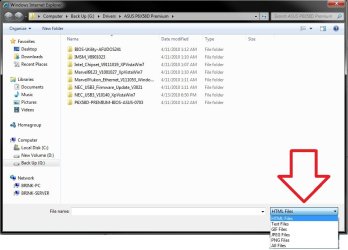
Do you have an option like the one below to be able to select what type of files will be displayed? If not, then it's as Al posted above and the program is just not going to let you see what it does not support opening.

browse in software showing folders but not files-option.jpg

Hope this helps,
Shawn
My System SpecsSystem Spec
14 Apr 2010   #6

Windows Home Premium (64)
Surrey, UK


Quote   Quote: Originally Posted by yeto View Post
When I click on browse to search for a file to open in some software that I am using the only thing that will show is folders. I can't get the browse for folders and files to show files.

In other words I click on (c then Program Files and only folders will show. I cannot get the files to show under Program Files. I need to be able to select a file in that folder. They will show up when I do the same using Windows Explorer.
-- which program is giving you the problems?
-- can you post a screenshot of what you are seeing?
My System SpecsSystem Spec
Reply

 browse in software showing folders but not files problems?


Thread Tools


Similar help and support threads for: browse in software showing folders but not files
Thread Forum
Video files not showing up in folders Media Center
Solved WD external not showing any files or folders, Sure it has stuff on it Hardware & Devices
Solved computer showing folders and files that no longer exist? General Discussion
Unnecessary files/folders added when installing software. Software
Folders and Files Not Showing Up Until Refreshed General Discussion


All times are GMT -5. The time now is 03:16 PM.


Seven Forums Android App Seven Forums IOS App Follow us on Facebook

Windows 7 Forums is an independent web site and has not been authorized,
sponsored, or otherwise approved by Microsoft Corporation.
"Windows 7" and related materials are trademarks of Microsoft Corp.
© Designer Media Ltd
  

1 2 3 4 5 6 7 8 9 10 11 12 13 14 15 16 17 18 19 20 21 22 23 24 25 26 27 28 29 30 31 32