No Icons in Desktop/Taskbar/Explorer

Brionac

New member
Local time
9:26 PM
Messages
16
Hi guys.

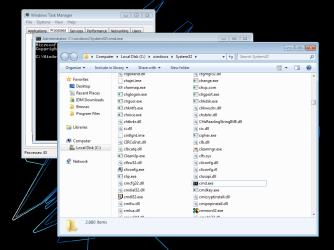
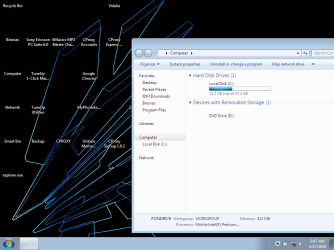
I am going crazy with this problem of mine. See screenshot on how it looks like. This problem just occurred yesterday.
screen3.png

Here is my ancient laptop's specs:

Intel Pentium 4 - M (1.9GHz, single-core)
512MB RAM
40GB HDD
ATI Mobility Radeon 7500 (32MB)

Here is a list of what I already did:

*Copied explorer.exe from another laptop; didn't work, so it is safe to assume that it is not the problem
*Full scan with latest Malwarebytes' Anti-Malware (v1.45), found nothing
*Safe Mode, still no icons
*Cleared IconCache.db but to my surprise, it was not rebuilt.

In the case I have lacked any information, kindly inform me. To my dismay, this is the longest time that I had spent troubleshooting.

Best regards.
 

My Computer My Computer

At a glance

Windows 7 Ultimate x86
Computer Manufacturer/Model Number
Neo B5110N
OS
Windows 7 Ultimate x86
Hello Brionac, and welcome to Seven Forums.

Since this has just happened, you might do a system restore using a restore point dated before this happened to hopefully fix it for you.

Hope this helps,
Shawn
 

My Computer My Computer

At a glance

64-bit Windows 11 Pro for WorkstationsIntel i7-8700K OC'd to 5 GHz64 GB (4x16GB) G.SKILL TridentZ RGB DDR4 3600...ASUS ROG-STRIX-GTX1080TI-O11G-GAMING
Computer type
PC/Desktop
Computer Manufacturer/Model Number
Self built custom
OS
64-bit Windows 11 Pro for Workstations
CPU
Intel i7-8700K OC'd to 5 GHz
Motherboard
ASUS ROG Maximus XI Formula Z390
Memory
64 GB (4x16GB) G.SKILL TridentZ RGB DDR4 3600 MHz
Graphics Card(s)
ASUS ROG-STRIX-GTX1080TI-O11G-GAMING
Sound Card
Integrated
Monitor(s) Displays
2 x Samsung Odyssey G7 27"
Screen Resolution
2560x1440
Hard Drives
1TB Samsung 990 PRO M.2,
4TB Samsung 990 PRO PRO M.2,
TerraMaster F8 SSD Plus NAS
PSU
Seasonic Prime Titanium 850W
Case
Thermaltake Core P3
Cooling
Corsair Hydro H115i
Keyboard
Logitech wireless K800
Mouse
Logitech MX Master 4
Internet Speed
2 Gb/s Download and 100 Mb/s Upload
Antivirus
Malwarebyte Anti-Malware Premium
Browser
Google Chrome
Other Info
Logitech Z625 speaker system,
Logitech BRIO 4K Pro webcam,
HP Color LaserJet Pro MFP M477fdn,
APC SMART-UPS RT 1000 XL - SURT1000XLI,
Galaxy S23 Plus phone
Hello Brionac, and welcome to Seven Forums.

Since this has just happened, you might do a system restore using a restore point dated before this happened to hopefully fix it for you.

Hope this helps,
Shawn

Thanks for the welcome and the proposed solution.

I forgot to include that I already did a system restore to an earlier date (2 days ago) but did not fix anything. Even I got desperate to restore it to the earliest date that I had set up a restore point, but still, no luck.

Perhaps, a core component?
 

My Computer My Computer

At a glance

Windows 7 Ultimate x86
Computer Manufacturer/Model Number
Neo B5110N
OS
Windows 7 Ultimate x86
hello brionac..

maybe you uncheck the setting..
right click on desktop and view > check show desktop icons
 

My Computer My Computer

At a glance

windows 7Phenom II AMD Dragon 3.5GhzDDR3 4GBATI Radeon 512Mb
Computer Manufacturer/Model Number
built up
OS
windows 7
CPU
Phenom II AMD Dragon 3.5Ghz
Memory
DDR3 4GB
Graphics Card(s)
ATI Radeon 512Mb
Monitor(s) Displays
HP L1506
Screen Resolution
1152 x 864
Hard Drives
WDC 1 TB SATA-II Green Power
Keyboard
HP wireless keyboard
Mouse
HP Optic
Internet Speed
1GB
hello brionac..

maybe you uncheck the setting..
right click on desktop and view > check show desktop icons

I already have it checked, but the weird thing is, it is not just the desktop icons. The taskbar icons and the explorer windows have no icons as well.
 

My Computer My Computer

At a glance

Windows 7 Ultimate x86
Computer Manufacturer/Model Number
Neo B5110N
OS
Windows 7 Ultimate x86
hello brionac..

maybe you uncheck the setting..
right click on desktop and view > check show desktop icons

I already have it checked, but the weird thing is, it is not just the desktop icons. The taskbar icons and the explorer windows have no icons as well.

ok trying to create new profile. and see the icon is same issue or not. maybe your profile got virus or something.
 

My Computer My Computer

At a glance

windows 7Phenom II AMD Dragon 3.5GhzDDR3 4GBATI Radeon 512Mb
Computer Manufacturer/Model Number
built up
OS
windows 7
CPU
Phenom II AMD Dragon 3.5Ghz
Memory
DDR3 4GB
Graphics Card(s)
ATI Radeon 512Mb
Monitor(s) Displays
HP L1506
Screen Resolution
1152 x 864
Hard Drives
WDC 1 TB SATA-II Green Power
Keyboard
HP wireless keyboard
Mouse
HP Optic
Internet Speed
1GB
Brionac,

If all else fails, you should be able to do a repair install to fix this without losing anything.
 

My Computer My Computer

At a glance

64-bit Windows 11 Pro for WorkstationsIntel i7-8700K OC'd to 5 GHz64 GB (4x16GB) G.SKILL TridentZ RGB DDR4 3600...ASUS ROG-STRIX-GTX1080TI-O11G-GAMING
Computer type
PC/Desktop
Computer Manufacturer/Model Number
Self built custom
OS
64-bit Windows 11 Pro for Workstations
CPU
Intel i7-8700K OC'd to 5 GHz
Motherboard
ASUS ROG Maximus XI Formula Z390
Memory
64 GB (4x16GB) G.SKILL TridentZ RGB DDR4 3600 MHz
Graphics Card(s)
ASUS ROG-STRIX-GTX1080TI-O11G-GAMING
Sound Card
Integrated
Monitor(s) Displays
2 x Samsung Odyssey G7 27"
Screen Resolution
2560x1440
Hard Drives
1TB Samsung 990 PRO M.2,
4TB Samsung 990 PRO PRO M.2,
TerraMaster F8 SSD Plus NAS
PSU
Seasonic Prime Titanium 850W
Case
Thermaltake Core P3
Cooling
Corsair Hydro H115i
Keyboard
Logitech wireless K800
Mouse
Logitech MX Master 4
Internet Speed
2 Gb/s Download and 100 Mb/s Upload
Antivirus
Malwarebyte Anti-Malware Premium
Browser
Google Chrome
Other Info
Logitech Z625 speaker system,
Logitech BRIO 4K Pro webcam,
HP Color LaserJet Pro MFP M477fdn,
APC SMART-UPS RT 1000 XL - SURT1000XLI,
Galaxy S23 Plus phone
  • Like
Reactions: ryo
hello brionac..

maybe you uncheck the setting..
right click on desktop and view > check show desktop icons

I already have it checked, but the weird thing is, it is not just the desktop icons. The taskbar icons and the explorer windows have no icons as well.

ok trying to create new profile. and see the icon is same issue or not. maybe your profile got virus or something.

I have created another profile, with similar results. The weird thing I observed is, when explorer.exe is not running, all icons are in perfect condition. I tried to access the control panel via Task Manager, and everything seemed fine. Any ideas?

Brionac,

If all else fails, you should be able to do a repair install to fix this without losing anything.

It seems that doing a repair install is the only option left for me. I will try this when I have the chance to possess the disc again.
 

My Computer My Computer

At a glance

Windows 7 Ultimate x86
Computer Manufacturer/Model Number
Neo B5110N
OS
Windows 7 Ultimate x86
I have no opportunity to have the disc. Maybe after two or three weeks. So, as of the moment, I shall repair this on my own. Or anyone here may have an idea.

Now, it is weird. The instance of explorer.exe without the taskbar (see screenshot) now displays the icons like there is no problem at all.

screen4.png

But, when I run the instance of explorer.exe with the taskbar, there goes the weirdness again. Anyone?
 

My Computer My Computer

At a glance

Windows 7 Ultimate x86
Computer Manufacturer/Model Number
Neo B5110N
OS
Windows 7 Ultimate x86
Brionac,

Strange. Try this to see if it may help with the Windows Explorer on the taskbar.
  • Right click on the Windows Explorer icon on the taskbar.
  • Right click on Windows Explorer in the Jump list, and click on Properties.
  • In the Shortcut tab, check to make sure that you have %windir%\explorer.exe in the Target box. If not, change it to be so, and click on OK.
 

My Computer My Computer

At a glance

64-bit Windows 11 Pro for WorkstationsIntel i7-8700K OC'd to 5 GHz64 GB (4x16GB) G.SKILL TridentZ RGB DDR4 3600...ASUS ROG-STRIX-GTX1080TI-O11G-GAMING
Computer type
PC/Desktop
Computer Manufacturer/Model Number
Self built custom
OS
64-bit Windows 11 Pro for Workstations
CPU
Intel i7-8700K OC'd to 5 GHz
Motherboard
ASUS ROG Maximus XI Formula Z390
Memory
64 GB (4x16GB) G.SKILL TridentZ RGB DDR4 3600 MHz
Graphics Card(s)
ASUS ROG-STRIX-GTX1080TI-O11G-GAMING
Sound Card
Integrated
Monitor(s) Displays
2 x Samsung Odyssey G7 27"
Screen Resolution
2560x1440
Hard Drives
1TB Samsung 990 PRO M.2,
4TB Samsung 990 PRO PRO M.2,
TerraMaster F8 SSD Plus NAS
PSU
Seasonic Prime Titanium 850W
Case
Thermaltake Core P3
Cooling
Corsair Hydro H115i
Keyboard
Logitech wireless K800
Mouse
Logitech MX Master 4
Internet Speed
2 Gb/s Download and 100 Mb/s Upload
Antivirus
Malwarebyte Anti-Malware Premium
Browser
Google Chrome
Other Info
Logitech Z625 speaker system,
Logitech BRIO 4K Pro webcam,
HP Color LaserJet Pro MFP M477fdn,
APC SMART-UPS RT 1000 XL - SURT1000XLI,
Galaxy S23 Plus phone
Brionac,

Strange. Try this to see if it may help with the Windows Explorer on the taskbar.
  • Right click on the Windows Explorer icon on the taskbar.
  • Right click on Windows Explorer in the Jump list, and click on Properties.
  • In the Shortcut tab, check to make sure that you have %windir%\explorer.exe in the Target box. If not, change it to be so, and click on OK.

Thanks for the help, Brink. I checked the windows explorer icon in the superbar as you said, but the path %windir%\explorer.exe is intact.

I did some more reminiscing on what may have caused this, but is it possible that a styler application did the problem? I installed and uninstalled StyleXP a week ago (yeah, I was kind of dumb to do this for experimental purposes) and then the problem occurred two days ago? If so then, what can I possibly do?
 

My Computer My Computer

At a glance

Windows 7 Ultimate x86
Computer Manufacturer/Model Number
Neo B5110N
OS
Windows 7 Ultimate x86
Brionac,

Strange. Try this to see if it may help with the Windows Explorer on the taskbar.
  • Right click on the Windows Explorer icon on the taskbar.
  • Right click on Windows Explorer in the Jump list, and click on Properties.
  • In the Shortcut tab, check to make sure that you have %windir%\explorer.exe in the Target box. If not, change it to be so, and click on OK.

Thanks for the help, Brink. I checked the windows explorer icon in the superbar as you said, but the path %windir%\explorer.exe is intact.

I did some more reminiscing on what may have caused this, but is it possible that a styler application did the problem? I installed and uninstalled StyleXP a week ago (yeah, I was kind of dumb to do this for experimental purposes) and then the problem occurred two days ago? If so then, what can I possibly do?

That would definitely create some problems, since StyleXP does not work in Windows 7. I think it's time to reinstall Windows....
 

My Computer My Computer

At a glance

Windows 7
OS
Windows 7
Brionac,

Depending on what all the styler changed, you might see if running a sfc /scannow command may be able to repair/restore the system files affected by it to fix this.

You might also unpin the bad Window Explorer from the taskbar, and pin the one that you say works instead to see if continues to do so.

If none of the above still does not help, then it looks like either a repair or clean install may be needed to fix what was done from the styler program if you do not have a restore point available that is dated before you used the styler program.
 

My Computer My Computer

At a glance

64-bit Windows 11 Pro for WorkstationsIntel i7-8700K OC'd to 5 GHz64 GB (4x16GB) G.SKILL TridentZ RGB DDR4 3600...ASUS ROG-STRIX-GTX1080TI-O11G-GAMING
Computer type
PC/Desktop
Computer Manufacturer/Model Number
Self built custom
OS
64-bit Windows 11 Pro for Workstations
CPU
Intel i7-8700K OC'd to 5 GHz
Motherboard
ASUS ROG Maximus XI Formula Z390
Memory
64 GB (4x16GB) G.SKILL TridentZ RGB DDR4 3600 MHz
Graphics Card(s)
ASUS ROG-STRIX-GTX1080TI-O11G-GAMING
Sound Card
Integrated
Monitor(s) Displays
2 x Samsung Odyssey G7 27"
Screen Resolution
2560x1440
Hard Drives
1TB Samsung 990 PRO M.2,
4TB Samsung 990 PRO PRO M.2,
TerraMaster F8 SSD Plus NAS
PSU
Seasonic Prime Titanium 850W
Case
Thermaltake Core P3
Cooling
Corsair Hydro H115i
Keyboard
Logitech wireless K800
Mouse
Logitech MX Master 4
Internet Speed
2 Gb/s Download and 100 Mb/s Upload
Antivirus
Malwarebyte Anti-Malware Premium
Browser
Google Chrome
Other Info
Logitech Z625 speaker system,
Logitech BRIO 4K Pro webcam,
HP Color LaserJet Pro MFP M477fdn,
APC SMART-UPS RT 1000 XL - SURT1000XLI,
Galaxy S23 Plus phone
Thanks for the help, guys. :D

I have managed to install 32-Bit of Windows Seven Professional via a USB flash drive. (Yep, a downgrade from Ultimate.) That mistake definitely taught me a lesson. LOL
 

My Computer My Computer

At a glance

Windows 7 Ultimate x86
Computer Manufacturer/Model Number
Neo B5110N
OS
Windows 7 Ultimate x86
try restoring the pc if not update the graphics card or go to the display options n find where it says fix problem n run that
 

My Computer My Computer

At a glance

Microsoft windows 7 ultimate 32 bitIntel pentium 4 4ghz1gb ramNVIDIA GeForce 7600 GS
Computer Manufacturer/Model Number
P4i6G
OS
Microsoft windows 7 ultimate 32 bit
CPU
Intel pentium 4 4ghz
Motherboard
Intel
Memory
1gb ram
Graphics Card(s)
NVIDIA GeForce 7600 GS
Sound Card
Creative sound blaster live
Monitor(s) Displays
Samsung SyncMaster 923NW
Hard Drives
40 gb western digital
160 gb western digital
PSU
ANTEC SIGNATURE 400W
Case
Antec blue server / gamers
Cooling
Fan cooling
Other Info
very stable pc XD
Back
Top