Windows 7 Forums


Windows 7: How Can I Disable Taskbar Thumbnail Preview?

27 Apr 2009   #1

Windows 7 x64 6.1.7600 Build 7600
Claremore, Oklahoma
 
 
How Can I Disable Taskbar Thumbnail Preview?

I know this has already asked/posted but it needs to be posted again/dealt with...

I've been trying to find a way to disable/remove the taskbar thumbnail preview in Windows 7. I've google searched to death lookin for a way how but nothing.

I'm aware that there is the option to do so in gpedit.msc and in regedit (hkey_current_user\software\microsoft\Windows\DWM where it says enableaeropeek change value to 0, but i assure u those methods do not work.

any help/info would be greatly appreciated

My System SpecsSystem Spec

27 Apr 2009   #2

Windows 7 Ultimate x64 SP1


I don't think a way has been found yet, I'm assuming you've read this thread already?

Unable to turn off Taskbar Thumbnail
My System SpecsSystem Spec
27 Apr 2009   #3

Windows® 8 Pro (64-bit)
Mumbai, India


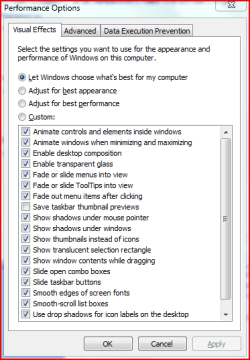
Hold the windows logo key+pause/break key. click on Advanced system settings.
Now click on the settings button under performance.
Uncheck Save Taskbar Thumbnail Preview.

How Can I Disable Taskbar Thumbnail Preview?-c.png
My System SpecsSystem Spec
.


27 Apr 2009   #4

Windows 7 Ultimate x64
Milton Keynes, United Kingdom


Quote   Quote: Originally Posted by dinesh View Post
Hold the windows logo key+pause/break key. click on Advanced system settings.
Now click on the settings button under performance.
Uncheck Save Taskbar Thumbnail Preview.

Attachment 9021
That's unfortunately only a space saving option. It only disables the saving of the thumbnail picture for a quicker preview next time round.

Nice thought though.

@lt200420, did you restart your pc after changing the registry? Also, as far as we can tell there is no way to disable the thumbnails other than using a basic theme, or disabling transparency.
My System SpecsSystem Spec
27 Apr 2009   #5

Windows 7 x64 6.1.7600 Build 7600
Claremore, Oklahoma


yes sir i did Orbital Shark
My System SpecsSystem Spec
27 Apr 2009   #6

Windows 7 Ultimate x64
Milton Keynes, United Kingdom


Quote   Quote: Originally Posted by lt200420 View Post
yes sir i did Orbital Shark
Not a lot can be done then other than disable transparency but then Windows 7 looks sh1te.
My System SpecsSystem Spec
06 May 2009   #7

Windows 7


has anyone yet found a way to disable it?
My System SpecsSystem Spec
02 Aug 2009   #8

Windows 7 Ultimate x64 Edition


Still looking for a way to disable them myself ...

The ExtendedUIHoverTime hack is far from perfect, if you drag a taskbar item around and then click it, the preview thumbnail will still come back.

Anybody worked out a way to remove them for good? I'm open to running a hacked version of Explorer.exe, that's how much I hate them.
My System SpecsSystem Spec
02 Aug 2009   #9

Windows 7 x64 6.1.7600 Build 7600
Claremore, Oklahoma


lol i posted about this more than 3 months ago.
cant believe this has not been taken care of.
My System SpecsSystem Spec
02 Aug 2009   #10


Windows Classic theme, small icons. Thumbnail preview and stacking is gone.
My System SpecsSystem Spec
Reply

 How Can I Disable Taskbar Thumbnail Preview? problems?


Thread Tools


Similar help and support threads for: How Can I Disable Taskbar Thumbnail Preview?
Thread Forum
Disable preview thumbnail for certain files (MP4, AVI) General Discussion
how to disable preview thumbnail icons for video files General Discussion
Solved Restore taskbar thumbnail preview that was in IE8? Browsers & Mail
How to disable only video thumbnail preview? Music, Pictures & Video
Taskbar (-thumbnail) Preview General Discussion


All times are GMT -5. The time now is 02:55 AM.


Windows 7 Forums is an independent web site and has not been authorized,
sponsored, or otherwise approved by Microsoft Corporation.
"Windows 7" and related materials are trademarks of Microsoft Corp.
© Designer Media Ltd