Windows 7 Forums


Windows 7: Hoe do I get desktop icons to open full screen?

21 Apr 2010   #1

Windows 7 Professional
 
 
Hoe do I get desktop icons to open full screen?

I finally learned somewhere on this forum how to have Internet explorer always open in fullscreen, and all my favorites open full screen when in IE. But, when I am at the desktop, and click on an icon, it does not open in full screen. I have to maximize it after it opens. I realize this is pretty nitpicking, but I want everything to open in full screen if possible. Ideas?
Thanks,
Bill

My System SpecsSystem Spec

21 Apr 2010   #2

Windows 7 x64 Ultimate
A Finnish immigrant in Leipzig, Germany


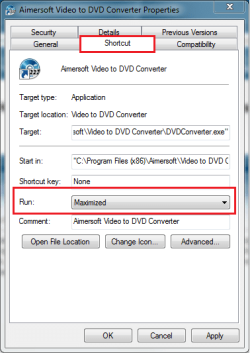
Right click the shortcut, choose Properties. Go to Shortcut tab, choose Run Maximized from drop down menu.

Notice that some applications have disabled the Maximize button, using a default window size. You can not maximize these apps.

Kari
Attached Thumbnails
Hoe do I get desktop icons to open full screen?-run_maximized.png  
My System SpecsSystem Spec
21 Apr 2010   #3

Windows 7 Professional
 
 
Thanks

Several had no shortcut tabs. I guess they are the ones you say can not be changed. All the ones that had a shortcut tab where on normal, and all let me change to maximized. Thanks for you help.
Bill
My System SpecsSystem Spec
.


21 Apr 2010   #4

Windows 7 x64 Ultimate
A Finnish immigrant in Leipzig, Germany


A nice and easy tip for you:

On desktop, you can have two types of icons: shortcuts and application icons. An application icon don't have the shortcut tab in Properties.

If you want, you can create a shortcut for every application icon. Just right click the icon and choose Create Shortcut from context menu. You can then go to Properties of this new shortcut, and choose how you want it to open.

Kari
My System SpecsSystem Spec
21 Apr 2010   #5

Windows 7 Professional
 
 
Strange

All my application icons had the shortcut tab, so they are the ones I cound change to open maximized. Most of the shortcuts don't have the shortcut tab in properties.
My System SpecsSystem Spec
Reply

 Hoe do I get desktop icons to open full screen? problems?


Thread Tools


Similar help and support threads for: Hoe do I get desktop icons to open full screen?
Thread Forum
Solved Opening Desktop Icons in Full Screen General Discussion
Laptop screen = desktop, TV through HDMI = full screen game? Hardware & Devices
How to show full file names with desktop icons General Discussion
Some webpages open full screen in IE8 Browsers & Mail
Open new window in full screen? Customization


All times are GMT -5. The time now is 03:05 PM.


Seven Forums Android App Seven Forums IOS App Follow us on Facebook

Windows 7 Forums is an independent web site and has not been authorized,
sponsored, or otherwise approved by Microsoft Corporation.
"Windows 7" and related materials are trademarks of Microsoft Corp.
© Designer Media Ltd
  

1 2 3 4 5 6 7 8 9 10 11 12 13 14 15 16 17 18 19 20 21 22 23 24 25 26 27 28 29 30 31 32