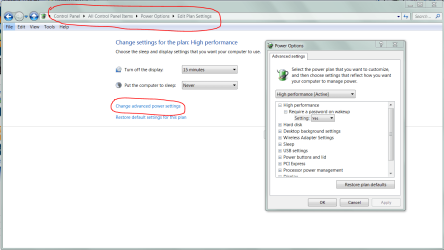
Just upgraded to W7. This problem arises, which I didn't have in XP: I run a program (one that I've developed) that does a huge number of numerical calculations. To reach its conclusion and give the answer takes hours and hours. Best to start it before bedtime, hoping to have the answer in the morning. But W7 goes into some kind of quasi-shut down mode; in the morning I see only the Intro screen where I choose the User, etc. Clicking it returns the desktop, and the program I had running all night is there, but it is frozen, with a blank screen. At the top it says something like "Program not responding." Can't find any way to revive it and show me the answer (or continue calculating, if it's not finished). I have to go to task manager and end it, losing all that overnight work. What can I do to fix that?
thanx,
Ben Crain
thanx,
Ben Crain
My Computer
At a glance
Windows 7
- OS
- Windows 7