I purchased a new Dell 1764 Win 7 Professional about 2-weeks ago and have been learning how to use Win 7 - I consider myself an old XP guy!
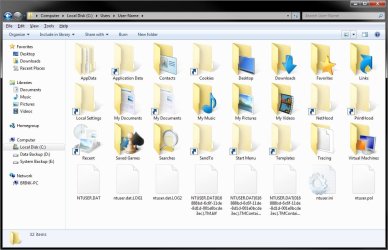
I was in the windows explorer to see who was listed inder the Users directory where I found a directory with my name on it. I double clicked and noted the contents of the directory was the same as in XP. I clicked on the Local Settings directory (I temporarily turned off the "hide protected operating system files" option to see if contents was the same) and got a message that access was denied. I was told by a tech that this was normal in Win 7 in order to stop people from changing options, etc. which could cause problems.
My question is this - was the tech correct by saying it was locked for protection? If the answer is yes, then who can access the directory? (I have system administrator rights.
Pierre
I was in the windows explorer to see who was listed inder the Users directory where I found a directory with my name on it. I double clicked and noted the contents of the directory was the same as in XP. I clicked on the Local Settings directory (I temporarily turned off the "hide protected operating system files" option to see if contents was the same) and got a message that access was denied. I was told by a tech that this was normal in Win 7 in order to stop people from changing options, etc. which could cause problems.
My question is this - was the tech correct by saying it was locked for protection? If the answer is yes, then who can access the directory? (I have system administrator rights.
Pierre
My Computer
At a glance
Windows 7 ProfessionalIntel Core j3 330M4GBIntel HD Graphics
- Computer Manufacturer/Model Number
- Dell Inspiron 1764
- OS
- Windows 7 Professional
- CPU
- Intel Core j3 330M
- Memory
- 4GB
- Graphics Card(s)
- Intel HD Graphics