Windows 7 Forums


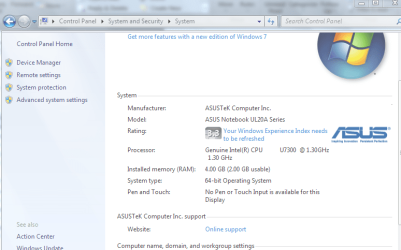
Windows 7: 4GB memory, only 2GB usable?

06 May 2010   #1


4GB memory, only 2GB usable?

How is it that even on a Core 2 Duo with Windows 7 64bit installed, only 2GB is usable out of the 4GB installed? Why?

In msconfig, I set the advanced boot option to 2 CPU cores and 4096 memory.

asusqhq.png at Pingy - Free Image Hosting

My System SpecsSystem Spec

06 May 2010   #2
ryo

windows 7
Indonesia


what MOBO you're using??
My System SpecsSystem Spec
06 May 2010   #3

Win 8 Release candidate 8400


Quote   Quote: Originally Posted by TheUnseen View Post
How is it that even on a Core 2 Duo with Windows 7 64bit installed, only 2GB is usable out of the 4GB installed? Why?

In msconfig, I set the advanced boot option to 2 CPU cores and 4096 memory.

asusqhq.png at Pingy - Free Image Hosting
Type msconfig in search. You may have max mem set at 2 gigs. Max mem, and max cpu, should be unchecked
My System SpecsSystem Spec
.


06 May 2010   #4

64-bit Windows 7 Ultimate SP1 & Windows 8 Enterprise
Texas


Hello TheUnseen,

Do you have a graphics card installed or a integrated graphics chip on your system?

If integrated, then you may have the other 2GB allocated for it in BIOS.

In MSCONFIG, uncheck both of those options below to have Windows 7 use all of them by default.

Memory - Set Maximum Amount Used by Windows 7

Processors - Limit Number Used by Windows 7

Hope this helps,
Shawn
My System SpecsSystem Spec
07 May 2010   #5

Windows 7 x64 / Same
In Your Basement.


Just because it is a Core 2 Duo doesn't mean it will utilize 4GB of RAM. As Ryo pointed out, the Mobo matters as well.
My System SpecsSystem Spec
10 May 2010   #6

Windows


Also untick maximum memory. A setting of 4096 will not allow you to use all of your memory.
My System SpecsSystem Spec
14 May 2010   #7

Windows 7 64 bit SP1


Some laptop chipsets have a maximum of 2GB of memory, no matter how much you put in.
My System SpecsSystem Spec
14 May 2010   #8

Windows 7 Ultimate x64/x86 Windows 7 Pro x64/x86 Windows 7 Home Premium x64/x86


He likly only has 2GB installed. Someone just told him he had 4 or that intalling a x64 OS would give it to him.

I have seen it before. Guy swore he had 4 gigs. I pulled a chip to find it was a 1 gig chip. But it said 2048 on the chip because it was a set of 2 1gig chips for 2048. Therefore they though they had 2gig chips.

For 2 gigs to vanish would be either a bad memory controler, bad memory, improper install(not fully locked down).

If the PC is 2 years old or younger it very likly supports at least 4 gigs.

Probably user error.
My System SpecsSystem Spec
14 May 2010   #9

Windows 7


Quote   Quote: Originally Posted by joel406 View Post
He likly only has 2GB installed. Someone just told him he had 4 or that intalling a x64 OS would give it to him.

I have seen it before. Guy swore he had 4 gigs. I pulled a chip to find it was a 1 gig chip. But it said 2048 on the chip because it was a set of 2 1gig chips for 2048. Therefore they though they had 2gig chips.

For 2 gigs to vanish would be either a bad memory controler, bad memory, improper install(not fully locked down).

If the PC is 2 years old or younger it very likly supports at least 4 gigs.

Probably user error.
The OP most likely has an integrated graphics controller that is sharing the available system memory.
My System SpecsSystem Spec
14 May 2010   #10

Windows 7 Ultimate x64/x86 Windows 7 Pro x64/x86 Windows 7 Home Premium x64/x86


Quote   Quote: Originally Posted by surfasb View Post
Quote   Quote: Originally Posted by joel406 View Post
He likly only has 2GB installed. Someone just told him he had 4 or that intalling a x64 OS would give it to him.

I have seen it before. Guy swore he had 4 gigs. I pulled a chip to find it was a 1 gig chip. But it said 2048 on the chip because it was a set of 2 1gig chips for 2048. Therefore they though they had 2gig chips.

For 2 gigs to vanish would be either a bad memory controler, bad memory, improper install(not fully locked down).

If the PC is 2 years old or younger it very likly supports at least 4 gigs.

Probably user error.
The OP most likely has an integrated graphics controller that is sharing the available system memory.
I have rarely seen more then 256mb alocated for Video for the onboard.
It dosent account for the entire 2GB.
My System SpecsSystem Spec
Reply

 4GB memory, only 2GB usable? problems?


Thread Tools


Similar help and support threads for: 4GB memory, only 2GB usable?
Thread Forum
4Gb memory (2.75 Gb usable) memory remapping in bios causes BSOD BSOD Help and Support
6GB memory (2GB usable) Performance & Maintenance
Max usable memory??? Hardware & Devices
adding memory results in less usable memory Hardware & Devices
Installed Memory (Usable Memory) Hardware & Devices


All times are GMT -5. The time now is 02:49 PM.


Seven Forums Android App Seven Forums IOS App Follow us on Facebook

Windows 7 Forums is an independent web site and has not been authorized,
sponsored, or otherwise approved by Microsoft Corporation.
"Windows 7" and related materials are trademarks of Microsoft Corp.
© Designer Media Ltd
  

1 2 3 4 5 6 7 8 9 10 11 12 13 14 15 16 17 18 19 20 21 22 23 24 25 26 27 28 29 30 31 32