

Have you noticed that a same search in Windows 7 can sometimes give you different results?
Windows 7 actually contains two search engines:
If you want to test this, do both searches. First, using Start Menu or Libraries Search, do a search and you'll see an instant search taking place, results appearing fast.
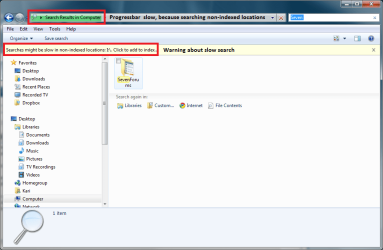
Open then My Computer, a local drive's window or any folder other than Users or its subfolders, and do the same search again. You'll notice two things: first, the progressbar moves slowly, reason being Grep is searching also the non-indexed locations. Second, you even get a warning about slow search (see the attached image).
Conclusion: to get better search results, open for instance My Computer window and search from there, instead of using the Start Menu search.
Thanks to a good friend and colleague for pointing this out to me.
Kari
Windows 7 actually contains two search engines:
- When search is initiated from Start Menu, Libraries window, Users folder or its subfolders or the window showing results of these searches, Windows 7 is searching only the indexed locations.
- When you start Search from the Computer window, the root of a local drive or from a local file folder other than Users and its subfolders, Windows 7 uses the second search engine (a.k.a. Grep), and searches also the non-indexed locations.
If you want to test this, do both searches. First, using Start Menu or Libraries Search, do a search and you'll see an instant search taking place, results appearing fast.
Open then My Computer, a local drive's window or any folder other than Users or its subfolders, and do the same search again. You'll notice two things: first, the progressbar moves slowly, reason being Grep is searching also the non-indexed locations. Second, you even get a warning about slow search (see the attached image).
Conclusion: to get better search results, open for instance My Computer window and search from there, instead of using the Start Menu search.
Thanks to a good friend and colleague for pointing this out to me.
Kari
Attachments
My Computer
At a glance
Windows 10 Pro x64 EN-GB1.6 GHz Intel Core i7-720QM Processor6 GBATI Mobility Radeon HD 5850 Graphics
- Computer type
- Laptop
- Computer Manufacturer/Model Number
- HP ENVY 17-1150eg
- OS
- Windows 10 Pro x64 EN-GB
- CPU
- 1.6 GHz Intel Core i7-720QM Processor
- Memory
- 6 GB
- Graphics Card(s)
- ATI Mobility Radeon HD 5850 Graphics
- Sound Card
- Beats sound system with integrated subwoofer
- Monitor(s) Displays
- 17" laptop display, 22" LED and 32" Full HD TV through HDMI
- Screen Resolution
- 1600*900 (1), 1920*1080 (2&3)
- Hard Drives
- Internal: 2 x 500 GB SATA Hard Disk Drive 7200 rpm
External: 2TB for backups, 3TB USB3 network drive for media
- Cooling
- As Envy runs a bit warm, I have it on a Cooler Master pad
- Keyboard
- Logitech diNovo Media Desktop Laser (bluetooth)
- Mouse
- Logitech Performance Mouse MX
- Internet Speed
- 50/10 Mbps VDSL
- Antivirus
- Windows Defender 4.3.9431.0
- Browser
- Maxthon 3.5.2., IE11


