Windows 7 Forums Search
Welcome to Windows 7 Forums. Our forum is dedicated to helping you find solutions with any problems, errors or issues you are experiencing with Windows 7. The Windows 7 forum also covers news and updates and has an extensive Windows 7 tutorial section that covers a wide range of tips and tricks.


Windows 7 - Can't access CorelDRAW Recent Documents

 
05-07-2010   #1


Windows 7 Ultimate


Can't access CorelDRAW Recent Documents

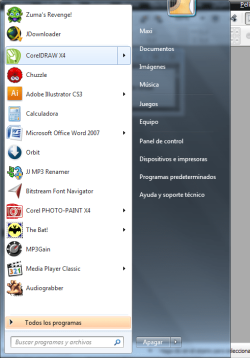
Hi, I have installed Corel Graphics Suite X4 on my Windows 7 machine, and I can't access the recent files nor the anchored files from the superbar or the start menu. In the start menu it simply does not expand when I click on the arrow, and right clicking on the superbar has a similar effect. First I thought there was something wrong with explorer.exe so I ended it and started it again. The problem continued, so I reinstalled Corel with no success. I have to say that it ONLY seems to be a problem with that program in particular, other programs (including others from the same suite) do not seem to show this behavior. I attached some caps to show what I mean.
Thank you.

Attached Thumbnails
Can't access CorelDRAW Recent Documents-nuevo-2.png  
Attached Images
 
My System SpecsSystem Spec
05-07-2010   #2


Windows 7 Ultimate x64 SP1


Hello Thom, and welcome to Seven Forums.

Since you can open and see recent items for other programs and that you just installed the program, it may take it a bit for the recent items to show up as you are opening them. Give it a day with opening the recent items off and on to see if they show up afterwards.

Hope this helps,
Shawn
My System SpecsSystem Spec
05-07-2010   #3


Windows 7 Ultimate


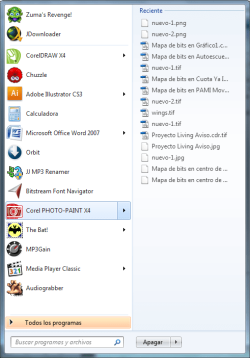
Hey Shawn, thanks for your answer, but you see, the thing is that I had the suite installed for months and I had documents that I frequently access fixed to this new "launch menu". I uninstalled the full suite, reboot, and reinstall it again. Windows, seems to remember these documents even when you reinstall a program. To exemplify this, take for instance Corel PHOTO-PAINT which is also part of the suite. See, this program even after reinstalling still remembers the files (see image attached), but with CorelDRAW it just seems like something is broken...
Attached Thumbnails
Can't access CorelDRAW Recent Documents-nuevo-3.png  
My System SpecsSystem Spec
.


05-07-2010   #4


Windows 7 Ultimate x64 SP1


I'm not sure, but it may be a issue with CorelDraw itself. You might also check to see if there are any updates available for the program at Corel to see if that may address this issue or bug. If not, then you might report this to them as well to let them know.
My System SpecsSystem Spec
05-07-2010   #5


Windows 7 Ultimate


Alright I will. By the way, It is up to date.
Thanks
My System SpecsSystem Spec
05-07-2010   #6


Windows 7 Ultimate x64 SP1


Please let us know if they reply back with a solution for you.
My System SpecsSystem Spec
Reply

 Can't access CorelDRAW Recent Documents problems?


Thread Tools


Similar Threads for: Can't access CorelDRAW Recent Documents
Thread Forum
Recent Documents General Discussion
Recent Documents sort order General Discussion
Recent documents not working General Discussion
Recent Documents General Discussion
Temporarily disable recent documents General Discussion


All times are GMT -5. The time now is 05:16 AM.


Windows 7 Forums is an independent web site and has not been authorized,
sponsored, or otherwise approved by Microsoft Corporation.
"Windows 7" and related materials are trademarks of Microsoft Corp.
© Designer Media Ltd
  

1 2 3 4 5 6 7 8 9 10 11 12 13 14 15 16 17 18 19 20 21 22 23 24 25 26 27 28 29 30