Windows 7 Forums


Windows 7: DOS Screen on startup

15 May 2010   #1

windows 7
Edmond, OK
 
 
DOS Screen on startup

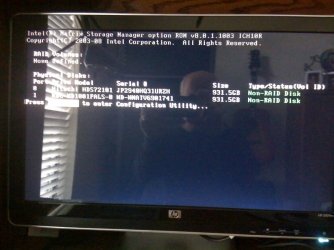
I added a second hard drive to my system this week. Now when I boot I get a dos screen for a couple of seconds that displays a Storage Manager message. It discplay information about my old drive and my new drive and says they are both non-Raid disks.

After the display, everything starts and runs as it should. This is an HPE-180t running Windows 7 64 bit.

Thanks!

Attached Thumbnails
DOS Screen on startup-photo.jpg  
My System SpecsSystem Spec

15 May 2010   #2

Win 7 Ultimate 32bit


so, what is your question?

No, you can't turn it off to my knowledge, nor do you want to as you may want to get to that screen if you ever decide to use raid.

it is part of the Motherboard and BIOS. Your Mobo has built-in RAID controller.

You can ignore it.
My System SpecsSystem Spec
Reply

 DOS Screen on startup problems?


Thread Tools


Similar help and support threads for: DOS Screen on startup
Thread Forum
Blank screen on boot up, before login screen; slow startup General Discussion
Crash to bootscreen on startup, startup repair black screen BSOD Help and Support
startup screen goes to a black screen General Discussion
Black screen on startup, showing cursor, doesn't go to log in screen. BSOD Help and Support
Long Startup screen and Blue screen every 2-3 hours Drivers


All times are GMT -5. The time now is 03:25 AM.


Windows 7 Forums is an independent web site and has not been authorized,
sponsored, or otherwise approved by Microsoft Corporation.
"Windows 7" and related materials are trademarks of Microsoft Corp.
© Designer Media Ltd