
Can someone please tell me firstly the difference between "standby" RAM and "free" RAM and secondly a way to FORCE the computer to give up the "standby" RAM once it's stopped using it.
I'm using lightroom to output about 600 .jpg files at about 100k each, it runs really fast for a bit and then slows down.
i was watching the RESMON and i can see that at times it runs completely out of "free" RAM and has about 6GB of "Standby" RAM available.
see first pic below with 13mb free
Even if i close lightroom and then reopen it it doesn't give back this "standby" RAM.
If i run lightroom on only about 100 files it runs a lot quicker (gut feeling no imperical data) and then if I reset the PC I feel like it holds that speed.
I'm hoping that someone can tell me some way to once I close lightroom i can get back all the RAM that has been grabbed by "standby" and change it back to "free"
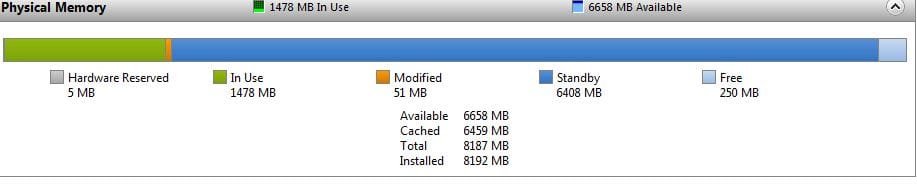
my last pic is of the RESMON when lightroom is idle and i'm typing in notepad
see pic with 250mb free
I just want my programs to run fast!!! :-/
p.s sorry i put this in the wrong place, can someone move it maybe????
I'm using lightroom to output about 600 .jpg files at about 100k each, it runs really fast for a bit and then slows down.
i was watching the RESMON and i can see that at times it runs completely out of "free" RAM and has about 6GB of "Standby" RAM available.
see first pic below with 13mb free
Even if i close lightroom and then reopen it it doesn't give back this "standby" RAM.
If i run lightroom on only about 100 files it runs a lot quicker (gut feeling no imperical data) and then if I reset the PC I feel like it holds that speed.
I'm hoping that someone can tell me some way to once I close lightroom i can get back all the RAM that has been grabbed by "standby" and change it back to "free"
my last pic is of the RESMON when lightroom is idle and i'm typing in notepad
see pic with 250mb free
I just want my programs to run fast!!! :-/
p.s sorry i put this in the wrong place, can someone move it maybe????
Attachments

Last edited:
My Computer
At a glance
windows717 8608GbRadeon 5770
- OS
- windows7
- CPU
- 17 860
- Motherboard
- GA-P55A-UD3R
- Memory
- 8Gb
- Graphics Card(s)
- Radeon 5770
- PSU
- 750W
- Cooling
- Stock (to be upgraded)


