Windows 7 Forums Search
Welcome to Windows 7 Forums. Our forum is dedicated to helping you find solutions with any problems, errors or issues you are experiencing with Windows 7. The Windows 7 forum also covers news and updates and has an extensive Windows 7 tutorial section that covers a wide range of tips and tricks.


Windows 7 - Start menu search


05-05-2009   #1


Win7 64 bits FR


Start menu search

Hello,

I would like to understand how the start menu search function works. That is because I find myself searching for a file that I know is indexed and it doesn't show it.

If I press "See more results", I find it.

In my example, I was searching for a picture. In the start menu, it would only show 3 word documents. When pressing "See more results", 4 jpeg files are shown.

Why isn't the jpeg files are shown in the start menu? Is it true for other file types?

My System SpecsSystem Spec
05-06-2009   #2


windows 7


try here.. it's a primer about vista search, most of it applies to win 7.
My System SpecsSystem Spec
05-06-2009   #3


Win7 64 bits FR


Thank you. I read it but it doesn't help me that much.

In Windows 7 we don't have the same options, but even if we had, I don't think it would change my results.

Here is a copy-paste from Windows help:

"The Start menu includes a search box that you can use to find files, folders, programs, and e-mail messages stored on your computer. When you start typing a word or phrase in the search box, the search begins automatically, and the search results temporarily fill the Start menu space above the search box.
The search results are organized into groups, depending on what kind of item each result is and where it's located on your computer. For example, you might see your search results grouped by Programs, by Control Panel tasks, by library (such as Documents or Pictures), and by Files. The top search results—but not all matches—for each group are displayed under a group heading. You can click an individual result to open that program or file, or you can click a group heading to see the complete list of search results for that group in Windows Explorer."

Clicking the heading doesn't show the file I was looking for. The only way is to click "Show more results"

Maybe I should try to upgrade to RC1, I only got 7077.
My System SpecsSystem Spec
.


05-06-2009   #4


W7 RTM Ultimate x64


Maybe you should upgrade to 7100

Enzo.
My System SpecsSystem Spec
05-06-2009   #5


Win7 64 bits FR


Ok I've upgraded to RC1, still have the same problem.

I suspected since the beginning something and now I've tested it. Here are the conclusions:
- I have all my documents on a FAT32 partition.
- The only thing I want to index is on that partition.
- For some reason, in FAT32, I don't get all the results in the start menu. Some files work all right, some others, I get no result, and this is for the same file types!
- Moving the files to a NTFS partition correct this problem.

I think I'll just have to convert my document partition to NTFS. I don't like that, I never had a good experience with NTFS on my home computer. But now I think I don't have the choice.
My System SpecsSystem Spec
05-06-2009   #6


W7 RTM Ultimate x64


Yeah, if its come down to that, ive personally never had a problem with, NTFS, if its solves it , then good
Enzo.
My System SpecsSystem Spec
05-06-2009   #7


Win7 64 bits FR


Update:

Converting to NTFS didn't help.

I removed all the folders in my indexing options. I have just let the "My images" folder. I see 0 result when writing *.jpg.

Now, if I change the "My image" folder to another one, you know when you want to change where your personal folders are, the search works again!!

Now I need to find a solution.
My System SpecsSystem Spec
05-06-2009   #8


Windows 7 SP1 Ultimate 64bit


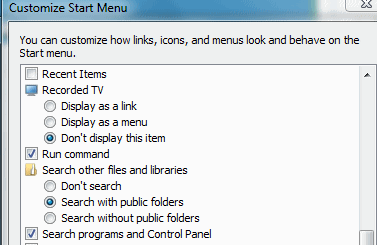
Does this setting help?
Attached Thumbnails
Start menu search-phen-ii-win-7007.gif  
My System SpecsSystem Spec
05-06-2009   #9


Win7 64 bits FR


It's already like that.
My System SpecsSystem Spec
05-06-2009   #10


Win7 64 bits FR


Ok now I have another thing blocking the results: Pictures library.

If the folder on my other hard drive is included in Pictures library, the results are not shown. Once I remove it, I get the results.
My System SpecsSystem Spec
Reply

Start menu search problems?


Thread Tools


Similar Threads for: Start menu search
Thread Forum
Start Menu - Add Libraries to Search in Start Menu Tutorials
Start Menu and Search General Discussion
Start Menu Search bug General Discussion
Start Menu - Add Search Connectors to Start Menu Search Tutorials
Google Desktop Search Results from Start menu search Software


All times are GMT -5. The time now is 08:51 PM.


Windows 7 Forums is an independent web site and has not been authorized,
sponsored, or otherwise approved by Microsoft Corporation.
"Windows 7" and related materials are trademarks of Microsoft Corp.
© Designer Media Ltd
  

1 2 3 4 5 6 7 8 9 10 11 12 13 14 15 16 17 18 19 20 21 22 23 24 25 26 27 28 29 30