
Windows 7 Forums Search
Welcome to Windows 7 Forums. Our forum is dedicated to helping you find solutions with any problems, errors or issues you are experiencing with Windows 7. The Windows 7 forum also covers news and updates and has an extensive Windows 7 tutorial section that covers a wide range of tips and tricks.


Windows 7 - Folder navigation jumps to previously expanded folder


06-01-2010   #1
kc1


Windows 7 Ultimate 64 bit, Home Premium


Folder navigation jumps to previously expanded folder

Hi,

I've got an annoying problem which is similar to [but not sure if its the same as] some other complaints about the navigation pane reported here (like this & this).

It seems to happen only when the navigation pane is open on file commands like "open..." and "save as...".

When the dialog opens and I left click a folder opening arrow on the left hand pane, the folder expands but then after half a second or so it jumps back to whatever folder was previously expanded. Both parts of the tree remain expanded but I have to scroll to get to the one I just expanded, which is very annoying.

Has anyone else come across this (sorry - tried a search but couldn't find it)?

Is there a way to change it?

My System SpecsSystem Spec
06-05-2010   #2
kc1


Windows 7 Ultimate 64 bit, Home Premium


bump?
My System SpecsSystem Spec
06-05-2010   #3


Windows 7 Professional SP1 - x64


Quote   Quote: Originally Posted by kc1 View Post
Hi,

I've got an annoying problem which is similar to [but not sure if its the same as] some other complaints about the navigation pane reported here (like this & this).

It seems to happen only when the navigation pane is open on file commands like "open..." and "save as...".

When the dialog opens and I left click a folder opening arrow on the left hand pane, the folder expands but then after half a second or so it jumps back to whatever folder was previously expanded. Both parts of the tree remain expanded but I have to scroll to get to the one I just expanded, which is very annoying.

Has anyone else come across this (sorry - tried a search but couldn't find it)?

Is there a way to change it?
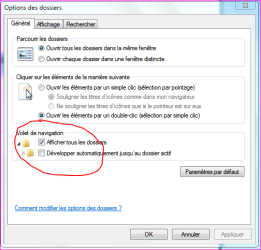
Could you have a look at your Control Panel => Option Folders=> Navigation Pane (check or uncheck and see what's happen for you). It does not happen to me so often but i recon sometimes when searching for files in drives, it becomes annoying:
Attached Thumbnails
Folder navigation jumps to previously expanded folder-capture.png  
My System SpecsSystem Spec
.


Reply

Folder navigation jumps to previously expanded folder problems?


Thread Tools


Similar Threads for: Folder navigation jumps to previously expanded folder
Thread Forum
Libraries Folder - Add or Remove from Navigation Pane Tutorials
Cursor randomly jumps to previously entered lines while typing General Discussion
Folder navigation in Windows 7 General Discussion
Solved Folder navigation, restore to xp style? Backup and Restore
Windows Live Mail folder pane jumps to top of column Browsers & Mail


All times are GMT -5. The time now is 07:03 AM.


Windows 7 Forums is an independent web site and has not been authorized,
sponsored, or otherwise approved by Microsoft Corporation.
"Windows 7" and related materials are trademarks of Microsoft Corp.
© Designer Media Ltd
  

1 2 3 4 5 6 7 8 9 10 11 12 13 14 15 16 17 18 19 20 21 22 23 24 25 26 27 28 29 30