Windows 7 Forums


Windows 7: "Date Modified" changes on original file when copying

10 Jun 2012   #31

Windows 7 Pro 64
SW Missouri, US


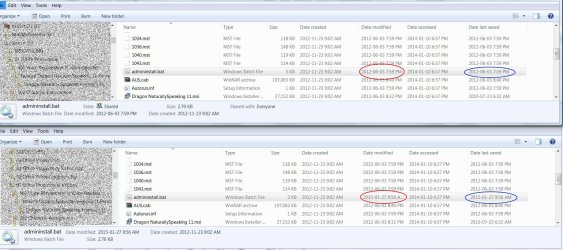
My results to others questions...
Copying to another drive.
Code:
                 Files        Folders        Shortcuts
Date Modified     unchanged    unchanged    unchanged
Date created      changed      changed      changed
Date              unchanged    changed      changed


Attached Thumbnails
"Date Modified" changes on original file when copying-mwsnap2012-06-10-16_44_59.jpg   "Date Modified" changes on original file when copying-mwsnap2012-06-10-16_45_22.jpg  
My System SpecsSystem Spec

28 Aug 2012   #32

Microsoft Windows 7 Home Premium 64-bits 7601 Multiprocessor Free Service Pack 1
SecretCity


Quote   Quote: Originally Posted by periboob View Post
My results to others questions...
Copying to another drive.
Code:
                 Files        Folders        Shortcuts
Date Modified     unchanged    unchanged    unchanged
Date created      changed      changed      changed
Date              unchanged    changed      changed
What's strange about this? What did you expect?
My System SpecsSystem Spec
28 Aug 2012   #33

Microsoft Windows 7 Home Premium 64-bits 7601 Multiprocessor Free Service Pack 1
SecretCity


For every file on an NTFS volume, there are the following dates:
  1. File Created
  2. File Accessed
  3. File Modified
  4. MTF last written
Each of these dates are explained below:
File Created: This is the date the file was “created” on the volume. This does not change when working normally with a file, e.g. opening, closing, saving, or modifying the file.
File Accessed: This is the date the file was last accessed. An access can be a move, an open, or any other simple access. It can also be tripped by Anti-virus scanners, or Windows system processes. Therefore caution has to be used when stating a “file was last accessed by user XXX” if there is only the “File Access” date in NTFS to work from.=>feature is off by default (registry HKEY_LOCAL_MACHINE\SYSTEM\CurrentControlSet\Control\FileSystem\NtfsDisableLastAccessUpdate=1)
File Modified: This date as shown by Windows there has been a change to the file itself. E.g a notepad document is has more date added to it, would trip the date it was modified.
MFT Entry Modified: A basic understanding of NTFS and the MFT is required for this section. This is date not shown by Windows Explorer or the average windows interace, but requires forensic tools , e.g EnCase, FTK, iLook, WinHex, etc. This date shows when the MFT entry, which points to the file of concern, was changed. This means that if the record that points to the file is changed, then this date would trip. As all the dates, file name, file sizes are stored in the MFT, if any of those are changed then the date will change. For example, if the file size changes then the MFT Entry modified date is changed. If the file name is changed, than the MFT entry modified is changed
My System SpecsSystem Spec
.


Reply

 "Date Modified" changes on original file when copying problems?


Thread Tools


Similar help and support threads for: "Date Modified" changes on original file when copying
Thread Forum
Solved How to change "Date modified" in folders Customization
Windows Photo Gallery "Modified" date Music, Pictures & Video
Solved How to manuallly edit "Date Modified" information? Customization
"easy transfer" resets folder modified date General Discussion
"Date Modified" changes when copying... General Discussion


All times are GMT -5. The time now is 01:58 AM.


Windows 7 Forums is an independent web site and has not been authorized,
sponsored, or otherwise approved by Microsoft Corporation.
"Windows 7" and related materials are trademarks of Microsoft Corp.
© Designer Media Ltd