Windows 7 Forums


Windows 7: Folder shortcut missing from taskbar, windows 7

03 Jun 2010   #1


Folder shortcut missing from taskbar, windows 7

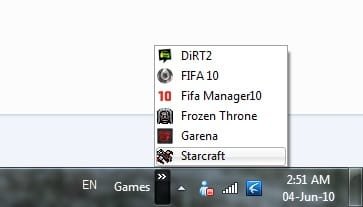
i cr8 a folder and all my game shortcut into d folder. i mk it appear at left side d date there taskbar there. but d folder alwys went missing after few restart. i alwys need recreate again d shortcut at the taskbar. any solution to this bug? testing on windows 7 professional and ultimate. both same. alwys missing d folder shortcut. using original windows with updates. i dont want keep repeating doing the same keep adding the shortcut folder. any solution?


see picture below.

picture with the shortcut folder, after few restart become sec picture without folder shortcut.


few restarts become


i wan the shortcut look like this.


Last edited by gliew87; 03 Jun 2010 at 02:04 PM..
My System SpecsSystem Spec

03 Jun 2010   #2

Windows 7 Home Premium SP1, clean install, upgrade disc
CT


Welcome

Try this put the folder, then right click on task bar and lock. Tell me what happens.
My System SpecsSystem Spec
03 Jun 2010   #3

windows 7 Ultimate 64 Bit
PA. in the U.S.A.


You could try pinning the shortcut to the task bar and or the start menu. Create as you did before and open file then right click on the icon in taskbar and "pin it" to task bar??
My System SpecsSystem Spec
.


03 Jun 2010   #4


Quote   Quote: Originally Posted by richc46 View Post
Welcome

Try this put the folder, then right click on task bar and lock. Tell me what happens.
mind to explain? i not really understand what u trying to ask me do?
My System SpecsSystem Spec
03 Jun 2010   #5

Windows 7 Home Premium SP1, clean install, upgrade disc
CT


I would be very happy to try to explain

Put the folder on the taskbar

Then move the cursor to another part of the task bar

Right click on your mouse

Then select lock taskbar
My System SpecsSystem Spec
03 Jun 2010   #6


Quote   Quote: Originally Posted by Hannibal001 View Post
You could try pinning the shortcut to the task bar and or the start menu. Create as you did before and open file then right click on the icon in taskbar and "pin it" to task bar??
u meant pin it after putting on start menu? but after pin i click it will open d folder. but i dont wan a folder been opened. i wan a list appear. i upload how i want it to be. as pict below
Attached Thumbnails
Folder shortcut missing from taskbar, windows 7-untitled.jpg  
My System SpecsSystem Spec
03 Jun 2010   #7
whs

Vista, Windows7, Mint Mate, Zorin, Windows 8
Florida in winter, Black Forest/Germany


Maybe I don't quite understand what you are trying to do. But as far as I can see, this is a toolbar of a folder called "Games". Where did you park that folder (which is the repository of the toolbar) and did you either delete or move it after you created the toolbar? That would be an explanation for the disappearance of the toolbar.
My System SpecsSystem Spec
03 Jun 2010   #8


erm inside d folder with games shortcut. all still exist and nth been moved. i put under my documents, evertime i restart it will missing again and again. but when i move the game folder to d:, the shrcut at taskbar will remain 2 or 3 times after restart. and then also missing and i need readd again d folder at taskbar
My System SpecsSystem Spec
03 Jun 2010   #9
whs

Vista, Windows7, Mint Mate, Zorin, Windows 8
Florida in winter, Black Forest/Germany


Quote   Quote: Originally Posted by gliew87 View Post
erm inside d folder with games shortcut. all still exist and nth been moved. i put under my documents, evertime i restart it will missing again and again. but when i move the game folder to d:, the shrcut at taskbar will remain 2 or 3 times after restart. and then also missing and i need readd again d folder at taskbar
Put the folder on the desktop. Maybe (or maybe not) that helps. I always keep the repository folder on the desktop and never had the problem you describe.
My System SpecsSystem Spec
03 Jun 2010   #10


er is not that folder missing, the folder still there at at my documents, but after adding new toolbar at taskbar there, after restart it(the new toolbar that i added) will missing. i do not keep d folder at desktop as i wan keep desktop clean and neat.
My System SpecsSystem Spec
Reply

 Folder shortcut missing from taskbar, windows 7 problems?


Thread Tools


Similar help and support threads for: Folder shortcut missing from taskbar, windows 7
Thread Forum
Missing icon on windows explorer system folder on my taskbar? General Discussion
Solved Windows Explorer taskbar shortcut problems General Discussion
can't pin any folder to windows explorer shortcut in the taskbar Customization
Solved Open Firefox windows no longer group with program shortcut on Taskbar Browsers & Mail
Solved User's Folder shortcut on taskbar General Discussion


All times are GMT -5. The time now is 08:52 PM.


Seven Forums Android App Seven Forums IOS App Follow us on Facebook

Windows 7 Forums is an independent web site and has not been authorized,
sponsored, or otherwise approved by Microsoft Corporation.
"Windows 7" and related materials are trademarks of Microsoft Corp.
© Designer Media Ltd
  

1 2 3 4 5 6 7 8 9 10 11 12 13 14 15 16 17 18 19 20 21 22 23 24 25 26 27 28 29 30 31 32