| Windows 7: Major problems copying and moving files |
08 Jun 2010
|
#1 | | |
Major problems copying and moving files What good is an operating system if you can't safely move and copy files? I have had this (and similar problems) happen several times in Windows 7. I am trying to move large (video) files. I dragged the files into a sub folder. Windows Explorer indicated move into x folder. But Windows then shows the files in both the source and destination folders. (So I thought they must have been copied instead.) So I deleted the files from the source area, but then they were gone from both places. (I always do shift-delete, so they were gone, gone!) Now I'm looking at the folder/directory from a command prompt and it doesn't match what I see in Windows explorer. (There seems to be some confusion with moving verses copying and also--especially--updating or refreshing what is contained in folders.) This is not the first time. I have been burned with this several times. My only solution is to not trust what I am seeing and reboot my computer. Come on guys! This is a basic operating system function that I'm attempting here!!! I am an old DOS guy from way back. I am using an i7 processor and Windows 7 Home Premium (64-bit). | My System Specs |
| |
08 Jun 2010
|
#2 | | |
Problem Duplicated I can consistently duplicate this. Move a file to subfolder. File still shows in source folder. Delete from source folder. File is deleted from subfolder (and then also disappears from source folder). | My System Specs | | |
08 Jun 2010
|
#3 | | Windows 7 Ult, Windows 8 Pro, San Diego |
Are you using Libraries to move those files back and forth? | My System Specs | | System Manufacturer/Model Number Home built OS Windows 7 Ult, Windows 8 Pro, CPU Q9650-4.275GHz, E8600 4.5GHz, E6750-3.8GHz Motherboard Evga 780i FTW Memory G.Skill PC2 9600 1200Mhz 5 5 5 15 2T Graphics Card GTX480 Sound Card Asus Xonar D2 Monitor(s) Displays HannsG Screen Resolution 1680X1050 Keyboard Logitech G15 Mouse Logitech G9 PSU ThermalTake Toughpower 1000Watt modular Case ThermalTake XaserV Cooling Xigmatek S1283 Hard Drives GSkill Phoenix Pro 120GB SSD Internet Speed T1 |
08 Jun 2010
|
#4 | | Windows 7 x64 Ultimate A Finnish immigrant in Leipzig, Germany |
Eldongr, welcome to the Seven Forums.
I tried, three different rigs, two Ultimates and a Home Premium, and can not reproduce this issue.
If you drag and drop with left mouse button, the file is immediately moved to target folder and disappears from original folder when move is finished. With larger files, moving can take some time; during this time, the file is shown on both folders.
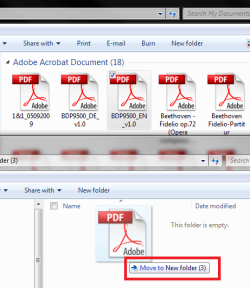
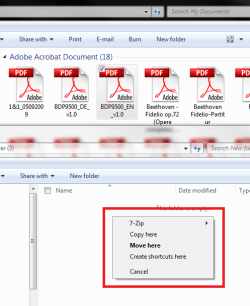
Dragging and dropping with the right mouse button is my method. When you do this, a tooltip tells Moving to (target) folder, but when you relese right mouse button in target folder, you get a context menu which let you choose between Move, Copy or Create shortcut.
Right button Drag:
Right button released:
Kari | My System Specs | | Computer type Laptop System Manufacturer/Model Number HP ENVY 17-1150eg OS Windows 7 x64 Ultimate CPU 1.6 GHz Intel Core i7-720QM Processor Memory 6 GB Graphics Card ATI Mobility Radeon HD 5850 Graphics Sound Card Beats sound system with integrated subwoofer Monitor(s) Displays 17" laptop display, 22" LCD and 32" Full HD TV through HDMI Screen Resolution 1600*900, 1680*1050 and 1920*1080 Keyboard Logitech diNovo Media Desktop Laser (bluetooth) Mouse Logitech MX1000 Laser (Bluetooth) Hard Drives Internal: 2 x 500 GB SATA Hard Disk Drive 7200 rpm
External: 2TB for backups, 3TB USB3 network drive for media Internet Speed 50/10 Mbps VDSL Antivirus MSE, Windows Defender Browser Maxthon 3.5.2. Other Info Windows 7 Ultimate Retail Full in English, additional Guest-user accounts in Finnish, German and Swedish (Working languages English & Swedish, Family language German, my own language, mother tongue, Finnish. I really need Ultimate to get to use Language Packs!) |
08 Jun 2010
|
#5 | | |
Yes. This appears to be an issue with accessing folders through libraries. When I navigate using libraries I get different results than when looking at the same folder without libraries. Perhaps this is a user error, but I think not. Shouldn't copy, move, and viewing folder contents be the same regardless of how you navigated to the folder? | My System Specs | | |
08 Jun 2010
|
#6 | | Windows 7 Ult, Windows 8 Pro, San Diego |
Libraries are not the actual file, they just represent files in other locations, thats what those pretty pictures are about. There is a setting to allow Libraries for moving files around but you would be far better served by simply going into the User folders to move those larger files around. It works more consistantly that way.
For instance, instead of going into Libraries to perform your file transfers, you should go into the "User name" User files, then use the My picture,My music, My documents, any of the User folders in order to move those files around.
Then also use the little blue Network icon, lower left after clicking on the file icon, then choose the> User name icon to transfer those files to other machines. It should work better for you after that. You will need to share the User folders on all machines for access to all the User folders.
There is also a way to enable file transfers using Libraries but it needs to be enabled on all machines. | My System Specs | | System Manufacturer/Model Number Home built OS Windows 7 Ult, Windows 8 Pro, CPU Q9650-4.275GHz, E8600 4.5GHz, E6750-3.8GHz Motherboard Evga 780i FTW Memory G.Skill PC2 9600 1200Mhz 5 5 5 15 2T Graphics Card GTX480 Sound Card Asus Xonar D2 Monitor(s) Displays HannsG Screen Resolution 1680X1050 Keyboard Logitech G15 Mouse Logitech G9 PSU ThermalTake Toughpower 1000Watt modular Case ThermalTake XaserV Cooling Xigmatek S1283 Hard Drives GSkill Phoenix Pro 120GB SSD Internet Speed T1 |
08 Jun 2010
|
#7 | | |
Wow. This is a dangerous "feature." I see that doing file transfers/maintenance while in libraries is a bad thing. So much for their usefulness if you ask me. Unfortunately when you delete files from a library, it also deletes them from the original folder (and what you see is NOT what you get) as far as file status/location...
Thanks | My System Specs | | |
08 Jun 2010
|
#8 | | Windows 7 x64 Ultimate A Finnish immigrant in Leipzig, Germany |
Oh yes, I didn't think OP might be moving files inside the library. Then, of course, this can happen.
Let's say your Videos library contains two folders, X:\Videos and Y:\Videos. You open Libraries > Videos and Y:\Videos side by side, dragging a file from Video library (actual location X:\Videos) to Y:\Videos.
Because Y:\Videos is included in Video library, the file is of course shown on both also after the move. Only its actual de facto location is changed; opening X:\Videos don't show it any more because it was moved.
Conclusion: Library function is working as it was planned to work, as it is supposed to work. It shows the file, wherever it is actually located, as long as the location folder is included in library.
I can not see what is so difficult in this kind of behavior. Just remember library shows the content of all included folders.
Kari | My System Specs | | Computer type Laptop System Manufacturer/Model Number HP ENVY 17-1150eg OS Windows 7 x64 Ultimate CPU 1.6 GHz Intel Core i7-720QM Processor Memory 6 GB Graphics Card ATI Mobility Radeon HD 5850 Graphics Sound Card Beats sound system with integrated subwoofer Monitor(s) Displays 17" laptop display, 22" LCD and 32" Full HD TV through HDMI Screen Resolution 1600*900, 1680*1050 and 1920*1080 Keyboard Logitech diNovo Media Desktop Laser (bluetooth) Mouse Logitech MX1000 Laser (Bluetooth) Hard Drives Internal: 2 x 500 GB SATA Hard Disk Drive 7200 rpm
External: 2TB for backups, 3TB USB3 network drive for media Internet Speed 50/10 Mbps VDSL Antivirus MSE, Windows Defender Browser Maxthon 3.5.2. Other Info Windows 7 Ultimate Retail Full in English, additional Guest-user accounts in Finnish, German and Swedish (Working languages English & Swedish, Family language German, my own language, mother tongue, Finnish. I really need Ultimate to get to use Language Packs!) |
08 Jun 2010
|
#9 | | |
I had something similar happen. It has to due with libraries. I figured it out and posted the solution in my original thread. WMP Creates Duplicate Files | My System Specs | | OS Windows 7 64-bit CPU AMD Athlon II X4 620 Propus @ 2.6ghz Motherboard GIGABYTE GA-MA785GM-US2H Memory OCZ Platinum 4GB (2 x 2GB) 240-Pin DDR2 SDRAM DDR2 1066 (PC2 Graphics Card ATI Radeon HD 4200 [on board] Sound Card Realtek ALC889A [on board] Case APEVIA X-QPACK-NW-BK/420 Black Aluminum |
08 Jun 2010
|
#10 | | Windows 7 Home Premium x64 7600 [MSDN] Los Angeles |
Let me suggest you try TerraCopy, it has a built-in verifyer and ignores issues like the library one in my experience. On the plus side, you move/copy speed will (in theory) improve. Code: http://www.codesector.com/teracopy.php | My System Specs | | System Manufacturer/Model Number Custom Build/Mod OS Windows 7 Home Premium x64 7600 [MSDN] CPU Intel QX9650 Extreme 5.0 GHz Motherboard ASUS Rampage Extreme Rev2 Memory 8GB (4x2) Corsair Dominator DDR3 Graphics Card 2x Sapphire Radeon HD4870X2 (QuadFire) Sound Card SupremeFX X-Fi Monitor(s) Displays Dell 2408WFP 24" Panel Screen Resolution 1920x1200 Keyboard Logitech Mouse Logitech PSU Corsair HX1000 Case CoolerMaster - Cosmos S Cooling Custom Liquid - 320mm rad w/ 3x 80mm fans, CPU/NB/SB Blocks Hard Drives 4x WD Caviar Black 640GB (2TB+ Total)
MegaRAID SATA 300-8X Controller
2x RiDATA SataII SSD 64GB (Raid10)
1x LG Blu-ray read/write
1x Phillips LightScribe DVD read/write Internet Speed Fractional T1 - Shared Other Info OC'd to 5.0GHz @ 50c under full load Major problems copying and moving files problems? All times are GMT -5. The time now is 10:12 PM. | |