Windows 7 Forums Search
Welcome to Windows 7 Forums. Our forum is dedicated to helping you find solutions with any problems, errors or issues you are experiencing with Windows 7. The Windows 7 forum also covers news and updates and has an extensive Windows 7 tutorial section that covers a wide range of tips and tricks.


Windows 7 - Aero Peek


12-12-2008   #1


Win7


Aero Peek

I been using Windows 7 latest pre-beta for about a week. Today I noticed that Aero Peek no longer works. By that I mean the little rectangle on the task bar won't let me see translucent boxes and the desktop. It was working when I first installed. Whe are the registery settings? The preview checkbox is checked and I am running Areo theme. If I click it it will minimize the windows just no mouse over peeking.

My System SpecsSystem Spec
12-12-2008   #2


Windows 7 Ultimate Vista Ultimate x64


Try to create a new account to see if it works on a fresh one, it worked for me when Aero Snap mysteriously stopped working, all I did then was copy all my files to the new account and deleted the first one. It's not the best fix I know but it was the quickest way at the time.
My System SpecsSystem Spec
12-12-2008   #3


Win7


Grim
That does work but what files or registry entries does it change to get it working again? I did some looking but I can't figure it out.
My System SpecsSystem Spec
.


12-12-2008   #4


Win7


Found the Answer

I kept palying around and looking for what the changes were when creating a new logon and I found why iy quit working. I had made some changes under the Performance Options. I was using Custom Settings and found this to be the culprit.

Under Performance Options, Custom, Animate controls and elements inside windows. I this is unchecked Aero Peek quits working. If it's checked it starts working once again. Took some digging but it payed off.

So again it needs to be checked for Aero Peek to work.
My System SpecsSystem Spec
12-12-2008   #5


Windows 7 Ultimate Vista Ultimate x64


Glad to see you sorted it out.
My System SpecsSystem Spec
12-14-2008   #6


SEVEN x64


hi all.......

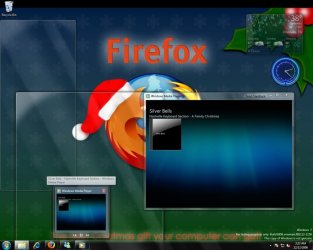
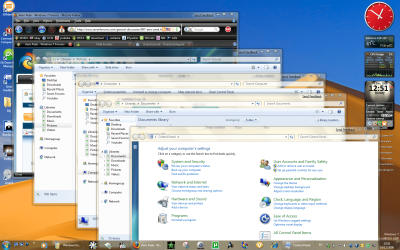
how do i make my windows appear like this..??
Aero Peek-aero-p.jpg

i thought it would just be a case of opening multiple windows but mine don't go like that..?? is there something other than the blue badge kit that needs to be enabled...
thx...


SK
My System SpecsSystem Spec
12-14-2008   #7


W 7 64-bit Ultimate


Hello SK.

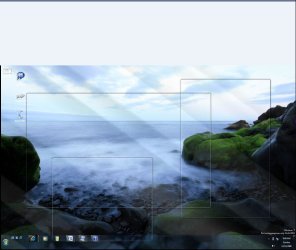
This is what I get in 6801 with IE maximized and a couple other windows open.

Aero Peek-peek.jpg


Later Ted
My System SpecsSystem Spec
12-14-2008   #8


SEVEN x64


thats it!!!!...

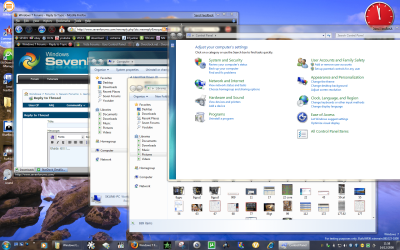
i cant get that..?? this is what i see...
Aero Peek-poi.png

it cant be the fact that im using FF3...??


SK
My System SpecsSystem Spec
12-14-2008   #9


W 7 64-bit Ultimate


Hell SK.

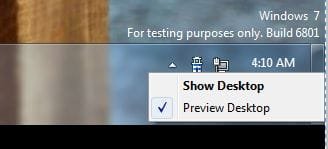
What is this set to? r click the peek button.

Aero Peek-peek2.jpg


Later Ted
My System SpecsSystem Spec
12-14-2008   #10


SEVEN x64


its set to ''preview desktop''.......?? strange a....


SK
My System SpecsSystem Spec
Reply

Aero Peek problems?


Thread Tools


Similar Threads for: Aero Peek
Thread Forum
Solved Aero Peek not available Customization
Aero peek. Software
aero peek help Customization
Aero Peek General Discussion
Aero peek off Customization


All times are GMT -5. The time now is 06:15 PM.


Windows 7 Forums is an independent web site and has not been authorized,
sponsored, or otherwise approved by Microsoft Corporation.
"Windows 7" and related materials are trademarks of Microsoft Corp.
© Designer Media Ltd
  

1 2 3 4 5 6 7 8 9 10 11 12 13 14 15 16 17 18 19 20 21 22 23 24 25 26 27 28 29 30