Windows 7 Forums


Windows 7: Windows 7 x64 professional screensaver issues

17 Jun 2010   #1

Windows 7
 
 
Windows 7 x64 professional screensaver issues

I did a windows anytime upgrade from home premium to professional. The problem I'm having is my screensavers don't want to start. If I set them to start in 10 minutes or more I get nothing but a black screen and it makes me log on again(which it is NOT set to do) I have my power settings on "best performance".
Any suggestions??

My System SpecsSystem Spec

18 Jun 2010   #2

Windows 7 Home Premium x64 SP1
Bay Area Peninsula


Hello, I see you have no replies. Let's see if we can't add some info to get this kick started.

You have a screen saver chosen. When it kicks in the screen just goes black. Can you wake the PC with mouse or keyboard at this point? You say "it makes me log on again". Let's get specific about what this means. You are unable to wake from this black screen, so must log on again? Using what method? There are certainly screen saver and power settings to explore, but lets get very specific, step by step, with any messages you see, etc. what happens.

The screen goes black after the period I have set for screen saver to come on. I have a screen saver set. After it goes black...

I think we can get you some help with more info. A Guy
My System SpecsSystem Spec
22 Jun 2010   #3

Windows 7


Sorry I took so long to respond.....WAAY to much overtime.
Anyway, the screensaver situation is really strange. Thru trial and error I have got the screensavers running, but ONLY if the screensaver delay is below 10 minutes. Anything above and it won't activate. In addition, it requires me to log in after the 10 minute mark as well. I currently have the power settings at high performance and never putting the computer to sleep.

I really appreciate your help.
My System SpecsSystem Spec
.


22 Jun 2010   #4

Windows 7 Ult, Windows 8 Pro,
San Diego


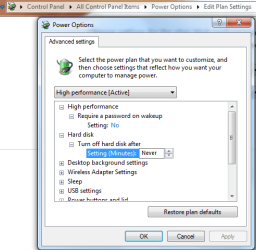
You might try the Advanced Power settings and make sure that the settings for Harddisk,Desktop background,and sleep settings are set to not turn on.
Attached Thumbnails
Windows 7 x64 professional screensaver issues-power-plan-settings-harddrive-off-.png  
My System SpecsSystem Spec
22 Jun 2010   #5

XP / Win7 x64 Pro


^^ That's what I was going to suggest. There are a lot more fine-tuning options in the Advanced Settings portion of the power plan setup.
My System SpecsSystem Spec
23 Jun 2010   #6

Windows 7


Good call....I think.
Under "require a password on wakup"it's not giving me an option to turn it off. All I have is "yes". The drop down arrow isn't highlighted or clickable. I still can't delay the screensaver any longer than 10 minutes either.
My System SpecsSystem Spec
23 Jun 2010   #7

Windows 7


AH HA!!
I overlooked the "change settings that are currently unavailable" link. I shut off the password prompt so it looks like that should be OK. Now onto that pesky screensaver issue....
Thanks again for all your help
My System SpecsSystem Spec
Reply

 Windows 7 x64 professional screensaver issues problems?


Thread Tools


Similar help and support threads for: Windows 7 x64 professional screensaver issues
Thread Forum
BSOD Issues in Windows 7 Professional BSOD Help and Support
which are you favorite screensaver ,outside the w7 bundle screensaver? General Discussion
Win7 x64 Screensaver Questions/Issues. No 'Stretching'? Performance & Maintenance
Security Essentials Screensaver Scans Your Computer on Screensaver Act System Security
WMC7 ScreenSaver as default Windows screensaver Media Center


All times are GMT -5. The time now is 03:36 AM.


Seven Forums Android App Seven Forums IOS App Follow us on Facebook

Windows 7 Forums is an independent web site and has not been authorized,
sponsored, or otherwise approved by Microsoft Corporation.
"Windows 7" and related materials are trademarks of Microsoft Corp.
© Designer Media Ltd
  

1 2 3 4 5 6 7 8 9 10 11 12 13 14 15 16 17 18 19 20 21 22 23 24 25 26 27 28 29 30 31 32