Windows 7 Forums


Windows 7: Replacing a existing drive with a larger drive

18 Jun 2010   #1

Windows 7
 
 
Replacing a existing drive with a larger drive

Hello,

I have 4 - 250gb SATA drives on my Windows 7 machine. One has Windows 7, One has Vista (I dual boot) and the other two are used for storage. I want to replace one of the storage drives with a larger capacity drive 1TB.

In looking inside the cabinet I cant tell which drive has what on it.

Can I just unplug the cable on one drive at a time and identify it that way? Or would it create a problem, such as, Windows renaming the 3 remaining drives?

What's the best way to do this?

Thanks

Don

My System SpecsSystem Spec

18 Jun 2010   #2

Win7 x 6 PC's
California, Florida, Boston


Enter BIOs setup and look at HD's to determine which HD is plugged into which port 0, 1, 2, 3.

If this isn't enough, type CMD into Start Search box, rightclick to run as Admin, type "Diskpart," , then "list disk"

Now copy down which drive is in which slot judging by size and content.
My System SpecsSystem Spec
18 Jun 2010   #3

Windows 7 RTM x64
Belgium & Hungary


You can pull out them one by one to check what they are containing. The windows won't rename them.
My System SpecsSystem Spec
.


18 Jun 2010   #4

Windows 7 HP 64bit, Windows 8 Pro w/Media Center 64bit
Covington, La


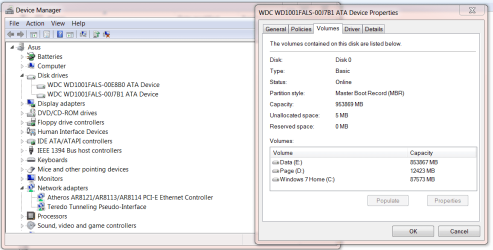
You can look in Device Manager and see if the drives are identified by model number. Then select properties and volume and populate to see what is on each drive.

Replacing a existing drive with a larger drive-drive.png

Jim
My System SpecsSystem Spec
18 Jun 2010   #5
whs

Vista, Windows7, Mint Mate, Zorin, Windows 8
Florida in winter, Black Forest/Germany


Quote:
type CMD into Start Search box, rightclick to run as Admin, type "Diskpart," , then "list disk"
If all disks are the same size and are fully occupied with partitions, you will not be able to tell them apart because the free space will always be shown as zero. For that you have to use a little trick. Shrink a few MBs off a partition on each drive and leave it as unallocated space. If you use a different number of MBs per drive, you will be able to tell them apart because those shrunk MBs will show as free space. Example Disk1:

DISKPART> list disk
Disk ### Status Size Free
-------- ---------- ------- -------
Disk 0 Online 233 GB 0 B
Disk 1 Online 233 GB 1199 MB
Disk 2 Online 15 GB 0 B

Now you know which port serves which disk.
My System SpecsSystem Spec
18 Jun 2010   #6

Windows 7
 
 
Thanks!!

Thanks to everyone who replied. I appreciate you taking the time and sharing your knowledge.

Don
My System SpecsSystem Spec
Reply

 Replacing a existing drive with a larger drive problems?


Thread Tools


Similar help and support threads for: Replacing a existing drive with a larger drive
Thread Forum
Installing win 7 image to a larger 3TB drive Backup and Restore
Can I copy my old Win 7 pro hdd to a new faster and larger drive? Backup and Restore
C: Drive swop drive for larger faster one? Installation & Setup
Solved Help restore to larger drive without format Backup and Restore
System drive content getting larger General Discussion


All times are GMT -5. The time now is 08:08 AM.


Seven Forums Android App Seven Forums IOS App Follow us on Facebook

Windows 7 Forums is an independent web site and has not been authorized,
sponsored, or otherwise approved by Microsoft Corporation.
"Windows 7" and related materials are trademarks of Microsoft Corp.
© Designer Media Ltd
  

1 2 3 4 5 6 7 8 9 10 11 12 13 14 15 16 17 18 19 20 21 22 23 24 25 26 27 28 29 30 31 32