| Windows 7: MOVE EXT HD FILES TO new W7 |
20 Jun 2010
|
#1 | | |
MOVE EXT HD FILES TO new W7 HI,
How can I move my IDE EXT HD FILES to my new Windows 7 Computer? easiest way ---
I saw something about "EASY TRANSFER " but that does not seem to fit--
Thanks ,, Ralph | My System Specs |
| System Manufacturer/Model Number hp athelon quad OS windows 7 professional Memory 6 g ddr3 Monitor(s) Displays hp 23" Hard Drives 640 and 124 on xp |
20 Jun 2010
|
#2 | | Windows 7 Ultimate x64, XP Mode, W8 RP VM, Linux Mint Debian 2nd OS HD- 7 Pro x64 second case New England |
Hello neorican Welcome to SF!
If you have an empty second drive for storage on your main system one way would be copying the external drive's entire partition in one shot. The process would be time consuming while you could be still be doing other things while that was taking place.
For that you would use a 3rd party partitioning program with the copy option. For copying files onto a drive with files already present the old copy & paste method is still available with two explorer windows open for hightlighting and right clicking to copy on one and the right click to paste in the other.
Either method will still consume quite a bit time depending on how much you would be copying over. The Windows Easy Transfer tool there is mainly for backing up folders and files from the main system drive generally to a second drive(internal or external) or partition especially if the main drive is to be reformatted or replaced at some point.
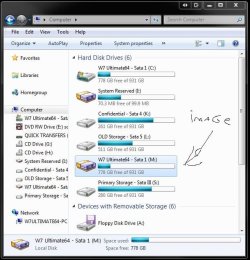
Another way to preserve all files from any drive however is the use of a drive backup or imaging program where you would simply include the external drive in a backup to second drive on the system itself. That could then an image you could mount for incremental backups when allowed to add even more files.
You'll have to excuse the penmenship in the image here that points to an image of the main drive being mounted as an example of how that would work. Acronis True Image was the program used here for this. | My System Specs | | OS Windows 7 Ultimate x64, XP Mode, W8 RP VM, Linux Mint Debian 2nd OS HD- 7 Pro x64 second case CPU AMD Phenom II X4 975 Deneb 3.6ghz - 965 on new mini tower Motherboard Gigabyte GA-790XTA-UD4 Memory Kingston Hyper X DDR3 1600 1.5v 16gb - Mushkin on 2nd build Graphics Card MSI HD Radeon 5750 1gb - MSI HD Radeon 6450 on mini tower Sound Card Creative Labs X-Fi XtremeGamer - Realtek onooard 2nd case Monitor(s) Displays 2 x Acer P191W 19" widesscreen - HP 20" widescreen mini towe Screen Resolution 1440x900 native - 1600x1024 on 7 Pro x64 build Keyboard Microsoft Recusa Razor - MS Comfort 3000 on second build Mouse MS Trackball Explorer - A4TECH dual scroll wheel trackball PSU Corsair 750TX - primary / Corsair CX600 - second Case Antec 900-2 - SSD compatible / NZXT Vulcan mini tower Cooling Zalman CNPS9900A Hard Drives Primary Ultimate x64 build-
WD Black Edition 1tb Sata 6.0 = 2
WD Black Edition 1tb Sata 3.0 = 2 (OS drives)
WD 1tb Green Power sata = 2 1 external
usb flash drives = 18
Second 7 Pro x64 mini tower-
WD Caviar SE 500gb sata II single drive presen Internet Speed 30mbps upgrade - primary hard wired - mini tower usb WiFi |
20 Jun 2010
|
#3 | | |
Hi Night Hawk,
Thank You for early reply ---seems that what you say to do is quite complicated and is quite different than what I was I told when I bought my new HP Windows 7 computer-
I was told that moving ext IDE to Windows 7 is EASY VIA usb --
My MORE important issue is moving my INTERNAL IDE HD's to my njew W 7--I was told that this can be done by using an IDE case so that Internals are now like externals, and again this was supposed to be easy -----
Anyway, if you believe that there is no other EASY way to do , I suppose I will have to get this done by a servicer---
Thanks again , Ralph | My System Specs | | System Manufacturer/Model Number hp athelon quad OS windows 7 professional Memory 6 g ddr3 Monitor(s) Displays hp 23" Hard Drives 640 and 124 on xp |
20 Jun 2010
|
#4 | | Vista 64 Ultimate, Windows 7 64 Ultimate, Ubuntu 9.10 S. ME and W. ME |
If you know the file extension, i.e. .jpg (photos) would be all jpeg's on your ext drive. You could type *.jpg in Search and then select all the .jpg's found then move them with a mouse drag to the C: drive folder you want them in, you would need to do this for all files. the easier way would be if your PC were wireless and on a home network and your old PC the same then you could use the File Transfer Wizard. | My System Specs | | System Manufacturer/Model Number DELL XPS Studio 435T OS Vista 64 Ultimate, Windows 7 64 Ultimate, Ubuntu 9.10 CPU i7 975 3.3 GHz Extreme (Factory OC'd to 3.6 GHz) Motherboard DELL provided Memory 18 Gb Tri-Channel 1066 Graphics Card ATI 5970 2048 Mb Sound Card X-Fi Extreme Gamer Monitor(s) Displays Vizio 37" HD-TV Screen Resolution 1920 x 1080 Keyboard Logitech Performance K350 Wireless Mouse Logitech Performance MX Wireless PSU DELL Provided 475 watts Case DELL Cooling 3 fans Hard Drives 1.5 Tb HDD
1.5 Tb HDD
2.0 Tb Network Drive
512 Gb Crucial SSD Internet Speed 3 Mb up 750 Kb down Other Info Bamboo Fun Tablet, Belkin N+ Wireless router, Pioneer Dolby System Wireless Headphones, Bose 5.1 Dolby Surround Sound System, LifeCam VX 3000 Webcam, Blu-Ray/Hi Def DVD +RW combo and Blu-ray +RW,l 15 in 1 media card reader, Logitech Rumblepad 2, Hauppauge 2250 DTV Tuner with MS Media Center Remote
Laptop:Alienware M17x, Q9100 CPU, 8Gb RAM, 1920x1200 WUXGA LCD driven by 4870's in CrossFireX, Bl |
20 Jun 2010
|
#5 | | Windows 7 Ultimate x64, XP Mode, W8 RP VM, Linux Mint Debian 2nd OS HD- 7 Pro x64 second case New England |
If you right click on a folder full of jpeg files you can select the copy option and then paste in the second window to see the entire folder copied over or highlight all intended folders in one effort for this.
When going to copy or move any large volume of folders, files, data it will still take time depending on fast the drive is, the method of transfer being the usb bus for you, and how much drive space is presently available on the destination drive.
The actual copy&paste process is quite basic however. For seeing an external drive installed internally that is a different matter regarding ide drives especially if you have Windows presently on a sata drive. With any repair or fresh install of Windows the installer will always look for the ide drive first over sata and the first ide if more then one is present to place boot files and mbr entries on that even while Windows is installed on another.
Internals seen as externals? Or vice versa with drives in external enclosures being available in Windows as additional logical drives. Even when plugging in a usb flash drive into a port that has to be mounted as a logical drive being provided a drive letter in order to available. With ide drives the one thing you are not able to do however is take advantage of the faster eSata type connection where sata drives are required while you still have ready access through the slower usb bus. | My System Specs | | OS Windows 7 Ultimate x64, XP Mode, W8 RP VM, Linux Mint Debian 2nd OS HD- 7 Pro x64 second case CPU AMD Phenom II X4 975 Deneb 3.6ghz - 965 on new mini tower Motherboard Gigabyte GA-790XTA-UD4 Memory Kingston Hyper X DDR3 1600 1.5v 16gb - Mushkin on 2nd build Graphics Card MSI HD Radeon 5750 1gb - MSI HD Radeon 6450 on mini tower Sound Card Creative Labs X-Fi XtremeGamer - Realtek onooard 2nd case Monitor(s) Displays 2 x Acer P191W 19" widesscreen - HP 20" widescreen mini towe Screen Resolution 1440x900 native - 1600x1024 on 7 Pro x64 build Keyboard Microsoft Recusa Razor - MS Comfort 3000 on second build Mouse MS Trackball Explorer - A4TECH dual scroll wheel trackball PSU Corsair 750TX - primary / Corsair CX600 - second Case Antec 900-2 - SSD compatible / NZXT Vulcan mini tower Cooling Zalman CNPS9900A Hard Drives Primary Ultimate x64 build-
WD Black Edition 1tb Sata 6.0 = 2
WD Black Edition 1tb Sata 3.0 = 2 (OS drives)
WD 1tb Green Power sata = 2 1 external
usb flash drives = 18
Second 7 Pro x64 mini tower-
WD Caviar SE 500gb sata II single drive presen Internet Speed 30mbps upgrade - primary hard wired - mini tower usb WiFi |
21 Jun 2010
|
#6 | | |
I managed to connect my ext ide hd to my new fast hp sata hd on my new computer--- easier than I thought.
Now - my major problem --My Old computer is dead - cannot boot--- i bought a CASE called ACOMDATA so that I can move my ide INTERNAL Hd data (which I removed from my dead computer ) to my new sata Hd on my new Windows 7 computer-- I bought the proper unit so that this will allow the int HD to act like an Ext HD--
When I connected the Usb , i got no connection -- Could I have hooked it wrong or is this a better way to transfer these files --
Thanks again , Ralph | My System Specs | | System Manufacturer/Model Number hp athelon quad OS windows 7 professional Memory 6 g ddr3 Monitor(s) Displays hp 23" Hard Drives 640 and 124 on xp |
21 Jun 2010
|
#7 | | Windows 7 Ultimate x64, XP Mode, W8 RP VM, Linux Mint Debian 2nd OS HD- 7 Pro x64 second case New England |
I hope you plugged in the power plug when going to insert the ide in the enclosure. Without any power you won't see anything.
When you mentioned the brand I figured it was time to show you the one used here for retrieving files from drives out of old cases before wiping them entirely. Newegg.com - acomdata SMBXXXU2E-Red Aluminum 3.5" Radiant Red USB 2.0 Samba Enclosure Kit
I preferred the fan cooled enclosure good for both ide and sata drives. With these the one thing to remember there is when first placing the drive in the tray you have to plug the power in on ide drives before pushing the drive onto the ide connector. There's no room to plug it in after the drive has been inserted. | My System Specs | | OS Windows 7 Ultimate x64, XP Mode, W8 RP VM, Linux Mint Debian 2nd OS HD- 7 Pro x64 second case CPU AMD Phenom II X4 975 Deneb 3.6ghz - 965 on new mini tower Motherboard Gigabyte GA-790XTA-UD4 Memory Kingston Hyper X DDR3 1600 1.5v 16gb - Mushkin on 2nd build Graphics Card MSI HD Radeon 5750 1gb - MSI HD Radeon 6450 on mini tower Sound Card Creative Labs X-Fi XtremeGamer - Realtek onooard 2nd case Monitor(s) Displays 2 x Acer P191W 19" widesscreen - HP 20" widescreen mini towe Screen Resolution 1440x900 native - 1600x1024 on 7 Pro x64 build Keyboard Microsoft Recusa Razor - MS Comfort 3000 on second build Mouse MS Trackball Explorer - A4TECH dual scroll wheel trackball PSU Corsair 750TX - primary / Corsair CX600 - second Case Antec 900-2 - SSD compatible / NZXT Vulcan mini tower Cooling Zalman CNPS9900A Hard Drives Primary Ultimate x64 build-
WD Black Edition 1tb Sata 6.0 = 2
WD Black Edition 1tb Sata 3.0 = 2 (OS drives)
WD 1tb Green Power sata = 2 1 external
usb flash drives = 18
Second 7 Pro x64 mini tower-
WD Caviar SE 500gb sata II single drive presen Internet Speed 30mbps upgrade - primary hard wired - mini tower usb WiFi |
22 Jun 2010
|
#8 | | |
Thanks again-- It is done -- The case unit that I used was the one that you mentioned -- Very strange ---I decided to use another USB cord than the one that came with the unit and VOILA it worked--- I guess I had a faulty cord .
Making the moves is a lengthy process as many files are of no value in Windows 7
Thanks again,,,,,,,,,,,,,,,,,,,,,,,Ralph | My System Specs | | System Manufacturer/Model Number hp athelon quad OS windows 7 professional Memory 6 g ddr3 Monitor(s) Displays hp 23" Hard Drives 640 and 124 on xp |
22 Jun 2010
|
#9 | | Windows 7 Ultimate x64, XP Mode, W8 RP VM, Linux Mint Debian 2nd OS HD- 7 Pro x64 second case New England |
You're welcome!  Bad cord eh?
Those are standard usb printer cords you can pick up at just about any retail store as well as online or places like an office supply store just in case the replacement sees any problems too. | My System Specs | | OS Windows 7 Ultimate x64, XP Mode, W8 RP VM, Linux Mint Debian 2nd OS HD- 7 Pro x64 second case CPU AMD Phenom II X4 975 Deneb 3.6ghz - 965 on new mini tower Motherboard Gigabyte GA-790XTA-UD4 Memory Kingston Hyper X DDR3 1600 1.5v 16gb - Mushkin on 2nd build Graphics Card MSI HD Radeon 5750 1gb - MSI HD Radeon 6450 on mini tower Sound Card Creative Labs X-Fi XtremeGamer - Realtek onooard 2nd case Monitor(s) Displays 2 x Acer P191W 19" widesscreen - HP 20" widescreen mini towe Screen Resolution 1440x900 native - 1600x1024 on 7 Pro x64 build Keyboard Microsoft Recusa Razor - MS Comfort 3000 on second build Mouse MS Trackball Explorer - A4TECH dual scroll wheel trackball PSU Corsair 750TX - primary / Corsair CX600 - second Case Antec 900-2 - SSD compatible / NZXT Vulcan mini tower Cooling Zalman CNPS9900A Hard Drives Primary Ultimate x64 build-
WD Black Edition 1tb Sata 6.0 = 2
WD Black Edition 1tb Sata 3.0 = 2 (OS drives)
WD 1tb Green Power sata = 2 1 external
usb flash drives = 18
Second 7 Pro x64 mini tower-
WD Caviar SE 500gb sata II single drive presen Internet Speed 30mbps upgrade - primary hard wired - mini tower usb WiFi MOVE EXT HD FILES TO new W7 problems? All times are GMT -5. The time now is 08:02 AM. | |