Windows 7 Forums


Windows 7: Lost Dual Boot Screen?...Lost Windows 7

08 May 2009   #1

Vista Home Premium 64-bit SP2
 
 
Lost Dual Boot Screen?...Lost Windows 7

I have Vista Home Premium 64 bit and I downloaded 64 Bit RC Windows 7 and did a clean install on another partition of my hard drive. Dual boot was working for about 4 days then all of a sudden it doesnt come up any more. The partition is still there with Windows 7 installed on it but its not booting under it. I go into MSConfig and Windows 7 isnt even being detected, checked the advanced system options in the control panel and it isnt there either.


Any idea how to recover windows 7? I did not install it from dvd, I installed from Daemon Tools and worked fine.

Do I need to Burn the image to a DVD and run it on startup if I want to run Windows 7?
My System SpecsSystem Spec

08 May 2009   #2

Windows 7 Ultimate x64 | Windows XP Pro x86 | Windows Vista Ultimate x86
Massachusetts


Try downloading EasyBCD and creating a choice for Windows 7

Download EasyBCD 1.7.2 - NeoSmart Technologies
My System SpecsSystem Spec
08 May 2009   #3

Vista Home Premium 64-bit SP2


That is one thing I dont want to do. There should be no reason why I need a secondary program to dual boot when I was able to. Anyone have any ideas on a system setting, not a 3RD part program to fix this issue. If there is no way to doing so then I wont be switching to Seven any time soon.
My System SpecsSystem Spec
.


08 May 2009   #4

Windows 7 Profesional 32-bit (6.1, Build 7600) RTM - TechNet
New Hampshire


Quote   Quote: Originally Posted by Blackhawk7188 View Post
That is one thing I dont want to do. There should be no reason why I need a secondary program to dual boot when I was able to. Anyone have any ideas on a system setting, not a 3RD part program to fix this issue. If there is no way to doing so then I wont be switching to Seven any time soon.
You know, you asked how to fix your problem.. And a way was offered to help.

Personally if you don't want to test 7 and all the things you might have to do to test it.. Don't.
My System SpecsSystem Spec
08 May 2009   #5

Vista x64 / 7 X64


Hi Blackhawk,

What does bcdedit reveal?

Open an elevated command prompt, type bcdedit, then press enter.

Post a screenshot, like this:

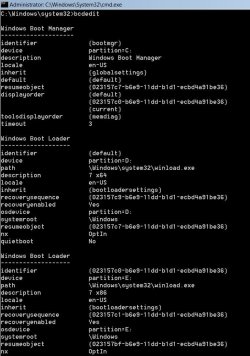
Lost Dual Boot Screen?...Lost Windows 7-a102009-02-06_031225.jpg
My System SpecsSystem Spec
08 May 2009   #6

Vista Home Premium 64-bit SP2


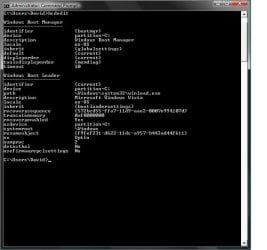
It doesnt come up like that here is the screenshot.
It seems that Windows 7 even on record anymore


Lost Dual Boot Screen?...Lost Windows 7-untitled.jpg
My System SpecsSystem Spec
08 May 2009   #7

Vista Home Premium 64-bit SP2


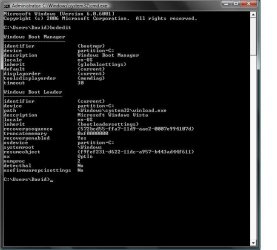
I have it right this time, sorry for running the command prompt incorrectly.
But the information still seems like Windows 7 is missing from the pc.

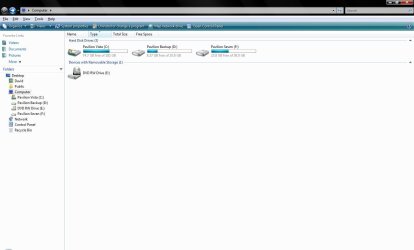
Second image is my computer drives. Pavilion Vista is Vista Home Prem., Pavilion Backup is my backup data partition, and Pavilion Seven was where I installed Windows 7 on.


Lost Dual Boot Screen?...Lost Windows 7-untitled2.jpg


Attachment 10120
Attached Thumbnails
Lost Dual Boot Screen?...Lost Windows 7-untitled.jpg  
My System SpecsSystem Spec
08 May 2009   #8

Vista x64 / 7 X64


Ok,

I was looking for a screenie for Disk Management, but it looks ok from what you posted.

Try this:

Open elevated command prompt, type: (Press enter after each command)

bcdedit /copy {current} /d "Windows 7"

It will return a long number in brackets - a GUID, or identifier.

Type that, including the brackets into the commands below

bcdedit /set {the-guid-you-got} device partition=F:

bcdedit /set {the guid-you-got} osdevice partition=F:

Reboot.
My System SpecsSystem Spec
08 May 2009   #9

64-bit Windows 7 Ultimate SP1 & Windows 8 Enterprise
Texas


Hello Blackhawk,

In addition to SIW2's post, you should also be able to run a Startup Repair from the Windows 7 installation DVD to repair the boot file.

Hope this helps,
Shawn
My System SpecsSystem Spec
08 May 2009   #10

Vista Home Premium 64-bit SP2


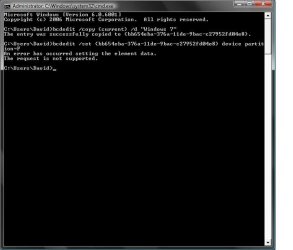
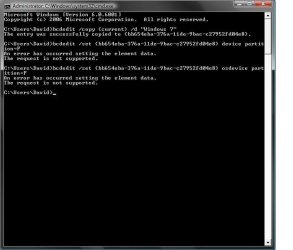
This what happened when I ran the command prompt. I rebooted, it said Windows 7 was an OS but it ran Vista instead even when i selected it. In the start-up repair do I need to make it into a DVD or can I mount it as an Image on Daemon Tools to run the repair? Do I have to run it on boot or while in Vista?
Lost Dual Boot Screen?...Lost Windows 7-untitled3.jpg
Lost Dual Boot Screen?...Lost Windows 7-untitled4.jpg
My System SpecsSystem Spec
Reply

 Lost Dual Boot Screen?...Lost Windows 7 problems?


Thread Tools


Similar help and support threads for: Lost Dual Boot Screen?...Lost Windows 7
Thread Forum
Lost access to Windows 7 Drive (Dual-Boot Windows 7 & Ubuntu) Installation & Setup
Lost boot,lost partition, lost OS. Hardware & Devices
dual boot , reinstall the windows and lost dual boot Installation & Setup
lost dual boot with vista after windows 7 install Installation & Setup
Lost Windows 7 dual boot after XP Install Installation & Setup


All times are GMT -5. The time now is 04:45 PM.


Windows 7 Forums is an independent web site and has not been authorized,
sponsored, or otherwise approved by Microsoft Corporation.
"Windows 7" and related materials are trademarks of Microsoft Corp.
© Designer Media Ltd