|
Welcome to Windows 7 Forums. Our forum is dedicated to helping you find solutions with any problems, errors or issues you are experiencing with Windows 7. The Windows 7 forum also covers news and updates and has an extensive Windows 7 tutorial section that covers a wide range of tips and tricks.
Windows 7 - Command prompt won't open |
06-26-2010
|
#1 | | |
Command prompt won't open I'm running 32 bit Windows 7, and when I run cmd.exe or click on the icon in the System32 folder nothing happens. I checked the task manager and the process is running but no window displays. Any ideas?
Thanks.
| My System Specs | | System Manufacturer/Model Number Dell Vostro 1500 OS Windows 7 32 Bit CPU Intel Core 2 Duo T5470 Memory 2 GB Graphics Card NVidia 8400M GS |
06-26-2010
|
#2 | | Vista 64 Ultimate, Windows 7 64 Ultimate, Ubuntu 9.10 |
Try this, go to Start and type cmd in the lower bottom box, when it appears in the upper window right mouse click and run as administrator, you can also make it a shortcut to cmd on the desktop or in the Taskbar set to run as admin. | My System Specs | | System Manufacturer/Model Number DELL XPS Studio 435T OS Vista 64 Ultimate, Windows 7 64 Ultimate, Ubuntu 9.10 CPU i7 975 3.3 GHz Extreme (Factory OC'd to 3.6 GHz) Motherboard DELL provided Memory 18 Gb Tri-Channel 1066 Graphics Card ATI 5970 2048 Mb Sound Card X-Fi Extreme Gamer Monitor(s) Displays Vizio 37" HD-TV Screen Resolution 1920 x 1080 Keyboard Logitech Performance K350 Wireless Mouse Logitech Performance MX Wireless PSU DELL Provided 475 watts Case DELL Cooling 3 fans Hard Drives 1.5 Tb HDD
1.5 Tb HDD
2.0 Tb Network Drive
512 Gb Crucial SSD Internet Speed 3 Mb up 750 Kb down Other Info Bamboo Fun Tablet, Belkin N+ Wireless router, Pioneer Dolby System Wireless Headphones, Bose 5.1 Dolby Surround Sound System, LifeCam VX 3000 Webcam, Blu-Ray/Hi Def DVD +RW combo and Blu-ray +RW,l 15 in 1 media card reader, Logitech Rumblepad 2, Hauppauge 2250 DTV Tuner with MS Media Center Remote
Laptop:Alienware M17x, Q9100 CPU, 8Gb RAM, 1920x1200 WUXGA LCD driven by 4870's in CrossFireX, Bl |
06-26-2010
|
#3 | | |
yeah i had tried that, but it has the same result, nothing happens. strange right? i have like 15 cmd.exe processes running in the background now according to the task manager haha | My System Specs | | System Manufacturer/Model Number Dell Vostro 1500 OS Windows 7 32 Bit CPU Intel Core 2 Duo T5470 Memory 2 GB Graphics Card NVidia 8400M GS |
06-26-2010
|
#4 | | Vista 64 Ultimate, Windows 7 64 Ultimate, Ubuntu 9.10 |
Yikes, this answer comes from another forum and has solved this issue, if you feel comfortable working in the Registry you might want to give this a go.
This problem may be also caused by the policies keys. You can use the followling method to remove the policies keys:
Remove Group Policy
================
1. Click Start, type REGEDIT in the Start Search bar and press Enter.
2. Locate the following key in the left pane:
[HKEY_LOCAL_MACHINE\Software\Policies\Microsoft]
3. Highlight “Microsoft” folder and click "Delete".
4. Repeat to delete the following keys:
[HKEY_LOCAL_MACHINE\Software\Microsoft\Windows\CurrentVersion\Policies
[HKEY_LOCAL_MACHINE\Software\Microsoft\Windows\CurrentVersion\Group Policy]
[HKEY_CURRENT_USER\Software\Policies\Microsoft]
[HKEY_CURRENT_USER\Software\Microsoft\Windows\CurrentVersion\Group Policy]
[HKEY_CURRENT_USER\Software\Microsoft\Windows\CurrentVersion\Policies
If some keys do not exist, please ignore them.
If the issue persists, you can run an in-place upgrade to repair the system.
In-place Upgrade
=============
1. Insert the Windows 7 DVD in the computer's DVD drive.
2. Click Start and choose Computer.
3. Please find the "setup.exe" file in the DVD-ROM and double click it.
4. Click Install now.
5. When we are prompted to input the product key, please click Next without inputting any key. The setup wizard will prompt and ask if you agree to install Windows Vista without the key. Please choose to confirm.
6. When you reach the "Which type of installation do you want" screen, click Upgrade to upgrade the system files of Windows 7. | My System Specs | | System Manufacturer/Model Number DELL XPS Studio 435T OS Vista 64 Ultimate, Windows 7 64 Ultimate, Ubuntu 9.10 CPU i7 975 3.3 GHz Extreme (Factory OC'd to 3.6 GHz) Motherboard DELL provided Memory 18 Gb Tri-Channel 1066 Graphics Card ATI 5970 2048 Mb Sound Card X-Fi Extreme Gamer Monitor(s) Displays Vizio 37" HD-TV Screen Resolution 1920 x 1080 Keyboard Logitech Performance K350 Wireless Mouse Logitech Performance MX Wireless PSU DELL Provided 475 watts Case DELL Cooling 3 fans Hard Drives 1.5 Tb HDD

1.5 Tb HDD
2.0 Tb Network Drive
512 Gb Crucial SSD Internet Speed 3 Mb up 750 Kb down Other Info Bamboo Fun Tablet, Belkin N+ Wireless router, Pioneer Dolby System Wireless Headphones, Bose 5.1 Dolby Surround Sound System, LifeCam VX 3000 Webcam, Blu-Ray/Hi Def DVD +RW combo and Blu-ray +RW,l 15 in 1 media card reader, Logitech Rumblepad 2, Hauppauge 2250 DTV Tuner with MS Media Center Remote
Laptop:Alienware M17x, Q9100 CPU, 8Gb RAM, 1920x1200 WUXGA LCD driven by 4870's in CrossFireX, Bl |
06-26-2010
|
#5 | | Windows 7 x64 pro/ Windows 7 x86 Pro/ XP SP3 x86 |
Run a scan with MBAM. Malwarebytes | My System Specs | | System Manufacturer/Model Number Too many to describe... OS Windows 7 x64 pro/ Windows 7 x86 Pro/ XP SP3 x86 |
06-26-2010
|
#6 | | Windows 7 Home Premium SP1, clean install, upgrade disc |
Welcome
I know that you were given the instructions in the first post, but I have seen this before, make sure you are doing this exactly. Elevated Command Prompt
The problem in the similar thread was that the OP was using the run command to ask for cmd. | My System Specs | | System Manufacturer/Model Number Dell XPS 420 OS Windows 7 Home Premium SP1, clean install, upgrade disc CPU Intel Core2 processsor Q8200(2.33Ghz 1333FSB) Quad Core Tech Motherboard Dell Memory 6 gb Graphics Card ATI Radeon 256MB HD3650 Sound Card Intergrated 7.1 Channel Audio Monitor(s) Displays Dell SP2009W 20" Keyboard Dell USB Keyboard Mouse Dell Premium Optical USB Cooling Fan Hard Drives 640 GB Serial ATA Hard drive Internet Speed DSL 2.85 |
06-26-2010
|
#7 | | Windows 7 Ultimate 64 bit |
Some thoughts:
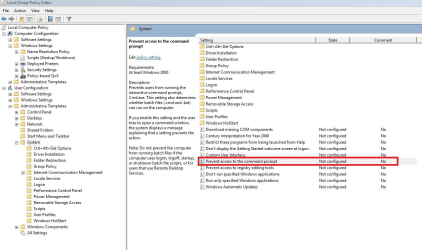
1. It's been disabled: Open GPEDIT.MSC and check that it hasn't been disabled (see attached pic) and navigate to User Config | Admin Templates | System.
2. It's off Screen: if it appears in the taskbar, hold down the shift key and right click on it, select MOVE and move it somewhere that you can see it.
3. Run it as a seperate memory process: Type CMD into SEARCH, right click on it and send it to the desktop (i.e. create a shortcut). Right click on the shortcut and select properties, On the shortcut tab select ADVANCED. On the Advanced window, tick the box "Run as Administrator", leave the separate memory space box ticked. Press Ok, OK. and try your new shortcut.
4. You have a nasty virus: Install UNHACKME, the trial installs a full version for a few days, although I recommend that you buy a copy. As a system admin, I use this in the business environment as well as at home. This will check for rootkits and other virus' which are likely to disable CMD.
Goodluck
Timo | My System Specs | | System Manufacturer/Model Number Custom Hack job OS Windows 7 Ultimate 64 bit CPU Intel(R) Core(TM)2 Quad CPU Q8200 @ 2.33GHz Motherboard GigaByte EP45-UD3 Memory 8 GB Kingston Graphics Card Nvidia GeForce 9600GT Sound Card Soundblaster Audigy Monitor(s) Displays AOC x2 22" Keyboard Microsoft Wireless Keyboard 1000 Mouse Microsoft Wireless Optical 2000 PSU Thermaltake QFan 750W Case CM Scout Gaming Cooling Coolermaster V10 Hard Drives 2 x Samsung 500GB (RAID)
2 x Samsung 2TB
1 x WD Green 2TB
1 x Seagate 1TB
1 x Samsung 500GB Internet Speed 320 Other Info Winfast PVR2000CP
LG DVD-RAM DVD/RW/DL Super Multi
Linksys WMP300Nx2 Wireless Adapter |
06-26-2010
|
#8 | | |
so I've tried all of the suggested solutions except the registry deletions but they have all yielded the same result. they all add a cmd.exe process but none display a window. the malware scan yielded a few results but none made a difference. I will do the registry deletions if there is confidence it will work and if there are no other ideas.
thanks again everyone | My System Specs | | System Manufacturer/Model Number Dell Vostro 1500 OS Windows 7 32 Bit CPU Intel Core 2 Duo T5470 Memory 2 GB Graphics Card NVidia 8400M GS |
06-26-2010
|
#9 | | Windows 7 Home Premium SP1, clean install, upgrade disc |
If you decide to go with registry
Make a system restore point first
and
Back up the registry
You mess with registry and there is no back up, its bad. | My System Specs | | System Manufacturer/Model Number Dell XPS 420 OS Windows 7 Home Premium SP1, clean install, upgrade disc CPU Intel Core2 processsor Q8200(2.33Ghz 1333FSB) Quad Core Tech Motherboard Dell Memory 6 gb Graphics Card ATI Radeon 256MB HD3650 Sound Card Intergrated 7.1 Channel Audio Monitor(s) Displays Dell SP2009W 20" Keyboard Dell USB Keyboard Mouse Dell Premium Optical USB Cooling Fan Hard Drives 640 GB Serial ATA Hard drive Internet Speed DSL 2.85 |
06-26-2010
|
#10 | | Vista and Windows7, sometimes Ubuntu and Fedora |
As an alternative, you can try to run the Windows Power Shell. You find that in All Programs > Accessories. But you have to also run it in elevated mode - easiest is to right click on it > Properties > Advanced button > tick the "Run as Admin" box > OK > Apply. Now it will always run in elevated mode. Now you can use it to execute the cmd commands. If you type in help, it will show you all the commands possible. | My System Specs | | System Manufacturer/Model Number HP, Dell, Gateway - 2 laptops and 2 desktops OS Vista and Windows7, sometimes Ubuntu and Fedora CPU from 1.6GHz Duo to 2.5GHz Quad Monitor(s) Displays 2x HP w2207 Keyboard with trackball - no mices Mouse terrible devices, who wants them Hard Drives 5x HDD, 2x SSD, 6x Externals Internet Speed DSL 6000 Command prompt won't open problems? All times are GMT -5. The time now is 05:37 AM. |  |