Windows 7 Forums Search
Welcome to Windows 7 Forums. Our forum is dedicated to helping you find solutions with any problems, errors or issues you are experiencing with Windows 7. The Windows 7 forum also covers news and updates and has an extensive Windows 7 tutorial section that covers a wide range of tips and tricks.


Windows 7 - Can't boot into safe mode

 
06-27-2010   #1


MS Windows 7 Home Premium 64-bit


Can't boot into safe mode

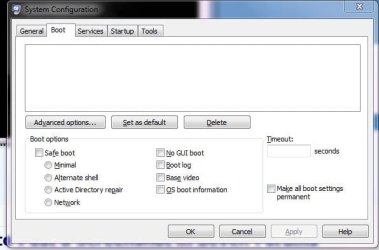
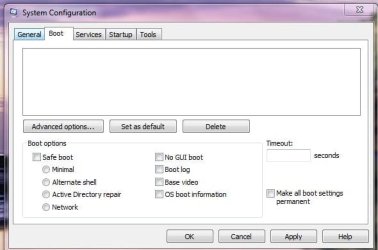
If I hit the f8 key while booting, my motherboard (Asus M4a78-EM) brings up a boot device menu. In msconfig all the safe mode boot options are not available and there is no OS listed in the box. I'm on Windows 7 Home premium. I haven't activated it yet, if that makes a difference. Any ideas?

Attached Thumbnails
Can't boot into safe mode-capture.jpg  
My System SpecsSystem Spec
06-27-2010   #2


Windows 7 Ultimate x64 SP1


Hello Cmate, and welcome to Seven Forums.

You should be able to check the Safe Boot option in your screenshot above to be able to boot into Safe Mode afterwards.
My System SpecsSystem Spec
06-27-2010   #3


MS Windows 7 Home Premium 64-bit


Quote   Quote: Originally Posted by Brink View Post
Hello Cmate, and welcome to Seven Forums.

You should be able to check the Safe Boot option in your screenshot above to be able to boot into Safe Mode afterwards.
Thanks for the quick replies, guys!

Hitting f8 on my mother board brings up a bios boot device menu.
Tried many times (before-after beep etc).


Nothing in the boot tab of msconfig is available i.e. "clickable" tried running from an elevated command prompt-no go.

I'm stumped!
Attached Thumbnails
Can't boot into safe mode-capture.jpg  
My System SpecsSystem Spec
.


06-27-2010   #4


Windows 7 Home Premium SP1, clean install, upgrade disc


Read what Brink posted,about safe boot, then look at your screen shot, its there. Read the tutorial, also.

Check safe boot.
My System SpecsSystem Spec
06-27-2010   #5


MS Windows 7 Home Premium 64-bit


Quote   Quote: Originally Posted by richc46 View Post
Read what Brink posted,about safe boot, then look at your screen shot, its there. Read the tutorial, also.

Check safe boot.
Clicking it does nothing. Everything in the box is "greyed out"

"Nothing in the boot tab of msconfig is available i.e. "clickable" tried running from an elevated command prompt-no go."
My System SpecsSystem Spec
06-27-2010   #6


What are the listings on the Boot Device Menu accessed by tapping F8 at Startup?
My System SpecsSystem Spec
06-27-2010   #7


MS Windows 7 Home Premium 64-bit


Quote   Quote: Originally Posted by gregrocker View Post
What are the listings on the Boot Device Menu accessed by tapping F8 at Startup?
optical drive
HDD
HDD
Usb device

It is a bios screen to change boot device priority. System then tries to boot to the device you choose.
My System SpecsSystem Spec
06-27-2010   #8


Hmmm. Try booting the Windows 7 HDD from the menu and then tapping F8 to see if you get Advanced Boot Options.

THe mobo should not be able to eliminate Advanced boot options accessibility by tapping F8 at bootup since its a Windows function, so try tapping F8 after you actually boot the HD on that menu.
My System SpecsSystem Spec
06-27-2010   #9


Windows 7 Pro X64 SP1


Quote   Quote: Originally Posted by Cmate View Post
If I hit the f8 key while booting, my motherboard (Asus M4a78-EM) brings up a boot device menu. In msconfig all the safe mode boot options are not available and there is no OS listed in the box. I'm on Windows 7 Home premium. I haven't activated it yet, if that makes a difference. Any ideas?
With my Asus P6T Deluxe, the same thing happens.

However, I can get into safe mode from there. Select the boot device you want (the normal boot drive will be the default), press the return key, and immediately press F8 again.

If it works for me, it doesn't require superhuman reflexes.
My System SpecsSystem Spec
06-27-2010   #10


MS Windows 7 Home Premium 64-bit


Bingo! Thanks guys, that worked.
@bobkn You weren't kidding when you said immediately...

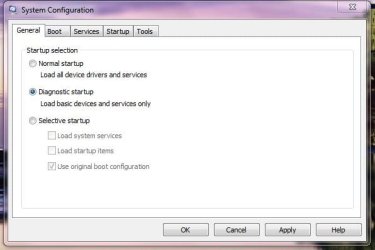
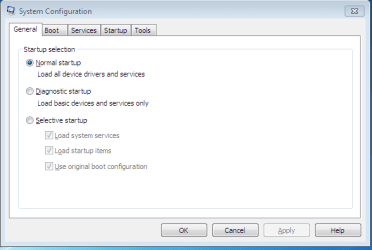
Any idea why I'm locked out of the boot tab of msconfig?

Am I correct in assuming that windows should be listed in the box of the boot tab?
Attached Thumbnails
Can't boot into safe mode-i_can_click_here.jpg   Can't boot into safe mode-i_cant_click_here.jpg  

Last edited by Cmate; 06-27-2010 at 10:25 PM.. Reason: new thought
My System SpecsSystem Spec
Reply

 Can't boot into safe mode problems?


Thread Tools


Similar Threads for: Can't boot into safe mode
Thread Forum
Windows crashed. Now can't boot, even in repair mode or safe mode. Crashes and Debugging
Solved Disk boot failure, can launch to safe mode through boot menu Crashes and Debugging
Black screen at boot with safe mode, system restore, or repair mode Backup and Restore
2+ min boot up on Win 7, even in Safe Mode (!) General Discussion
40 min boot up, even on safe mode??? Crashes and Debugging


All times are GMT -5. The time now is 05:37 AM.


Windows 7 Forums is an independent web site and has not been authorized,
sponsored, or otherwise approved by Microsoft Corporation.
"Windows 7" and related materials are trademarks of Microsoft Corp.
© Designer Media Ltd
  

1 2 3 4 5 6 7 8 9 10 11 12 13 14 15 16 17 18 19 20 21 22 23 24 25 26 27 28 29 30