
Windows 7 Forums Search
Welcome to Windows 7 Forums. Our forum is dedicated to helping you find solutions with any problems, errors or issues you are experiencing with Windows 7. The Windows 7 forum also covers news and updates and has an extensive Windows 7 tutorial section that covers a wide range of tips and tricks.


Windows 7 - 320 GB Drive missing its 100 GB D: Partition

 
06-30-2010   #1


Windows 7 Ultimate 64bit


320 GB Drive missing its 100 GB D: Partition

Hi all.
I need some help please.
All was fine yesterday.
When I fired up my computer this morning I found that my 100 GB D: partition has vanished
I took a look and the D: drive is now unallocated
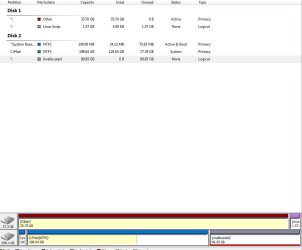
320 GB Drive missing its 100 GB D: Partition-capture.jpg

Please is there a way to restore my D: drive.
I use it as a back up and have lots of family pictures on it.
Please help!!

> Mainboard : Gigabyte EP43-UD3L
> Chipset : Intel P45/P43
> Processor : Intel Core 2 Duo E8400 @ 3000 MHz
> Physical Memory : 4096 MB (4 x 1024 DDR2-SDRAM )
> Video Card : NVIDIA GeForce GTX 260
> Hard Disk : ST3320620AS (320 GB)
> DVD-Rom Drive : Optiarc DVD RW AD-7200S ATA Device
> Operating System : Windows 7 Ultimate Professional 6.01.7600 (x64)
> DirectX : Version 11.00
> Windows Performance Index : 5.8 on 7.9

My System SpecsSystem Spec
06-30-2010   #2


ME/XP/Vista/Win7


My System SpecsSystem Spec
06-30-2010   #3


Windows 7 Ultimate 64bit


Thanks
I'll give it a try theog.
There is a lot of files I need of that drive all my tunes I wrote with music creator... oh man feel sick.
There has to be a way to undo whatever has been done.
My System SpecsSystem Spec
.


06-30-2010   #4


Windows 7 Enterprise 64-bit


Whatever you do, don't try and format it. I know the advice is pretty obvious, but people do stupid things when they're desperate.
My System SpecsSystem Spec
06-30-2010   #5


Windows 7 Ultimate 64bit


I hear ya Product FRED.
My System SpecsSystem Spec
06-30-2010   #6


Windows 7 Ultimate 64bit


Running a boot scan and chain smoking.
My System SpecsSystem Spec
06-30-2010   #7


Windows 7 Enterprise 64-bit


Try seeing if you can browse it using this: Backup and Restore to Bare Metal with Easy Open Source GPL Redo Backup Solution

If you have space, you can also use that to do a full system image (bare-metal) and experiment with fixes. It also has Firefox and a ton of tools built in so you can browse the forums while you try things.
My System SpecsSystem Spec
06-30-2010   #8


Windows 7 Ultimate 64bit


Will check out after scandisk is done.
Thanks Product FRED
My System SpecsSystem Spec
06-30-2010   #9


Vista x64 / 7 X64


Did you try the partition recovery in Partition Wizard?

Click the Disk at the top of PW window.

select partition recovery, do a quick scan of the drive, tick ALL the partitions you wan t to keep, click Apply.
My System SpecsSystem Spec
06-30-2010   #10


Windows 7 Ultimate 64bit


SIW2 that was the fix thank you so much.
I owe you a beer buddy.
Thanks to all that helped.

still what happened so I or others don't make the same mistake.
like I said it was fine last night then this morn,,, well it's fixed.
thanks again.
My System SpecsSystem Spec
Reply

 320 GB Drive missing its 100 GB D: Partition problems?


Thread Tools


Similar Threads for: 320 GB Drive missing its 100 GB D: Partition
Thread Forum
Missing Partition and Unallocated Space (Can't Create New Partition) General Discussion
Missing Partition Installation & Setup
Internal Hard Drive Logical Partition now missing... Hardware & Devices
Missing boot menu and missing data partition Installation & Setup
Missing a drive partition General Discussion


All times are GMT -5. The time now is 05:38 AM.


Windows 7 Forums is an independent web site and has not been authorized,
sponsored, or otherwise approved by Microsoft Corporation.
"Windows 7" and related materials are trademarks of Microsoft Corp.
© Designer Media Ltd
  

1 2 3 4 5 6 7 8 9 10 11 12 13 14 15 16 17 18 19 20 21 22 23 24 25 26 27 28 29 30