| Windows 7: Hidden icons in taskbar help |
10 Jul 2010
|
#1 | | Windows 7 Home Premium South Molton, Devon. UK |
Hidden icons in taskbar help Hi All,
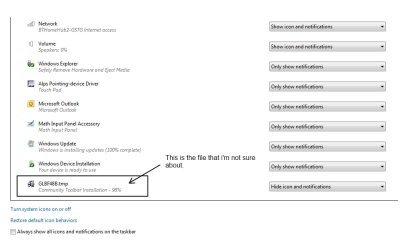
I've just bought Windows 7 Home Premium & Office 2010 and installed both onto my laptop but I have noticed if you click the show hidden icons and then customize there is something in there called GLBF48B.tmp (Community toolbar installation - 98%)
Does anyone now what this might be??
Other than Office i've installed Paint.net, CCleaner, Firefox 4 Beta, Avast Free & Zone Alarm Free.
Thank you in advance,
Steve | My System Specs |
| OS Windows 7 Home Premium |
10 Jul 2010
|
#2 | | Windows 7 Home Premium x64 New Zealand |
Could you please be a bit clearer in what you are saying? I don't quite understand. Is what you're trying to say that you have an icon on your taskbar called GLBF48B.tmp? Why don't you try right click delete. Also could you provide a screenshot. | My System Specs | | System Manufacturer/Model Number Toshiba OS Windows 7 Home Premium x64 CPU Celeron Other Info I will Fill in my Specs soon |
10 Jul 2010
|
#3 | | Vista 64 Ultimate, Windows 7 64 Ultimate, Ubuntu 9.10 S. ME and W. ME |
It's obviously a temporary file with the .tmp association and doubt you need it in the Taskbar, personally I'd right mouse click on it to unpin it then do a search in Computer to find where it is, if it is in a temporary folder I'd delete it. | My System Specs | | System Manufacturer/Model Number DELL XPS Studio 435T OS Vista 64 Ultimate, Windows 7 64 Ultimate, Ubuntu 9.10 CPU i7 975 3.3 GHz Extreme (Factory OC'd to 3.6 GHz) Motherboard DELL provided Memory 18 Gb Tri-Channel 1066 Graphics Card ATI 5970 2048 Mb Sound Card X-Fi Extreme Gamer Monitor(s) Displays Vizio 37" HD-TV Screen Resolution 1920 x 1080 Keyboard Logitech Performance K350 Wireless Mouse Logitech Performance MX Wireless PSU DELL Provided 475 watts Case DELL Cooling 3 fans Hard Drives 1.5 Tb HDD
1.5 Tb HDD
2.0 Tb Network Drive
512 Gb Crucial SSD Internet Speed 3 Mb up 750 Kb down Other Info Bamboo Fun Tablet, Belkin N+ Wireless router, Pioneer Dolby System Wireless Headphones, Bose 5.1 Dolby Surround Sound System, LifeCam VX 3000 Webcam, Blu-Ray/Hi Def DVD +RW combo and Blu-ray +RW,l 15 in 1 media card reader, Logitech Rumblepad 2, Hauppauge 2250 DTV Tuner with MS Media Center Remote
Laptop:Alienware M17x, Q9100 CPU, 8Gb RAM, 1920x1200 WUXGA LCD driven by 4870's in CrossFireX, Bl |
10 Jul 2010
|
#4 | | Windows 7 Home Premium x64 New Zealand |
Thanks for clarifying that. Must have accidentally dragged the temp file onto the Taskbar, am I right? | My System Specs | | System Manufacturer/Model Number Toshiba OS Windows 7 Home Premium x64 CPU Celeron Other Info I will Fill in my Specs soon |
10 Jul 2010
|
#5 | | Vista 64 Ultimate, Windows 7 64 Ultimate, Ubuntu 9.10 S. ME and W. ME |

Quote: Originally Posted by Fastboy42 Thanks for clarifying that. Must have accidentally dragged the temp file onto the Taskbar, am I right? That's my guess, a lot of programs will leave an icon of the Temp Download on the desktop that will disappear once the programs real Icon is placed there, the OP either did not see the .tmp extension in the Properties or the Icon he wanted and dragged it there, I cant think of an instance where an Icon placed itself in the Taskbar without asking if that was what you wanted. | My System Specs | | System Manufacturer/Model Number DELL XPS Studio 435T OS Vista 64 Ultimate, Windows 7 64 Ultimate, Ubuntu 9.10 CPU i7 975 3.3 GHz Extreme (Factory OC'd to 3.6 GHz) Motherboard DELL provided Memory 18 Gb Tri-Channel 1066 Graphics Card ATI 5970 2048 Mb Sound Card X-Fi Extreme Gamer Monitor(s) Displays Vizio 37" HD-TV Screen Resolution 1920 x 1080 Keyboard Logitech Performance K350 Wireless Mouse Logitech Performance MX Wireless PSU DELL Provided 475 watts Case DELL Cooling 3 fans Hard Drives 1.5 Tb HDD
1.5 Tb HDD
2.0 Tb Network Drive
512 Gb Crucial SSD Internet Speed 3 Mb up 750 Kb down Other Info Bamboo Fun Tablet, Belkin N+ Wireless router, Pioneer Dolby System Wireless Headphones, Bose 5.1 Dolby Surround Sound System, LifeCam VX 3000 Webcam, Blu-Ray/Hi Def DVD +RW combo and Blu-ray +RW,l 15 in 1 media card reader, Logitech Rumblepad 2, Hauppauge 2250 DTV Tuner with MS Media Center Remote
Laptop:Alienware M17x, Q9100 CPU, 8Gb RAM, 1920x1200 WUXGA LCD driven by 4870's in CrossFireX, Bl |
10 Jul 2010
|
#6 | | Windows 7 Home Premium x64 New Zealand |

Quote: Originally Posted by fishnbanjo 
Quote: Originally Posted by Fastboy42 Thanks for clarifying that. Must have accidentally dragged the temp file onto the Taskbar, am I right? That's my guess, a lot of programs will leave an icon of the Temp Download on the desktop that will disappear once the programs real Icon is placed there, the OP either did not see the .tmp extension in the Properties or the Icon he wanted and dragged it there, I cant think of an instance where an Icon placed itself in the Taskbar without asking if that was what you wanted. Pretty easy to drag it there without noticing though. I do it all the time. | My System Specs | | System Manufacturer/Model Number Toshiba OS Windows 7 Home Premium x64 CPU Celeron Other Info I will Fill in my Specs soon |
10 Jul 2010
|
#7 | | Vista 64 Ultimate, Windows 7 64 Ultimate, Ubuntu 9.10 S. ME and W. ME |

Quote: Originally Posted by Fastboy42 
Quote: Originally Posted by fishnbanjo 
Quote: Originally Posted by Fastboy42 Thanks for clarifying that. Must have accidentally dragged the temp file onto the Taskbar, am I right? That's my guess, a lot of programs will leave an icon of the Temp Download on the desktop that will disappear once the programs real Icon is placed there, the OP either did not see the .tmp extension in the Properties or the Icon he wanted and dragged it there, I cant think of an instance where an Icon placed itself in the Taskbar without asking if that was what you wanted. Pretty easy to drag it there without noticing though. I do it all the time.  Yes, like your new Avatar too! | My System Specs | | System Manufacturer/Model Number DELL XPS Studio 435T OS Vista 64 Ultimate, Windows 7 64 Ultimate, Ubuntu 9.10 CPU i7 975 3.3 GHz Extreme (Factory OC'd to 3.6 GHz) Motherboard DELL provided Memory 18 Gb Tri-Channel 1066 Graphics Card ATI 5970 2048 Mb Sound Card X-Fi Extreme Gamer Monitor(s) Displays Vizio 37" HD-TV Screen Resolution 1920 x 1080 Keyboard Logitech Performance K350 Wireless Mouse Logitech Performance MX Wireless PSU DELL Provided 475 watts Case DELL Cooling 3 fans Hard Drives 1.5 Tb HDD
1.5 Tb HDD
2.0 Tb Network Drive
512 Gb Crucial SSD Internet Speed 3 Mb up 750 Kb down Other Info Bamboo Fun Tablet, Belkin N+ Wireless router, Pioneer Dolby System Wireless Headphones, Bose 5.1 Dolby Surround Sound System, LifeCam VX 3000 Webcam, Blu-Ray/Hi Def DVD +RW combo and Blu-ray +RW,l 15 in 1 media card reader, Logitech Rumblepad 2, Hauppauge 2250 DTV Tuner with MS Media Center Remote
Laptop:Alienware M17x, Q9100 CPU, 8Gb RAM, 1920x1200 WUXGA LCD driven by 4870's in CrossFireX, Bl |
11 Jul 2010
|
#8 | | Windows 7 Home Premium South Molton, Devon. UK |

Quote: Originally Posted by Fastboy42 Could you please be a bit clearer in what you are saying? I don't quite understand. Is what you're trying to say that you have an icon on your taskbar called GLBF48B.tmp? Why don't you try right click delete. Also could you provide a screenshot. Here is a screenshot for you. | My System Specs | | OS Windows 7 Home Premium |
11 Jul 2010
|
#9 | | Windows 7 Home Premium x64 New Zealand |
ahh. Ok. Try going: CTRL + ALT + DEL >> Task Manager >> Processes
Then look for anything that would relate to "Community Toolbar" and then Endtask.
Hopefully that fixes it.
Also recommend running a virus and Mal ware scan, something's running in the background. | My System Specs | | System Manufacturer/Model Number Toshiba OS Windows 7 Home Premium x64 CPU Celeron Other Info I will Fill in my Specs soon Hidden icons in taskbar help problems? All times are GMT -5. The time now is 11:13 PM. | |