Can't Boot Windows with ANY Rescue CD!

technomann

New member
Suddenly and for no apparent reason, I cannot boot into my Windows 7 PC. I am running Windows 7 Home Premium 64-bit dual boot with Linux Ubuntu. On boot up most of the time I cannot even get to the GRUB boot loader. I just get a blank screen, sometimes a blinking cursor up in the left corner. I cannot boot from the Windows 7 install DVD. It starts to load windows files then freezes. I have downloaded and burned about half a dozen "Rescue CD" iso images, from AVG to Avir to Norton to Paragon Rescue Kit, etc., etc. -- all to no avail! Either they won't boot at all or they freeze during the process. I even created a couple of bootable rescue USB flash drives. Nothing works!!! Once or twice I managed to actually start a virus scan with the AVG Rescue disk, but then the scan aborted before it could even get going. It's like something keeps killing the scan. I can't even get into my BIOS! It just freezes when I hit the F10 key. What the heck is going on and how can I fix this? Is this some really nasty boot sector virus or perhaps a hardware failure? I just replaced the HDD a few weeks ago, so I don't think it could be that. Any and all ideas GREATLY appreciated!
 

My Computer

OS
Windows 7 64-bit
Suddenly and for no apparent reason, I cannot boot into my Windows 7 PC. I am running Windows 7 Home Premium 64-bit dual boot with Linux Ubuntu. On boot up most of the time I cannot even get to the GRUB boot loader. I just get a blank screen, sometimes a blinking cursor up in the left corner. I cannot boot from the Windows 7 install DVD. It starts to load windows files then freezes. I have downloaded and burned about half a dozen "Rescue CD" iso images, from AVG to Avir to Norton to Paragon Rescue Kit, etc., etc. -- all to no avail! Either they won't boot at all or they freeze during the process. I even created a couple of bootable rescue USB flash drives. Nothing works!!! Once or twice I managed to actually start a virus scan with the AVG Rescue disk, but then the scan aborted before it could even get going. It's like something keeps killing the scan. I can't even get into my BIOS! It just freezes when I hit the F10 key. What the heck is going on and how can I fix this? Is this some really nasty boot sector virus or perhaps a hardware failure? I just replaced the HDD a few weeks ago, so I don't think it could be that. Any and all ideas GREATLY appreciated!

Could be a virus, hardware, or software. Does it POST? do you see your boot screen or does it go directly to the black screen?

Ken
 

My Computer

Computer Manufacturer/Model Number
HP Pavillion dv-7 1005 Tx
OS
Win 8 Release candidate 8400
CPU
[email protected]
Memory
4 gigs
Graphics Card(s)
Nvidia 9600M
Sound Card
HD built-in
Monitor(s) Displays
17" Wxga
Screen Resolution
1440x900
Cooling
none
Internet Speed
45Mb down 5Mb up
Suddenly and for no apparent reason, I cannot boot into my Windows 7 PC. I am running Windows 7 Home Premium 64-bit dual boot with Linux Ubuntu. On boot up most of the time I cannot even get to the GRUB boot loader. I just get a blank screen, sometimes a blinking cursor up in the left corner. I cannot boot from the Windows 7 install DVD. It starts to load windows files then freezes. I have downloaded and burned about half a dozen "Rescue CD" iso images, from AVG to Avir to Norton to Paragon Rescue Kit, etc., etc. -- all to no avail! Either they won't boot at all or they freeze during the process. I even created a couple of bootable rescue USB flash drives. Nothing works!!! Once or twice I managed to actually start a virus scan with the AVG Rescue disk, but then the scan aborted before it could even get going. It's like something keeps killing the scan. I can't even get into my BIOS! It just freezes when I hit the F10 key. What the heck is going on and how can I fix this? Is this some really nasty boot sector virus or perhaps a hardware failure? I just replaced the HDD a few weeks ago, so I don't think it could be that. Any and all ideas GREATLY appreciated!

Could be a virus, hardware, or software. Does it POST? do you see your boot screen or does it go directly to the black screen?

Ken

Once in a while I'll get to the GRUB boot screen. I can select either Ubuntu or Windows 7, but then it won't boot into either OS. It will start to but then freeze. On boot I'll see the <Hit escp key for Start Menu> message at the bottom left, but then it will go to a blank screen. And sometimes I can get to a rescue CD interface, but again a freeze or sudden scan abort.
 

My Computer

OS
Windows 7 64-bit
Open up the case and see if you need to clean out the dust bunnies. While you have the side off i would re-seat your RAM modules and any add-in cards like Video cards etc. Then try powering up again, make sure all the fans are working especially the CPU fan. If it still won't boot up I would try to boot up with the bar minimum of components, Motherboard, CPU with heat sink, video card and 1 stick or RAM. If the motherboard has onboard video use that. If it won't post then you have pretty well guarantied its a hardware problem. If it does post and you can get into the BIOS, then connect your hardware back up one item at a time until the problem comes back. The last item you connected is likely the culprit. If you can get it to reliably post then you can run some diagnostics on your Hard drive and RAM to rule them out.
 

My Computer

Computer type
PC/Desktop
Computer Manufacturer/Model Number
Home Built
OS
Windows 10 Education 64 bit
CPU
AMD Phenom II X4 980 Black Edition Deneb 3.7GHz
Motherboard
Asus M4N68T-M V2 µATX Motherboard
Memory
8GB 4GBx2 Kingston PC10600 DDR3 1333 Memory
Graphics Card(s)
Zotac NVIDIA Geforce GT640 2 Gig DDR3 PCIe
Sound Card
VIA VT1708s High Definition Audio 8-channel Onboard
Monitor(s) Displays
22" LG E2242 1080p and 2 19" I-INC AG191D
Screen Resolution
1280x1024 - 1920x1080 - 1280x1024
Hard Drives
Crucial M100 256 GB SSD and 500 GB WD Blue SATA
PSU
Thermaltake TR 620
Case
Power Up Black ATX Mid-Tower Case
Cooling
Stock heatsink and fan
Keyboard
Logitech Wireless K350 Wave
Mouse
Logitech Wireless M570 Trackman Wheel
Internet Speed
80 Mbps Down 30 Mbps Up
Antivirus
Windows Defender
Browser
Internet Explorer 11
Other Info
HP DVD1040e Lightscribe - External USB2
In addition to the suggestions above, consider resetting the bios using jumpers on your motherboard and removing and reinstalling the battery on your motherboard. You could have a corrupted bios.
 

My Computer

Computer Manufacturer/Model Number
Homemade
OS
Win 7 64 bit professional
CPU
CPU: 3930K @ 4.8 MHz Stable as a rock
Motherboard
ASUS Rampage IV Extreme LGA 2011
Memory
CORSAIR DOMINATOR GT 16GB (4 x 4GB) 240-Pin DDR3
Graphics Card(s)
EVGA SuperClocked+ GeForce GTX 680
Monitor(s) Displays
Dell 3007WFP
Screen Resolution
2560 x 1600
Hard Drives
Vector(256gb) x 2
RevoDrive 3 X2 space (240 GB)
Crucial C300 256 GB SSD
PSU
CORSAIR AX1200i 1200W Digital ATX12V v2.31 and EPS 2.92 SLI
Cooling
Water cooling EK Supremacy ELITE
Mouse
ratZ-7
Other Info
WEI-7.8
Open up the case and see if you need to clean out the dust bunnies. While you have the side off i would re-seat your RAM modules and any add-in cards like Video cards etc. Then try powering up again, make sure all the fans are working especially the CPU fan. If it still won't boot up I would try to boot up with the bar minimum of components, Motherboard, CPU with heat sink, video card and 1 stick or RAM. If the motherboard has onboard video use that. If it won't post then you have pretty well guarantied its a hardware problem. If it does post and you can get into the BIOS, then connect your hardware back up one item at a time until the problem comes back. The last item you connected is likely the culprit. If you can get it to reliably post then you can run some diagnostics on your Hard drive and RAM to rule them out.

I neglected to mention that the afflicted machine is an HP Pavilion LAPTOP. I removed the bottom cover and there were no dust bunnies. The only hardware I could easily get to were the HDDs and the memory sticks. I re-seated the memory, and then removed the primary HDD from the laptop. I hooked up this 2.5 SATA drive to my desktop PC via USB, and ran my virus scanner and malware scanner over the entire contents of the drive from the Win 7 desktop PC, but no boot sector virus was evident.

In the mean time, I had a cloned backup of the 2.5 SATA, whick I installed in the HP Laptop. I tried to boot with that, but nothing, nada, not even a POST now. All I get are lights around the periphery of the keyboard blinking 4 times in succession, over and over. I suppose this is code for some hardware error or other?
 

My Computer

OS
Windows 7 64-bit
No POST is a hardware fault. Laptops are a pain to work on. As you've discovered there isn't much you can swap out for testing. Try taking the battery out and running it just on the power pack. The flashing lights may be the equivalent of a BIOS beep code. If you poke around the HP site you might find some info as to what they mean. If you use the right search term Google might offer up some info too. How old is it? If it's really old the CMOS battery may have died or shorted out. It could be a real pain to get to and replace though. I worked on a Dell laptop and there was a trick to getting it apart without breaking something. Lots of little screws of different lengths, so you really had to keep track of where they came out. I striped it down 2 or 3 times but never did get it working again. :(
 

My Computer

Computer type
PC/Desktop
Computer Manufacturer/Model Number
Home Built
OS
Windows 10 Education 64 bit
CPU
AMD Phenom II X4 980 Black Edition Deneb 3.7GHz
Motherboard
Asus M4N68T-M V2 µATX Motherboard
Memory
8GB 4GBx2 Kingston PC10600 DDR3 1333 Memory
Graphics Card(s)
Zotac NVIDIA Geforce GT640 2 Gig DDR3 PCIe
Sound Card
VIA VT1708s High Definition Audio 8-channel Onboard
Monitor(s) Displays
22" LG E2242 1080p and 2 19" I-INC AG191D
Screen Resolution
1280x1024 - 1920x1080 - 1280x1024
Hard Drives
Crucial M100 256 GB SSD and 500 GB WD Blue SATA
PSU
Thermaltake TR 620
Case
Power Up Black ATX Mid-Tower Case
Cooling
Stock heatsink and fan
Keyboard
Logitech Wireless K350 Wave
Mouse
Logitech Wireless M570 Trackman Wheel
Internet Speed
80 Mbps Down 30 Mbps Up
Antivirus
Windows Defender
Browser
Internet Explorer 11
Other Info
HP DVD1040e Lightscribe - External USB2
Look carefully on the motherboard for blown capacitors (rounded/fat on the silver top that should be flat). HPs are notorious for this.
 

My Computer

Computer Manufacturer/Model Number
Custom
OS
Windows 7 Ultimate RTM (Technet)
CPU
3.00 gigahertz Intel Core2 Duo E8400
Motherboard
ASUSTeK Computer INC. P5K/EPU Rev 1.xx
Memory
4GB
Graphics Card(s)
ATI Radeon X1950 Pro
Sound Card
Built in HD Audio
Monitor(s) Displays
22" Gateway LCD
Screen Resolution
1920 x 1200
Hard Drives
ST3160023A [Hard drive] (160.04 GB) -- drive 0, rev 8.01, ST3500630AS [Hard drive] (500.11 GB) -- drive 2, rev 3.AAK
ST3500630AS [Hard drive] (500.11 GB) -- drive 1, rev 3.AAK
Keyboard
Logitech G11
Mouse
Microsoft Wireless Laser Mouse 5000
Internet Speed
13.44 Mbps
hmm, did you try to flash your bios earlier? sounds like a corupted bios? also does your laptop have a hardware intrusion / bios lock. if so you will probably have to reset it, this sounds more logical becouse it stoped posting after you opened it.
 

My Computer

Computer type
PC/Desktop
Computer Manufacturer/Model Number
HP Pavilion g7-1350dx
OS
Windows 7 Ultimate SP1 x64
CPU
AMD A6-3420M APU
Memory
4.0 Gb DDR3 838 MHz
Graphics Card(s)
AMD Radeon HD 6520G
Sound Card
IDT HD Audio
Screen Resolution
1600x 900
Hard Drives
500GB Hitachi HTS547550A9E384
Take yourself a can of compressed air.

Blow out the vents around sides and bottom of case.

When you get a chance be sure to visit the HP site. HP has improved the usefulness of their site considerably.
 

My Computer

Computer Manufacturer/Model Number
Toshiba Satellite S875D-S7239 laptop
OS
MS Windows 7 Ultimate SP1 64-bit
CPU
AMD A10-4600M
Motherboard
AMD Pumori (Socket FT1)
Memory
6.00 GB Dual-Channel DDR3 @ 798MHz (11-11-12-28)
Graphics Card(s)
AMD Radeon HD 7660G
Sound Card
High Definition Audio Device
Monitor(s) Displays
Generic PnP Monitor (1600x900@60Hz)
Screen Resolution
1600x900@60Hz
Hard Drives
SSD 119GB Corsair CSSD-V128GB2 ATA Device
Keyboard
Standard PS/2 Keyboard
Mouse
HP Wireless Optical Mobile Mouse Model FHA-3410
Internet Speed
What the local pub, local coffee shop offers.
Other Info
Optical Drive:MATSHITA BD-CMB UJ160B ATA Device


Also have an Asus ha1002xp netbook with Win 7 Ultimate installed.
No POST is a hardware fault. Laptops are a pain to work on. As you've discovered there isn't much you can swap out for testing. Try taking the battery out and running it just on the power pack. The flashing lights may be the equivalent of a BIOS beep code. If you poke around the HP site you might find some info as to what they mean. If you use the right search term Google might offer up some info too. How old is it? If it's really old the CMOS battery may have died or shorted out. It could be a real pain to get to and replace though. I worked on a Dell laptop and there was a trick to getting it apart without breaking something. Lots of little screws of different lengths, so you really had to keep track of where they came out. I striped it down 2 or 3 times but never did get it working again. :(

I checked HP's website and the 4 flashing LEDs are indeed a code-- for a problem with the integrated graphics controller. Great. I read the following review on TigerDirect for my particular HP Pavilion:

"These computers have a defective motherboard video card that blow up about a year into their lives. For that matter, research all HP computers and take a pass if you find anything remotely negaitve. There are a lot of $700 HP brand paperweights out there now."

This is the 2nd HP laptop that I have owned that has CRAPPED out on me. Guess it is time to switch brands. Ideas/preferences as to best laptop on the market right now? Anyone?
 

My Computer

OS
Windows 7 64-bit
Toshiba
 

My Computer

Computer Manufacturer/Model Number
Toshiba Satellite S875D-S7239 laptop
OS
MS Windows 7 Ultimate SP1 64-bit
CPU
AMD A10-4600M
Motherboard
AMD Pumori (Socket FT1)
Memory
6.00 GB Dual-Channel DDR3 @ 798MHz (11-11-12-28)
Graphics Card(s)
AMD Radeon HD 7660G
Sound Card
High Definition Audio Device
Monitor(s) Displays
Generic PnP Monitor (1600x900@60Hz)
Screen Resolution
1600x900@60Hz
Hard Drives
SSD 119GB Corsair CSSD-V128GB2 ATA Device
Keyboard
Standard PS/2 Keyboard
Mouse
HP Wireless Optical Mobile Mouse Model FHA-3410
Internet Speed
What the local pub, local coffee shop offers.
Other Info
Optical Drive:MATSHITA BD-CMB UJ160B ATA Device


Also have an Asus ha1002xp netbook with Win 7 Ultimate installed.
hmm. ive had alot of broblems with both brands mentioned, but those were older laptops, have they improved lately?
 

My Computer

Computer type
PC/Desktop
Computer Manufacturer/Model Number
HP Pavilion g7-1350dx
OS
Windows 7 Ultimate SP1 x64
CPU
AMD A6-3420M APU
Memory
4.0 Gb DDR3 838 MHz
Graphics Card(s)
AMD Radeon HD 6520G
Sound Card
IDT HD Audio
Screen Resolution
1600x 900
Hard Drives
500GB Hitachi HTS547550A9E384
Yes,

Also Lenova is to be recommended.
 

My Computer

Computer Manufacturer/Model Number
Toshiba Satellite S875D-S7239 laptop
OS
MS Windows 7 Ultimate SP1 64-bit
CPU
AMD A10-4600M
Motherboard
AMD Pumori (Socket FT1)
Memory
6.00 GB Dual-Channel DDR3 @ 798MHz (11-11-12-28)
Graphics Card(s)
AMD Radeon HD 7660G
Sound Card
High Definition Audio Device
Monitor(s) Displays
Generic PnP Monitor (1600x900@60Hz)
Screen Resolution
1600x900@60Hz
Hard Drives
SSD 119GB Corsair CSSD-V128GB2 ATA Device
Keyboard
Standard PS/2 Keyboard
Mouse
HP Wireless Optical Mobile Mouse Model FHA-3410
Internet Speed
What the local pub, local coffee shop offers.
Other Info
Optical Drive:MATSHITA BD-CMB UJ160B ATA Device


Also have an Asus ha1002xp netbook with Win 7 Ultimate installed.
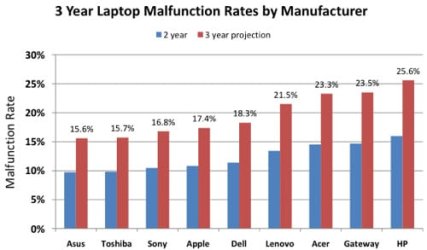
Laptop Reliability Chart

500x_squaretrade_laptop_reliability_1109.pdf__page_6_of_8_.jpg

Looking at the first 3 years of ownership, 31% of laptop owners reported a failure to SquareTrade. Two-thirds of this failure (20.4%) came from hardware malfunctions, and one-third (10.6%) was reported as accidental damage.

Netbooks are projected to have a 20% higher failure rate from hardware malfunctions than more expensive laptop computers.

ASUS and Toshiba were the most reliable manufacturers, with fewer than 16% having a hardware malfunction over 3 years.

PDF

A Guy
 

My Computer

Computer type
PC/Desktop
OS
Windows 10 Home x64
CPU
INTEL Core i5-750 Quad-Core 3.37GHz
Motherboard
ASUS P7P55D
Memory
HyperX Fury Black Series 8GB (2 x 4GB) 1866Mhz
Graphics Card(s)
EVGA GeForce GTX 750 Superclocked 1GB 128-Bit GDDR5
Monitor(s) Displays
LG 32MA68HY 32" IPS
Screen Resolution
1920 x 1080
Hard Drives
Samsung 840 Evo 120GB, SEAGATE 500GB Barracuda® 7200.12, SATA 3 Gb/s, 7200 RPM, 16MB cache
PSU
ANTEC TruePower New TP-550, 80 PLUS, 550W
Case
ANTEC Three Hundred Illusion
Cooling
COOLER MASTER Hyper 212 Plus, 4 x 120mm 1 x 140mm Noctua's
Internet Speed
85 + Mbps
Antivirus
Avast
Browser
Vivaldi
Laptop Reliability Chart

View attachment 87259

Looking at the first 3 years of ownership, 31% of laptop owners reported a failure to SquareTrade. Two-thirds of this failure (20.4%) came from hardware malfunctions, and one-third (10.6%) was reported as accidental damage.

Netbooks are projected to have a 20% higher failure rate from hardware malfunctions than more expensive laptop computers.

ASUS and Toshiba were the most reliable manufacturers, with fewer than 16% having a hardware malfunction over 3 years.

PDF

A Guy

Looks like Fujitsu's are below 10%.
 

My Computer

OS
ME/XP/Vista/Win7
theog,

How did you come to Fujitsu being less than 10%.
 

My Computer

Computer Manufacturer/Model Number
Toshiba Satellite S875D-S7239 laptop
OS
MS Windows 7 Ultimate SP1 64-bit
CPU
AMD A10-4600M
Motherboard
AMD Pumori (Socket FT1)
Memory
6.00 GB Dual-Channel DDR3 @ 798MHz (11-11-12-28)
Graphics Card(s)
AMD Radeon HD 7660G
Sound Card
High Definition Audio Device
Monitor(s) Displays
Generic PnP Monitor (1600x900@60Hz)
Screen Resolution
1600x900@60Hz
Hard Drives
SSD 119GB Corsair CSSD-V128GB2 ATA Device
Keyboard
Standard PS/2 Keyboard
Mouse
HP Wireless Optical Mobile Mouse Model FHA-3410
Internet Speed
What the local pub, local coffee shop offers.
Other Info
Optical Drive:MATSHITA BD-CMB UJ160B ATA Device


Also have an Asus ha1002xp netbook with Win 7 Ultimate installed.
Back
Top