Windows 7 Forums Search
Welcome to Windows 7 Forums. Our forum is dedicated to helping you find solutions with any problems, errors or issues you are experiencing with Windows 7. The Windows 7 forum also covers news and updates and has an extensive Windows 7 tutorial section that covers a wide range of tips and tricks.


Windows 7 - how to be able to see the active Window in the Taskbar

 
07-24-2010   #1


Windows 7


how to be able to see the active Window in the Taskbar

Ever since i went to Window7, i can't tell which window is active when i glance at the task bar. All of the window icons are clear, which makes it almost impossible to tell which one is active.

Does anyone know how i can change the settings or something so that i can tell which window is active. Thanks for any suggestions.

My System SpecsSystem Spec
07-24-2010   #2


Windows 7 Ultimate x64 SP1


Hello Popwindow, and welcome to Seven Forums.

The icon that is more frosted over than the others will be the active window.

how to be able to see the active Window in the Taskbar-active.jpg

Hope this helps,
Shawn
My System SpecsSystem Spec
07-26-2010   #3


Windows 7


This does not work for me. I can barely tell which one is more frosted over. Can someone tell me how to change my settings so i can tell.
My System SpecsSystem Spec
.


07-26-2010   #4


Windows 7 Ultimate, Ubuntu 10.04 LTS - the Lucid Lynx


Hello,

This article might help you The taskbar (overview) Also swtich to the default theme and see if that makes any difference.

- Captain
My System SpecsSystem Spec
07-26-2010   #5


Windows 7 Ultimate x64 SP1


Popwindow,

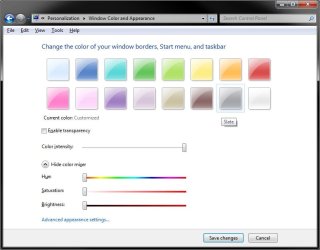
In addition to the title bar being dark for a open active window instead of faded, you could also try changing the color and color intensity of the taskbar to see if it helps the more frosted over icon stand out better. However, this will also change all window borders color as well. See steps 5 abd 6 in the tutorial below for more on this.

Window Color and Appearance - Change

You might try the settings I use. The most frosted icon on the taskbar stands out quite clearly for me with it.

how to be able to see the active Window in the Taskbar-color.jpg

Hope this helps,
Shawn
My System SpecsSystem Spec
Reply

 how to be able to see the active Window in the Taskbar problems?


Thread Tools


Similar Threads for: how to be able to see the active Window in the Taskbar
Thread Forum
Open Excel workbook in active window rather than first window Microsoft Office
Solved Active Window just disappears Hardware & Devices
Solved Active Window Screenshot General Discussion
how to capture an active window. General Discussion
Active window to front General Discussion


All times are GMT -5. The time now is 05:45 AM.


Windows 7 Forums is an independent web site and has not been authorized,
sponsored, or otherwise approved by Microsoft Corporation.
"Windows 7" and related materials are trademarks of Microsoft Corp.
© Designer Media Ltd
  

1 2 3 4 5 6 7 8 9 10 11 12 13 14 15 16 17 18 19 20 21 22 23 24 25 26 27 28 29 30