
ATI HD5770 1GB with Sony KDL-32EX01 = colour problem

Devilz

New member
Power User
Local time
11:15 PM
Messages
324
Location
England
I bought new LCD which is Sony KDL-32EX301 which supports full HD i.e. 1080p. I got XFX ATI Radeon HD 5770 1GB graphic card which use to work absolutely fine with old monitor ( which was 22" LCD).

Since I've installed Sony TV with computer with HDMI cable, desktop keep changing colour. I'm using driver from XFX, version is: 8.741.0.0

Does upgrading driver will resolve the problem?

Specs of computer are:


  • ASUS P5E3
  • Intel Q6600 @ 2.4 GHz
  • XFX ATi HD 5770 1GB
  • 4 GB (4x1) DDR3 - Dual Channel Linear Mode
  • Windows 7 Ultimate - 64 bit
 

My Computer My Computer

At a glance

Windows 8.1 - 64 BitIntel Core i5-4670K (Haswell)8GB DDR3-RAM PC1600 CL9 ADATA XPG V1.0 blackGigabyte NVIDIA GTX 770 Graphics Card (2GB, D...
Computer type
PC/Desktop
Computer Manufacturer/Model Number
Self Built
OS
Windows 8.1 - 64 Bit
CPU
Intel Core i5-4670K (Haswell)
Motherboard
Gigabyte GA-Z87X-D3H
Memory
8GB DDR3-RAM PC1600 CL9 ADATA XPG V1.0 black
Graphics Card(s)
Gigabyte NVIDIA GTX 770 Graphics Card (2GB, DDR5, PCI-E)
Sound Card
ASUS Xonar DX 7.1 | Turtle Beach HPA 2
Monitor(s) Displays
Samsung SyncMaster P2270HD
Screen Resolution
1080p
Hard Drives
Samsung 840 Evo 250 GB (OS only)
Seagate Barracuda 1TB S-ATA
Seagate Barracuda 250GB S-ATA
Maxtor 250GB S-ATA (Backup only)
WD Elements 500Gb/Go
PSU
750 watts
Case
Zalman GS-1000 Special Edition
Cooling
Zalman CNPS10X Performa
Keyboard
Logitech K350
Mouse
Logitech M705 | Razer Vespula Mouse Pad
Internet Speed
Virgin Media - 60Mbps
Antivirus
Microsoft Security Essentials
Other Info
120mm fans x 4
(2 on top, 1 at rear, 1 at bottom)
Your problem is more than likely not the 5770, if you can't test it on another monitor the read some of the Sony info on updates. Sony eSupport - KDL-32EX301 - Software Updates & Drivers

I found if a TV has the ability to connect to a PC as a monitor the HDMI is best for audio and the VGA port for video, your 5770 should have supplied a DVI-HDMI adapter and a DVI-VGA adapter, good luck.
 

My Computer My Computer

At a glance

Vista 64 Ultimate, Windows 7 64 Ultimate, Ubu...i7 975 3.3 GHz Extreme (Factory OC'd to 3.6 GHz)18 Gb Tri-Channel 1066ATI 5970 2048 Mb
Computer Manufacturer/Model Number
DELL XPS Studio 435T
OS
Vista 64 Ultimate, Windows 7 64 Ultimate, Ubuntu 9.10
CPU
i7 975 3.3 GHz Extreme (Factory OC'd to 3.6 GHz)
Motherboard
DELL provided
Memory
18 Gb Tri-Channel 1066
Graphics Card(s)
ATI 5970 2048 Mb
Sound Card
X-Fi Extreme Gamer
Monitor(s) Displays
Vizio 37" HD-TV
Screen Resolution
1920 x 1080
Hard Drives
1.5 Tb HDD
1.5 Tb HDD
2.0 Tb Network Drive
512 Gb Crucial SSD
PSU
DELL Provided 475 watts
Case
DELL
Cooling
3 fans
Keyboard
Logitech Performance K350 Wireless
Mouse
Logitech Performance MX Wireless
Internet Speed
3 Mb up 750 Kb down
Other Info
Bamboo Fun Tablet, Belkin N+ Wireless router, Pioneer Dolby System Wireless Headphones, Bose 5.1 Dolby Surround Sound System, LifeCam VX 3000 Webcam, Blu-Ray/Hi Def DVD +RW combo and Blu-ray +RW,l 15 in 1 media card reader, Logitech Rumblepad 2, Hauppauge 2250 DTV Tuner with MS Media Center Remote

Laptop:Alienware M17x, Q9100 CPU, 8Gb RAM, 1920x1200 WUXGA LCD driven by 4870's in CrossFireX, Bl
yeah but I don't want to compromise video quality. One of the reasons to get 1080p LCD was to run computer games on 1080p which I don't think is possible with DVI connector? :confused:
 

My Computer My Computer

At a glance

Windows 8.1 - 64 BitIntel Core i5-4670K (Haswell)8GB DDR3-RAM PC1600 CL9 ADATA XPG V1.0 blackGigabyte NVIDIA GTX 770 Graphics Card (2GB, D...
Computer type
PC/Desktop
Computer Manufacturer/Model Number
Self Built
OS
Windows 8.1 - 64 Bit
CPU
Intel Core i5-4670K (Haswell)
Motherboard
Gigabyte GA-Z87X-D3H
Memory
8GB DDR3-RAM PC1600 CL9 ADATA XPG V1.0 black
Graphics Card(s)
Gigabyte NVIDIA GTX 770 Graphics Card (2GB, DDR5, PCI-E)
Sound Card
ASUS Xonar DX 7.1 | Turtle Beach HPA 2
Monitor(s) Displays
Samsung SyncMaster P2270HD
Screen Resolution
1080p
Hard Drives
Samsung 840 Evo 250 GB (OS only)
Seagate Barracuda 1TB S-ATA
Seagate Barracuda 250GB S-ATA
Maxtor 250GB S-ATA (Backup only)
WD Elements 500Gb/Go
PSU
750 watts
Case
Zalman GS-1000 Special Edition
Cooling
Zalman CNPS10X Performa
Keyboard
Logitech K350
Mouse
Logitech M705 | Razer Vespula Mouse Pad
Internet Speed
Virgin Media - 60Mbps
Antivirus
Microsoft Security Essentials
Other Info
120mm fans x 4
(2 on top, 1 at rear, 1 at bottom)
Ummm, I run a Vizio 37" 1080p at full HDTV 1920x1200 with a 5870, the 4870 I upgraded from did it as well and I use a DVI-VGA adapter to do it with. The GPU manufacturers have these adapters to ensure the GPU can put the signal out to the TV/Monitor as it is expected. Your TV manufacturer has the ideal setup listed in the manual so that you'll get what you expect from it. I run Blu-Ray movies and HD Video all the time.
 

My Computer My Computer

At a glance

Vista 64 Ultimate, Windows 7 64 Ultimate, Ubu...i7 975 3.3 GHz Extreme (Factory OC'd to 3.6 GHz)18 Gb Tri-Channel 1066ATI 5970 2048 Mb
Computer Manufacturer/Model Number
DELL XPS Studio 435T
OS
Vista 64 Ultimate, Windows 7 64 Ultimate, Ubuntu 9.10
CPU
i7 975 3.3 GHz Extreme (Factory OC'd to 3.6 GHz)
Motherboard
DELL provided
Memory
18 Gb Tri-Channel 1066
Graphics Card(s)
ATI 5970 2048 Mb
Sound Card
X-Fi Extreme Gamer
Monitor(s) Displays
Vizio 37" HD-TV
Screen Resolution
1920 x 1080
Hard Drives
1.5 Tb HDD
1.5 Tb HDD
2.0 Tb Network Drive
512 Gb Crucial SSD
PSU
DELL Provided 475 watts
Case
DELL
Cooling
3 fans
Keyboard
Logitech Performance K350 Wireless
Mouse
Logitech Performance MX Wireless
Internet Speed
3 Mb up 750 Kb down
Other Info
Bamboo Fun Tablet, Belkin N+ Wireless router, Pioneer Dolby System Wireless Headphones, Bose 5.1 Dolby Surround Sound System, LifeCam VX 3000 Webcam, Blu-Ray/Hi Def DVD +RW combo and Blu-ray +RW,l 15 in 1 media card reader, Logitech Rumblepad 2, Hauppauge 2250 DTV Tuner with MS Media Center Remote

Laptop:Alienware M17x, Q9100 CPU, 8Gb RAM, 1920x1200 WUXGA LCD driven by 4870's in CrossFireX, Bl
Ummm, I run a Vizio 37" 1080p at full HDTV 1920x1200 with a 5870, the 4870 I upgraded from did it as well and I use a DVI-VGA adapter to do it with. The GPU manufacturers have these adapters to ensure the GPU can put the signal out to the TV/Monitor as it is expected. Your TV manufacturer has the ideal setup listed in the manual so that you'll get what you expect from it. I run Blu-Ray movies and HD Video all the time.

so your advice is to use DVI-VGA cable for video, will it resolve the problem?
 

My Computer My Computer

At a glance

Windows 8.1 - 64 BitIntel Core i5-4670K (Haswell)8GB DDR3-RAM PC1600 CL9 ADATA XPG V1.0 blackGigabyte NVIDIA GTX 770 Graphics Card (2GB, D...
Computer type
PC/Desktop
Computer Manufacturer/Model Number
Self Built
OS
Windows 8.1 - 64 Bit
CPU
Intel Core i5-4670K (Haswell)
Motherboard
Gigabyte GA-Z87X-D3H
Memory
8GB DDR3-RAM PC1600 CL9 ADATA XPG V1.0 black
Graphics Card(s)
Gigabyte NVIDIA GTX 770 Graphics Card (2GB, DDR5, PCI-E)
Sound Card
ASUS Xonar DX 7.1 | Turtle Beach HPA 2
Monitor(s) Displays
Samsung SyncMaster P2270HD
Screen Resolution
1080p
Hard Drives
Samsung 840 Evo 250 GB (OS only)
Seagate Barracuda 1TB S-ATA
Seagate Barracuda 250GB S-ATA
Maxtor 250GB S-ATA (Backup only)
WD Elements 500Gb/Go
PSU
750 watts
Case
Zalman GS-1000 Special Edition
Cooling
Zalman CNPS10X Performa
Keyboard
Logitech K350
Mouse
Logitech M705 | Razer Vespula Mouse Pad
Internet Speed
Virgin Media - 60Mbps
Antivirus
Microsoft Security Essentials
Other Info
120mm fans x 4
(2 on top, 1 at rear, 1 at bottom)
Based on what the Sony Manual says it should, most TV's are using the HDMI for the audio side if the GPU has audio, which the 5770 does, and either DVI or DVI-VGA for the PC, the TV manufacturer sets the standard on how a PC is connected not the video card manufacturer. IF the VGA is the component set you won't lose any capability, just be sure to check your manual to see if there are settings you need to setup in the TV's menu, I quickly breezed through the PC section of your Sony's manual in .pdf on the net.
 

My Computer My Computer

At a glance

Vista 64 Ultimate, Windows 7 64 Ultimate, Ubu...i7 975 3.3 GHz Extreme (Factory OC'd to 3.6 GHz)18 Gb Tri-Channel 1066ATI 5970 2048 Mb
Computer Manufacturer/Model Number
DELL XPS Studio 435T
OS
Vista 64 Ultimate, Windows 7 64 Ultimate, Ubuntu 9.10
CPU
i7 975 3.3 GHz Extreme (Factory OC'd to 3.6 GHz)
Motherboard
DELL provided
Memory
18 Gb Tri-Channel 1066
Graphics Card(s)
ATI 5970 2048 Mb
Sound Card
X-Fi Extreme Gamer
Monitor(s) Displays
Vizio 37" HD-TV
Screen Resolution
1920 x 1080
Hard Drives
1.5 Tb HDD
1.5 Tb HDD
2.0 Tb Network Drive
512 Gb Crucial SSD
PSU
DELL Provided 475 watts
Case
DELL
Cooling
3 fans
Keyboard
Logitech Performance K350 Wireless
Mouse
Logitech Performance MX Wireless
Internet Speed
3 Mb up 750 Kb down
Other Info
Bamboo Fun Tablet, Belkin N+ Wireless router, Pioneer Dolby System Wireless Headphones, Bose 5.1 Dolby Surround Sound System, LifeCam VX 3000 Webcam, Blu-Ray/Hi Def DVD +RW combo and Blu-ray +RW,l 15 in 1 media card reader, Logitech Rumblepad 2, Hauppauge 2250 DTV Tuner with MS Media Center Remote

Laptop:Alienware M17x, Q9100 CPU, 8Gb RAM, 1920x1200 WUXGA LCD driven by 4870's in CrossFireX, Bl
I just updated video card driver to 8.753.0. Also updated firmware of LCD tv, hopefully it should resolve the issue of colour flickering, if not I'll try to connect with DVI cable (if I can find it)
 

My Computer My Computer

At a glance

Windows 8.1 - 64 BitIntel Core i5-4670K (Haswell)8GB DDR3-RAM PC1600 CL9 ADATA XPG V1.0 blackGigabyte NVIDIA GTX 770 Graphics Card (2GB, D...
Computer type
PC/Desktop
Computer Manufacturer/Model Number
Self Built
OS
Windows 8.1 - 64 Bit
CPU
Intel Core i5-4670K (Haswell)
Motherboard
Gigabyte GA-Z87X-D3H
Memory
8GB DDR3-RAM PC1600 CL9 ADATA XPG V1.0 black
Graphics Card(s)
Gigabyte NVIDIA GTX 770 Graphics Card (2GB, DDR5, PCI-E)
Sound Card
ASUS Xonar DX 7.1 | Turtle Beach HPA 2
Monitor(s) Displays
Samsung SyncMaster P2270HD
Screen Resolution
1080p
Hard Drives
Samsung 840 Evo 250 GB (OS only)
Seagate Barracuda 1TB S-ATA
Seagate Barracuda 250GB S-ATA
Maxtor 250GB S-ATA (Backup only)
WD Elements 500Gb/Go
PSU
750 watts
Case
Zalman GS-1000 Special Edition
Cooling
Zalman CNPS10X Performa
Keyboard
Logitech K350
Mouse
Logitech M705 | Razer Vespula Mouse Pad
Internet Speed
Virgin Media - 60Mbps
Antivirus
Microsoft Security Essentials
Other Info
120mm fans x 4
(2 on top, 1 at rear, 1 at bottom)
Keep us up to date, I think once it's doing what you want of it you'll be most satisfied.
 

My Computer My Computer

At a glance

Vista 64 Ultimate, Windows 7 64 Ultimate, Ubu...i7 975 3.3 GHz Extreme (Factory OC'd to 3.6 GHz)18 Gb Tri-Channel 1066ATI 5970 2048 Mb
Computer Manufacturer/Model Number
DELL XPS Studio 435T
OS
Vista 64 Ultimate, Windows 7 64 Ultimate, Ubuntu 9.10
CPU
i7 975 3.3 GHz Extreme (Factory OC'd to 3.6 GHz)
Motherboard
DELL provided
Memory
18 Gb Tri-Channel 1066
Graphics Card(s)
ATI 5970 2048 Mb
Sound Card
X-Fi Extreme Gamer
Monitor(s) Displays
Vizio 37" HD-TV
Screen Resolution
1920 x 1080
Hard Drives
1.5 Tb HDD
1.5 Tb HDD
2.0 Tb Network Drive
512 Gb Crucial SSD
PSU
DELL Provided 475 watts
Case
DELL
Cooling
3 fans
Keyboard
Logitech Performance K350 Wireless
Mouse
Logitech Performance MX Wireless
Internet Speed
3 Mb up 750 Kb down
Other Info
Bamboo Fun Tablet, Belkin N+ Wireless router, Pioneer Dolby System Wireless Headphones, Bose 5.1 Dolby Surround Sound System, LifeCam VX 3000 Webcam, Blu-Ray/Hi Def DVD +RW combo and Blu-ray +RW,l 15 in 1 media card reader, Logitech Rumblepad 2, Hauppauge 2250 DTV Tuner with MS Media Center Remote

Laptop:Alienware M17x, Q9100 CPU, 8Gb RAM, 1920x1200 WUXGA LCD driven by 4870's in CrossFireX, Bl
Just to let you know, I am running it on 1920x1080 pixels and it keep changing colours. Just changed it to 1360x768 and it hasn't changed colour yet, I guess problem is running on high resolution with HDMI cable. I'll try the same with DVI cable tomorrow
 

My Computer My Computer

At a glance

Windows 8.1 - 64 BitIntel Core i5-4670K (Haswell)8GB DDR3-RAM PC1600 CL9 ADATA XPG V1.0 blackGigabyte NVIDIA GTX 770 Graphics Card (2GB, D...
Computer type
PC/Desktop
Computer Manufacturer/Model Number
Self Built
OS
Windows 8.1 - 64 Bit
CPU
Intel Core i5-4670K (Haswell)
Motherboard
Gigabyte GA-Z87X-D3H
Memory
8GB DDR3-RAM PC1600 CL9 ADATA XPG V1.0 black
Graphics Card(s)
Gigabyte NVIDIA GTX 770 Graphics Card (2GB, DDR5, PCI-E)
Sound Card
ASUS Xonar DX 7.1 | Turtle Beach HPA 2
Monitor(s) Displays
Samsung SyncMaster P2270HD
Screen Resolution
1080p
Hard Drives
Samsung 840 Evo 250 GB (OS only)
Seagate Barracuda 1TB S-ATA
Seagate Barracuda 250GB S-ATA
Maxtor 250GB S-ATA (Backup only)
WD Elements 500Gb/Go
PSU
750 watts
Case
Zalman GS-1000 Special Edition
Cooling
Zalman CNPS10X Performa
Keyboard
Logitech K350
Mouse
Logitech M705 | Razer Vespula Mouse Pad
Internet Speed
Virgin Media - 60Mbps
Antivirus
Microsoft Security Essentials
Other Info
120mm fans x 4
(2 on top, 1 at rear, 1 at bottom)
Also be sure of what Hertz Freq it will need, some TV's will run at 59MHz only others at 60MHz only and others have no care either way. Some HDMI cables can't cope either, I'm sure you spec'd out the requirement which is probably HDMI v 1.3 some cables are 1.1 or 1.2 and often can be problematic.
 

My Computer My Computer

At a glance

Vista 64 Ultimate, Windows 7 64 Ultimate, Ubu...i7 975 3.3 GHz Extreme (Factory OC'd to 3.6 GHz)18 Gb Tri-Channel 1066ATI 5970 2048 Mb
Computer Manufacturer/Model Number
DELL XPS Studio 435T
OS
Vista 64 Ultimate, Windows 7 64 Ultimate, Ubuntu 9.10
CPU
i7 975 3.3 GHz Extreme (Factory OC'd to 3.6 GHz)
Motherboard
DELL provided
Memory
18 Gb Tri-Channel 1066
Graphics Card(s)
ATI 5970 2048 Mb
Sound Card
X-Fi Extreme Gamer
Monitor(s) Displays
Vizio 37" HD-TV
Screen Resolution
1920 x 1080
Hard Drives
1.5 Tb HDD
1.5 Tb HDD
2.0 Tb Network Drive
512 Gb Crucial SSD
PSU
DELL Provided 475 watts
Case
DELL
Cooling
3 fans
Keyboard
Logitech Performance K350 Wireless
Mouse
Logitech Performance MX Wireless
Internet Speed
3 Mb up 750 Kb down
Other Info
Bamboo Fun Tablet, Belkin N+ Wireless router, Pioneer Dolby System Wireless Headphones, Bose 5.1 Dolby Surround Sound System, LifeCam VX 3000 Webcam, Blu-Ray/Hi Def DVD +RW combo and Blu-ray +RW,l 15 in 1 media card reader, Logitech Rumblepad 2, Hauppauge 2250 DTV Tuner with MS Media Center Remote

Laptop:Alienware M17x, Q9100 CPU, 8Gb RAM, 1920x1200 WUXGA LCD driven by 4870's in CrossFireX, Bl
Just changed it to 1360x768 and it hasn't changed colour yet, I guess problem is running on high resolution with HDMI cable.

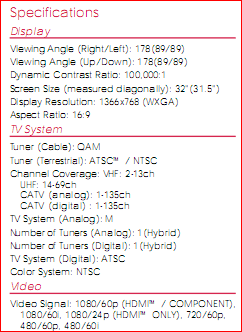
Probably with good reason. Just had a look at the spec sheet for that TV,

http://www.docs.sony.com/reflib/docget.asp?manualid=1078273&template_id=1&region_id=1&DL=',600,560,10,10,'Manuals

and it is only a 1366x768 resolution TV,

32ex301.PNG

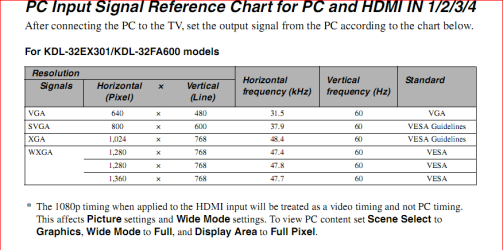
From looking at the user manual,

http://www.docs.sony.com/reflib/docget.asp?manualid=1074365&template_id=1&region_id=1&DL=',600,560,10,10,'Manuals

it has this with regards to connecting to a computer,

32ex301-1.PNG

No idea how Sony has managed 1080p on a 1366x768 resolution screen, but feeding 1920x1080 from the computer isn't going to work.
 
Last edited:

My Computer My Computer

At a glance

Win 7 Ultimate x64FX-8350 @ 4.6 GHz so farADATA XPG V1 Series Black 8GB DDR3 1600Sapphire R9 270x Dual-X
Computer type
PC/Desktop
Computer Manufacturer/Model Number
Me
OS
Win 7 Ultimate x64
CPU
FX-8350 @ 4.6 GHz so far
Motherboard
Asus M5A97 EVO
Memory
ADATA XPG V1 Series Black 8GB DDR3 1600
Graphics Card(s)
Sapphire R9 270x Dual-X
Sound Card
Xonar DGX w/ Corsair Vengence 1300
Monitor(s) Displays
Acer S232HL Abid
Screen Resolution
1920x1080
Hard Drives
120 GB OCZ Vertex 3
500 GB Seagate 7200.12
PSU
Antec Earthwatts 650W Green
Case
Antec Three Hundred
Cooling
Cooler Master 212 EVO
Keyboard
Logitech G510
Mouse
Logitech G500s
Internet Speed
35000/3000
I've changed settings but can't find display area option?? :confused:
 

My Computer My Computer

At a glance

Windows 8.1 - 64 BitIntel Core i5-4670K (Haswell)8GB DDR3-RAM PC1600 CL9 ADATA XPG V1.0 blackGigabyte NVIDIA GTX 770 Graphics Card (2GB, D...
Computer type
PC/Desktop
Computer Manufacturer/Model Number
Self Built
OS
Windows 8.1 - 64 Bit
CPU
Intel Core i5-4670K (Haswell)
Motherboard
Gigabyte GA-Z87X-D3H
Memory
8GB DDR3-RAM PC1600 CL9 ADATA XPG V1.0 black
Graphics Card(s)
Gigabyte NVIDIA GTX 770 Graphics Card (2GB, DDR5, PCI-E)
Sound Card
ASUS Xonar DX 7.1 | Turtle Beach HPA 2
Monitor(s) Displays
Samsung SyncMaster P2270HD
Screen Resolution
1080p
Hard Drives
Samsung 840 Evo 250 GB (OS only)
Seagate Barracuda 1TB S-ATA
Seagate Barracuda 250GB S-ATA
Maxtor 250GB S-ATA (Backup only)
WD Elements 500Gb/Go
PSU
750 watts
Case
Zalman GS-1000 Special Edition
Cooling
Zalman CNPS10X Performa
Keyboard
Logitech K350
Mouse
Logitech M705 | Razer Vespula Mouse Pad
Internet Speed
Virgin Media - 60Mbps
Antivirus
Microsoft Security Essentials
Other Info
120mm fans x 4
(2 on top, 1 at rear, 1 at bottom)
***update***

I guess colour problem was due to Audio/Video going through HDMI at same time. Since last night I'm using headphones for audio and only using video signal through HDMI and so far so good. no colour problem at all :D
 

My Computer My Computer

At a glance

Windows 8.1 - 64 BitIntel Core i5-4670K (Haswell)8GB DDR3-RAM PC1600 CL9 ADATA XPG V1.0 blackGigabyte NVIDIA GTX 770 Graphics Card (2GB, D...
Computer type
PC/Desktop
Computer Manufacturer/Model Number
Self Built
OS
Windows 8.1 - 64 Bit
CPU
Intel Core i5-4670K (Haswell)
Motherboard
Gigabyte GA-Z87X-D3H
Memory
8GB DDR3-RAM PC1600 CL9 ADATA XPG V1.0 black
Graphics Card(s)
Gigabyte NVIDIA GTX 770 Graphics Card (2GB, DDR5, PCI-E)
Sound Card
ASUS Xonar DX 7.1 | Turtle Beach HPA 2
Monitor(s) Displays
Samsung SyncMaster P2270HD
Screen Resolution
1080p
Hard Drives
Samsung 840 Evo 250 GB (OS only)
Seagate Barracuda 1TB S-ATA
Seagate Barracuda 250GB S-ATA
Maxtor 250GB S-ATA (Backup only)
WD Elements 500Gb/Go
PSU
750 watts
Case
Zalman GS-1000 Special Edition
Cooling
Zalman CNPS10X Performa
Keyboard
Logitech K350
Mouse
Logitech M705 | Razer Vespula Mouse Pad
Internet Speed
Virgin Media - 60Mbps
Antivirus
Microsoft Security Essentials
Other Info
120mm fans x 4
(2 on top, 1 at rear, 1 at bottom)
I just received another HD5770. My question is, if I put both cards in crossfire mode, will I be able to run my system in 1920x1080 resolution via HDMI cable without any problem?

Thanks
 

My Computer My Computer

At a glance

Windows 8.1 - 64 BitIntel Core i5-4670K (Haswell)8GB DDR3-RAM PC1600 CL9 ADATA XPG V1.0 blackGigabyte NVIDIA GTX 770 Graphics Card (2GB, D...
Computer type
PC/Desktop
Computer Manufacturer/Model Number
Self Built
OS
Windows 8.1 - 64 Bit
CPU
Intel Core i5-4670K (Haswell)
Motherboard
Gigabyte GA-Z87X-D3H
Memory
8GB DDR3-RAM PC1600 CL9 ADATA XPG V1.0 black
Graphics Card(s)
Gigabyte NVIDIA GTX 770 Graphics Card (2GB, DDR5, PCI-E)
Sound Card
ASUS Xonar DX 7.1 | Turtle Beach HPA 2
Monitor(s) Displays
Samsung SyncMaster P2270HD
Screen Resolution
1080p
Hard Drives
Samsung 840 Evo 250 GB (OS only)
Seagate Barracuda 1TB S-ATA
Seagate Barracuda 250GB S-ATA
Maxtor 250GB S-ATA (Backup only)
WD Elements 500Gb/Go
PSU
750 watts
Case
Zalman GS-1000 Special Edition
Cooling
Zalman CNPS10X Performa
Keyboard
Logitech K350
Mouse
Logitech M705 | Razer Vespula Mouse Pad
Internet Speed
Virgin Media - 60Mbps
Antivirus
Microsoft Security Essentials
Other Info
120mm fans x 4
(2 on top, 1 at rear, 1 at bottom)
I've tried 3 HDMI cables now but my screen is still losing colour. I've checked cables with PS3 and Sky HD box and they work fine so I guess its something to do with my computer not TV. I got two 5770 (crossfireX) cards, and they work fine with DVI cable and maximum I can go is 1360x768 but when I try with HDMI cable and change resolution to 720p or 1080p or even 1360x768, it loses colour.

So what can be the reason for this? Need help

*** I hope its not HDMI connectors on both cards which are faulty ***
 

My Computer My Computer

At a glance

Windows 8.1 - 64 BitIntel Core i5-4670K (Haswell)8GB DDR3-RAM PC1600 CL9 ADATA XPG V1.0 blackGigabyte NVIDIA GTX 770 Graphics Card (2GB, D...
Computer type
PC/Desktop
Computer Manufacturer/Model Number
Self Built
OS
Windows 8.1 - 64 Bit
CPU
Intel Core i5-4670K (Haswell)
Motherboard
Gigabyte GA-Z87X-D3H
Memory
8GB DDR3-RAM PC1600 CL9 ADATA XPG V1.0 black
Graphics Card(s)
Gigabyte NVIDIA GTX 770 Graphics Card (2GB, DDR5, PCI-E)
Sound Card
ASUS Xonar DX 7.1 | Turtle Beach HPA 2
Monitor(s) Displays
Samsung SyncMaster P2270HD
Screen Resolution
1080p
Hard Drives
Samsung 840 Evo 250 GB (OS only)
Seagate Barracuda 1TB S-ATA
Seagate Barracuda 250GB S-ATA
Maxtor 250GB S-ATA (Backup only)
WD Elements 500Gb/Go
PSU
750 watts
Case
Zalman GS-1000 Special Edition
Cooling
Zalman CNPS10X Performa
Keyboard
Logitech K350
Mouse
Logitech M705 | Razer Vespula Mouse Pad
Internet Speed
Virgin Media - 60Mbps
Antivirus
Microsoft Security Essentials
Other Info
120mm fans x 4
(2 on top, 1 at rear, 1 at bottom)
can anyone shed some light on it?
 

My Computer My Computer

At a glance

Windows 8.1 - 64 BitIntel Core i5-4670K (Haswell)8GB DDR3-RAM PC1600 CL9 ADATA XPG V1.0 blackGigabyte NVIDIA GTX 770 Graphics Card (2GB, D...
Computer type
PC/Desktop
Computer Manufacturer/Model Number
Self Built
OS
Windows 8.1 - 64 Bit
CPU
Intel Core i5-4670K (Haswell)
Motherboard
Gigabyte GA-Z87X-D3H
Memory
8GB DDR3-RAM PC1600 CL9 ADATA XPG V1.0 black
Graphics Card(s)
Gigabyte NVIDIA GTX 770 Graphics Card (2GB, DDR5, PCI-E)
Sound Card
ASUS Xonar DX 7.1 | Turtle Beach HPA 2
Monitor(s) Displays
Samsung SyncMaster P2270HD
Screen Resolution
1080p
Hard Drives
Samsung 840 Evo 250 GB (OS only)
Seagate Barracuda 1TB S-ATA
Seagate Barracuda 250GB S-ATA
Maxtor 250GB S-ATA (Backup only)
WD Elements 500Gb/Go
PSU
750 watts
Case
Zalman GS-1000 Special Edition
Cooling
Zalman CNPS10X Performa
Keyboard
Logitech K350
Mouse
Logitech M705 | Razer Vespula Mouse Pad
Internet Speed
Virgin Media - 60Mbps
Antivirus
Microsoft Security Essentials
Other Info
120mm fans x 4
(2 on top, 1 at rear, 1 at bottom)
Update

I just bought HDMI 1.3 cable, but still having the same problem. Screen goes green, when I'm using HDMI cable for display and I'm sure my Sony TV supports 1080p/720p

here are the screenshots

1b38cf72.jpg


48527559.jpg


gone back to dvi cable and its all ok

0bd49ffe.jpg
 

My Computer My Computer

At a glance

Windows 8.1 - 64 BitIntel Core i5-4670K (Haswell)8GB DDR3-RAM PC1600 CL9 ADATA XPG V1.0 blackGigabyte NVIDIA GTX 770 Graphics Card (2GB, D...
Computer type
PC/Desktop
Computer Manufacturer/Model Number
Self Built
OS
Windows 8.1 - 64 Bit
CPU
Intel Core i5-4670K (Haswell)
Motherboard
Gigabyte GA-Z87X-D3H
Memory
8GB DDR3-RAM PC1600 CL9 ADATA XPG V1.0 black
Graphics Card(s)
Gigabyte NVIDIA GTX 770 Graphics Card (2GB, DDR5, PCI-E)
Sound Card
ASUS Xonar DX 7.1 | Turtle Beach HPA 2
Monitor(s) Displays
Samsung SyncMaster P2270HD
Screen Resolution
1080p
Hard Drives
Samsung 840 Evo 250 GB (OS only)
Seagate Barracuda 1TB S-ATA
Seagate Barracuda 250GB S-ATA
Maxtor 250GB S-ATA (Backup only)
WD Elements 500Gb/Go
PSU
750 watts
Case
Zalman GS-1000 Special Edition
Cooling
Zalman CNPS10X Performa
Keyboard
Logitech K350
Mouse
Logitech M705 | Razer Vespula Mouse Pad
Internet Speed
Virgin Media - 60Mbps
Antivirus
Microsoft Security Essentials
Other Info
120mm fans x 4
(2 on top, 1 at rear, 1 at bottom)
Just bought an XFX 6870 on Sunday and was tickled to finally be able to run HDMI out from the card to the HDMI input on my Hannspree 25" monitor.

It looked like crap. Fuzzy, blurry, blah.

Went back to the DVI cable and it was better than ever. After scouring the net for answers the consensus seems to be that the only improvement an HDMI cable gives you over DVI is that it also carries the audio signal.

By no means would I consider this the last word on the subject, but for now I'm sticking with the DVI cable.
 

My Computer My Computer

At a glance

Main - Windows 7 Pro SP1 64-Bit; 2nd - Window...Main - Core i7 2600K; 2nd - Core i7 920Main - 16GB Corsair Vengeance; 2nd - 12GB Cor...Main - XFX Radeon 6870 1GB; 2nd - XFX Radeon ...
Computer Manufacturer/Model Number
Self
OS
Main - Windows 7 Pro SP1 64-Bit; 2nd - Windows Server 2008 R2
CPU
Main - Core i7 2600K; 2nd - Core i7 920
Motherboard
Main - Asus P8Z68-V Pro/Gen3; 2nd - Gigabyte GA-EX58-UDR3
Memory
Main - 16GB Corsair Vengeance; 2nd - 12GB Corsair Vengeance
Graphics Card(s)
Main - XFX Radeon 6870 1GB; 2nd - XFX Radeon 4870 1GB
Sound Card
Both: Onboard Realtek Azalia
Monitor(s) Displays
Main - Hann 25" + I-INC 25" + Acer 23"; 2nd - Upgrading Soon
Screen Resolution
Main - 1920x1080 (All Three Monitors); 2nd - Upgrading Soon
Hard Drives
Main - (1) Crucial M4 128GB (Boot)
Main - (1) Seagate 2TB 64MB Cache (Data)
Main - (1) Seagate 2TB 64MB Cache (Data Backup)
2nd - (1) Intel X25-M SSD 80GB (Boot)
2nd - (3) Seagate 1TB 32MB Cache (Data Backup)
2nd - (1) Seagate 320GB (Because)
PSU
Main - OCZ 600W Modular; 2nd - OCZ 600W
Case
Main - Thermaltake Element G; 2nd - NZXT something or other
Cooling
Main - Corsair H80; 2nd - Prolimatech Megahalems
Keyboard
Main - Razer Reclusa; 2nd - Old MS Keyboard
Mouse
Main - Logitech MX Revolution; 2nd - Old MS Mouse
Internet Speed
20Mbps Time-Warner Cable
Back
Top