Windows 7 Forums


Windows 7: Screen resolution problem

21 Aug 2010   #1

Windows 7
 
 
Screen resolution problem

People, I just bought a POV GTX 465, before i used a Radeon X1550
I'm using a VGA-DVI connector since the one on my motherboard broke.
I already installed the driver from the CD.It wasn't in the recommended resolution so I changed it from 1024X768 to 1360X768 but it says "Out of range 65.5khz/80hz
so I downloaded the latest driver but still nothing changed
Anybody help??

EDIT.::.
I'm using an LG FLATRON W1941S


Last edited by girarae; 23 Aug 2010 at 08:56 AM..
My System SpecsSystem Spec

21 Aug 2010   #2

MS Windows 7 Professional 64-bit SP1
Lancashire


Did you uninstall the driver before you fitted the new gfx card?
My System SpecsSystem Spec
21 Aug 2010   #3

Windows 7


No, but i uninstalled it after it
My System SpecsSystem Spec
.


21 Aug 2010   #4

MS Windows 7 Professional 64-bit SP1
Lancashire


Does your monitor support 80hz? If not reboot into safe mode, then uninstall any drivers to do with ATI and/or nVidia then reboot in normal mode then install your new gfx card drivers!!
My System SpecsSystem Spec
21 Aug 2010   #5

Windows 7


How do you start in safe mode on win 7, using Asus
My System SpecsSystem Spec
21 Aug 2010   #6

Windows 7 Professional SP1 64-bit
Virginia


Tap F8 repeatedly when you first turn on your computer.
My System SpecsSystem Spec
23 Aug 2010   #7

Windows 7


I tried going into safemode uninstalling it and reboot and install it but the problem still persists .First i couldn't install it at first because WIN 7 installs it on it's own so i have to wait it to finish.Recently i was playing Just Cause 2 fine but now the out of range comes out..Anyone help!.


Uploaded with ImageShack.us

Last edited by girarae; 23 Aug 2010 at 08:51 AM..
My System SpecsSystem Spec
23 Aug 2010   #8

Windows 7 Professional SP1 64-bit
Virginia


See is you can do things in a different order. Uninstall, reboot into safe mode, and try installing while in safe mode.
My System SpecsSystem Spec
23 Aug 2010   #9

MS Windows 7 Professional 64-bit SP1
Lancashire


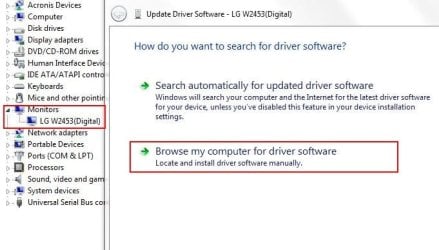
In that picture where it says 'Display = 1. Generic non PnP monitor. Could that be your problem? You need a driver for your monitor??

Make & Model of your Monitor please??
My System SpecsSystem Spec
23 Aug 2010   #10

Windows 7 Professional SP1 64-bit
Virginia


I remember some people with that resolution had to enter the info into the NVIDIA control panel manually. Not sure how to do this though.

EDIT: Anthony, look at the bottom of the first post.
My System SpecsSystem Spec
Reply

 Screen resolution problem problems?


Thread Tools


Similar help and support threads for: Screen resolution problem
Thread Forum
Screen resolution problem Gaming
Screen resolution problem. Graphic Cards
Screen resolution problem Graphic Cards
problem with screen resolution Drivers
Solved bit of a screen resolution problem Graphic Cards


All times are GMT -5. The time now is 10:12 AM.


Windows 7 Forums is an independent web site and has not been authorized,
sponsored, or otherwise approved by Microsoft Corporation.
"Windows 7" and related materials are trademarks of Microsoft Corp.
© Designer Media Ltd