I have recently installed Windows 7 Ultimate but lost my 1440 x 900 screen resolution. I have a Viewsonic 19" LCD (VX1935WM-3). I have read a lot of threads on installing drivers and new video cards which is opverwhelming and very confussing. Is there a straight forward fix (like that is even possible!)?
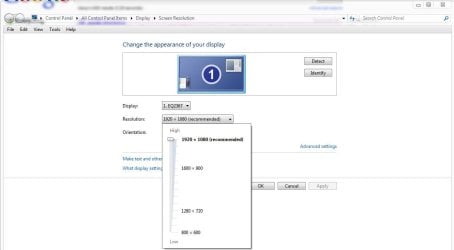
Unfortunately the control panel only offers 4 resolutions and skips right over 1440 x 900. I also downloaded the latest verion form NVIDIA with no luck. My search continues...
Unfortunately the control panel only offers 4 resolutions and skips right over 1440 x 900. I also downloaded the latest verion form NVIDIA with no luck. My search continues...
I had this issue with my Mrs's HP w19 monitor. The solution was to make sure that I used the short monitor cable that was supplied with the monitor and no others, at least, no other longer cables. Bloody stupid HP in my opinion. Never had this issue with any other monitors before, just this HP one.
I don't know whether this is the same issue as what you are having, but I thought I'd better tell you what happened with mine in case.
My Computer
At a glance
Windows 7 Ultimate x64AMD Phenom II x4 9658Gb Corsair XMS3 DDR3Asus EN9600GT 512Mb DDR3 Fanless
Computer Manufacturer/Model Number
Self Built
OS
Windows 7 Ultimate x64
CPU
AMD Phenom II x4 965
Motherboard
Gigabyte
Memory
8Gb Corsair XMS3 DDR3
Graphics Card(s)
Asus EN9600GT 512Mb DDR3 Fanless
Sound Card
Integrated
Monitor(s) Displays
Belinea 22" LCD (Primary) and HP 19" LCD (secondary)
Screen Resolution
1680 x 1050 / 1440 x 900
Hard Drives
4 x 1Tb
1 x 250Gb
+ Backup Drives
PSU
800w Silent
Case
Nifty looking Midi Case
Cooling
3 x Super Cooling Quiet Case Fans. Water Cooled CPU.
I downloaded the "signed" drivers for Windows 7 from the Viewsonic site. While installing it prompted me to download the "unsigned" versions because they were not compatible. I downloaded the unsigned drivers but I have no idea if they were applied. When I opened the downloaded file it extracted then did nothing else. I can see the application in my Control Panel/Programs. I am unsure if I need another step to actually apply the drivers?!
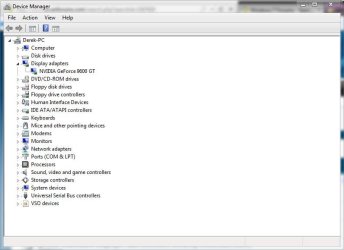
The easiset way to know if your display driver is installed is to go to device manager> monitor> and see if your display is listed.
If it is then you should be able to have the option to use it's native resolution.
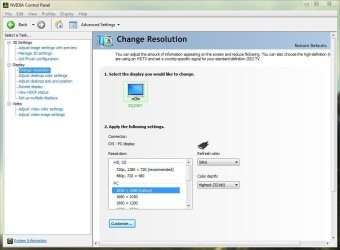
You can also go to Nvidia control panel>change resolution>customize button>create custom resolution> add 1440 pixels by 900 pixels>color depth 32bit> refresh rate 60Hz> then press test.
If the resoluton passes then click accept or ok
Fabe
My Computer
At a glance
Windows 7 ultimate 64 bit / XP Home sp3intel Core 2 Duo E8400 3.0ghz8 gigs 1066 OCZ Fata1tyEVGA GTX 580 Call of Duty Black Ops Edition
Logitech Z2300 Speakers/ Bose Noise Cancelling Headphones/Avermedia PCI-e Hybrid TV Bravo/Epson NX415 all in one/ 4 Port Powered USB Hub/ LG 10x Bluray Burner /TSST Corp DVDRW External
I ended up being able to install the NVIDIA drivers for Windows 7. That gave me the actual NVIDIA Control Panel where I could finally get to the 1440x900display settings. Problem solved. Thank you all for your assitance! Much apopreciated! Uel
I ended up being able to install the NVIDIA drivers for Windows 7. That gave me the actual NVIDIA Control Panel where I could finally get to the 1440x900display settings. Problem solved. Thank you all for your assitance! Much apopreciated! Uel