Windows 7 Forums


Windows 7: Green Pixels, Screen Freezes, Random Turn Offs?

30 Oct 2010   #21

Windows 7 Eternity 64bit
Rochdale


Error Message again!!!


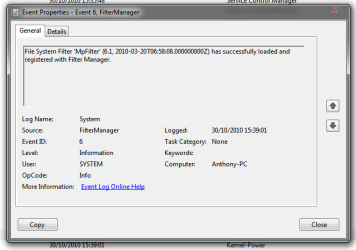
I have attached the new error message it is "MPFilter" this time??
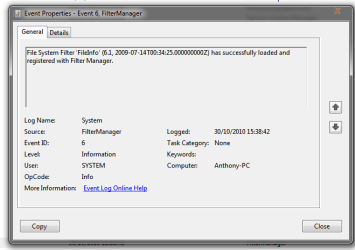
Also there is another error that always comes before this. that is also attached at the bottom.
Attached Thumbnails
Green Pixels, Screen Freezes, Random Turn Offs?-log3.png   Green Pixels, Screen Freezes, Random Turn Offs?-log4.png  
My System SpecsSystem Spec

31 Oct 2010   #22

Windows 7 Ultimate x64
Brisbane, Queensland, Australia


what you are describing sounds like a graphics card problem, have you tried going back to an older driver?
My System SpecsSystem Spec
04 Nov 2010   #23

Windows 7 Eternity 64bit
Rochdale


Yes problem still there
My System SpecsSystem Spec
.


04 Nov 2010   #24

W7 Professional x64
Portland, OR


Do you have onboard graphics or another card that you use to see if it is a card issue?
My System SpecsSystem Spec
04 Nov 2010   #25

Win 7 Home Premium 64 Bit


three pages and no one has told him his graphics card is screwed

those are artifacts they are caused by overheating or faulty ram on the GPU , half of the screen freezing another gpu issue.

on very very rare occations this has turned out to a driver issue first thing try other drivers

you could try clocking back (underclocking your gpu memory) you could try making sure your gpu is seated properly on yuor mobo , you could try reseating your gpu cooler paying particular attention to ram heatsinks (or the part of the HS that contacts the ram) you should monitor the gpu core voltage when under load (with an app such as msi afterburner) although core temp maybe fine your memory temp could still be too hot there is no way of monitoring it

If i were you id stop worrying about unrelated errors and concentrate on your graphics card its that thats failing

My System SpecsSystem Spec
04 Nov 2010   #26

Windows 7 x86/x64, Server 2008r2, Web Server 2008


Quote   Quote: Originally Posted by archie123 View Post
three pages and no one has told him his graphics card is screwed

those are artifacts they are caused by overheating or faulty ram on the GPU , half of the screen freezing another gpu issue.

on very very rare occations this has turned out to a driver issue first thing try other drivers

you could try clocking back (underclocking your gpu memory) you could try making sure your gpu is seated properly on yuor mobo , you could try reseating your gpu cooler paying particular attention to ram heatsinks (or the part of the HS that contacts the ram) you should monitor the gpu core voltage when under load (with an app such as msi afterburner) although core temp maybe fine your memory temp could still be too hot there is no way of monitoring it

If i were you id stop worrying about unrelated errors and concentrate on your graphics card its that thats failing
So how can something hardware related show up in a screen shot??? im not sure how that happens?
My System SpecsSystem Spec
05 Nov 2010   #27

W7 Professional x64
Portland, OR


because your graphics card is what renders the screen shot
My System SpecsSystem Spec
05 Nov 2010   #28

Windows 7 x86/x64, Server 2008r2, Web Server 2008


Ahh good point :P
My System SpecsSystem Spec
05 Nov 2010   #29

Windows 7 Ultimate x64


I have similar issues before. The green and pink artifacts only appear when playing movies or games. I immediately concluded it was gfx. Replaced the nvidia with Ati and the problem is gone. However, once a while and very rarely now, the PC freezes. I begin to suspect it's not my nvidia but it is due to the pci-e slot or my mobo, slowly killing my card. It doesn't bother me much as the freezes is very rare.
My System SpecsSystem Spec
06 Nov 2010   #30

Windows 7 Eternity 64bit
Rochdale


Yeah it might be because the computer gets hot inside as well. sometimes after it freezes and i restart the computer it says the temp is about 50-60 degrees.
My System SpecsSystem Spec
Reply

 Green Pixels, Screen Freezes, Random Turn Offs? problems?


Thread Tools


Similar help and support threads for: Green Pixels, Screen Freezes, Random Turn Offs?
Thread Forum
PC Monitor: Random white & blue green screen displays? Graphic Cards
Pixels turn white while updating to latest AMD Driver Drivers
Solved How Do I Get Rid Of Random Green Pixels? Graphic Cards
Random Crashes and computer shut offs BSOD Help and Support
Sreens turn green Graphic Cards


All times are GMT -5. The time now is 02:44 AM.


Seven Forums Android App Seven Forums IOS App Follow us on Facebook

Windows 7 Forums is an independent web site and has not been authorized,
sponsored, or otherwise approved by Microsoft Corporation.
"Windows 7" and related materials are trademarks of Microsoft Corp.
© Designer Media Ltd
  

1 2 3 4 5 6 7 8 9 10 11 12 13 14 15 16 17 18 19 20 21 22 23 24 25 26 27 28 29 30 31 32