| Windows 7: Adding an external display - questions |
18 Dec 2010
|
#1 | | |
Adding an external display - questions I have budget laptop that I use primarily as a desktop replacement and I've upgraded just about every piece that can be upgraded, RAM hard disk, OS... and now I would like to add a decent external monitor, and good wireless keyboard / mouse combo.
The laptop only has VGA output and a max. native resolution of 1280x800 on the laptop's display. I've used it before to watch dvds on my TV, but the resolution was something very low like 600x800, IIRC. I'm not sure why, though.
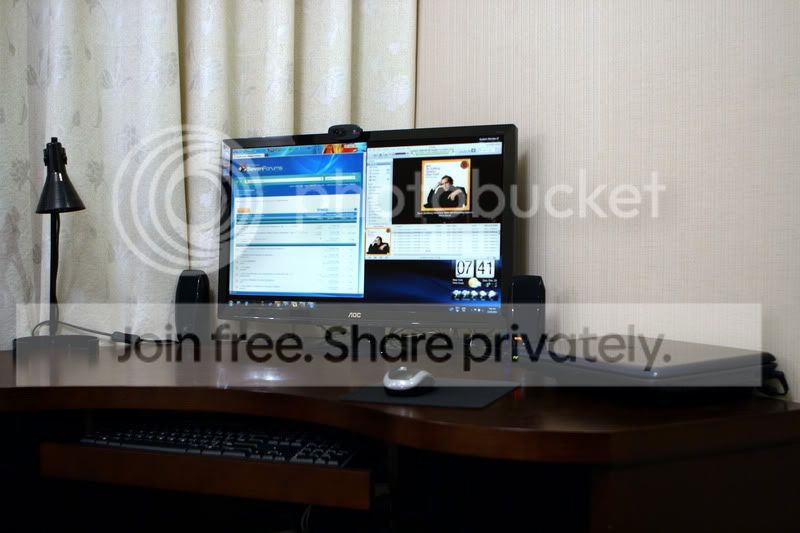
Anyway, for the new monitor, I am looking at 24 and 27inch 1080 HD LCDs, with 1920x1080 max. resolution. The 27 incher actually has really good price, so I am thinking to go for it, but I am not sure what other components I would need to be able to take advantage of it. I dont want to get it and be limited to 600x800 pixels due to the VGA output. The panel does support VGA and DVI-D interface types, so I presume I need some sort of converter to get from analog back to digital. But is VGA limited to the laptop's native resolution?
Thanks for any suggestions / input.
Last edited by Dick Jagger; 19 Dec 2010 at 02:39 AM..
| My System Specs |
| System Manufacturer/Model Number Acer Aspire 4730Z OS Windows 7 Ultimate CPU Intel Pentium Dual CPU T3400 @ 2.16GHz Motherboard Acer Aspire 4730Z V1.22 GL40 Memory 4.0GB Dual-Channel DDR2 @ 332MHz Graphics Card Mobile Intel(R) 4 Series Express Chipset Family 1309 MB Sound Card Realtek High Definition Audio Monitor(s) Displays AOC 2795V Screen Resolution 1920 x 1080 Hard Drives 500GB Hitachi HTS545050B9A300 ATA Travelstar |
18 Dec 2010
|
#2 | | Vista 64 Ultimate, Windows 7 64 Ultimate, Ubuntu 9.10 S. ME and W. ME |
You should be able to use a VGA-DVI converter on either your video output or a DVI-VGA converter (might come with the monitor) on the cable input side. You may also wish to read the Intel report on some issues with this chipset at Graphics — Unable to use the native resolution, such as 1920x1080, 1680x1050 and 1440x900 I seriously doubt you'd be relegated to 800x600 resolution though. | My System Specs | | System Manufacturer/Model Number DELL XPS Studio 435T OS Vista 64 Ultimate, Windows 7 64 Ultimate, Ubuntu 9.10 CPU i7 975 3.3 GHz Extreme (Factory OC'd to 3.6 GHz) Motherboard DELL provided Memory 18 Gb Tri-Channel 1066 Graphics Card ATI 5970 2048 Mb Sound Card X-Fi Extreme Gamer Monitor(s) Displays Vizio 37" HD-TV Screen Resolution 1920 x 1080 Keyboard Logitech Performance K350 Wireless Mouse Logitech Performance MX Wireless PSU DELL Provided 475 watts Case DELL Cooling 3 fans Hard Drives 1.5 Tb HDD
1.5 Tb HDD
2.0 Tb Network Drive
512 Gb Crucial SSD Internet Speed 3 Mb up 750 Kb down Other Info Bamboo Fun Tablet, Belkin N+ Wireless router, Pioneer Dolby System Wireless Headphones, Bose 5.1 Dolby Surround Sound System, LifeCam VX 3000 Webcam, Blu-Ray/Hi Def DVD +RW combo and Blu-ray +RW,l 15 in 1 media card reader, Logitech Rumblepad 2, Hauppauge 2250 DTV Tuner with MS Media Center Remote
Laptop:Alienware M17x, Q9100 CPU, 8Gb RAM, 1920x1200 WUXGA LCD driven by 4870's in CrossFireX, Bl |
18 Dec 2010
|
#3 | | Windows 7 Ultimate AMD64 Sydney, Nova Scotia |
Just so you know a DVI-D is digital only. You will have to use a signal converter to convert the analog VGA signal to a digital DVI signal. A dongle or adapter cable that just swaps the pins around won't work. DVI connectors can be DVI-I, analog and digital, DVI-D digital only or DVI-A analog only. Most video cards are DVI-I and you can just put a DVI to VGA adapter on them. There is no electron ices inside just wires to route the analog signal to the correct pins for VGA. On the monitor end there is a DVI-D and sometimes a VGA in connector. The digital and analog inputs are separated into two different connectors. You might be better off trying to find a monitor that also has a VGA input. The signal converter you'll need will cost you a few bucks. I haven't looked at the prices but I would imagine they are not cheap. | My System Specs | | Computer type PC/Desktop System Manufacturer/Model Number Home Built OS Windows 7 Ultimate AMD64 CPU AMD Phenom II X4 980 Black Edition Deneb 3.7GHz Motherboard Asus M4N68T-M V2 µATX Motherboard Memory 8GB 4GBx2 Kingston PC10600 DDR3 1333 Memory Graphics Card BFG NVIDIA Geforce 220GT 1 Gig DDR2 PCIe Sound Card VIA VT1708s High Definition Audio 8-channel Onboard Monitor(s) Displays 2 x 19" I-INC AG191D TFT Flat Panel Screen Resolution 1280x1024 x 2 Keyboard Logitech Internet 600 Mouse Logitech Wireless Trackman Wheel PSU Retail Plus 465 Watt Case Power Up Black ATX Mid-Tower Case Cooling Stock heatsink and fan Hard Drives 500 Gig WesternDigital SATA-300 Drive Internet Speed 80 Mbps Down 30 Mbps Up Antivirus Microsoft Security Essentials Browser Internet Explorer 10 Other Info HP DVD1040e Lightscribe - External USB2 |
18 Dec 2010
|
#4 | | |
Thanks for the feedback... the one I'm looking at does have a VGA input as well as a DVI-D. And I have a VGA to VGA connector already, but I'm not clear if this type of connection will allow for higher resolution output than that of the laptop currently.
And thanks for that Intel link, I'll have to re-read it though!
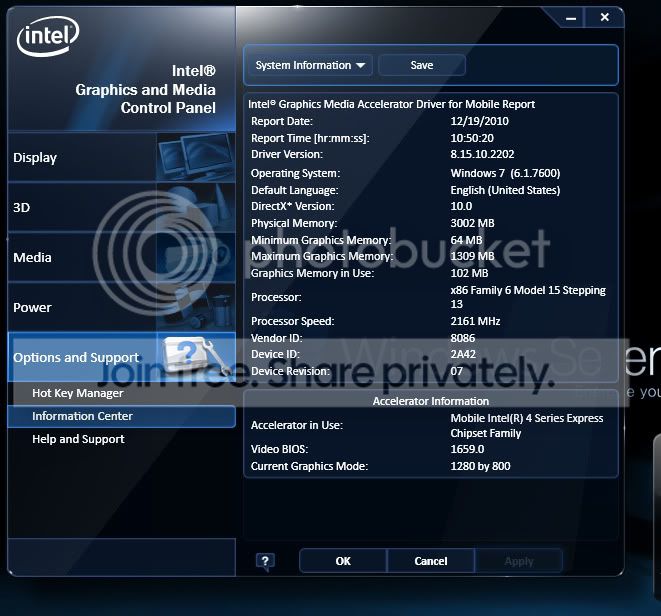
With the latest chipset driver from Intel, I see these resolution options with the laptop's display...
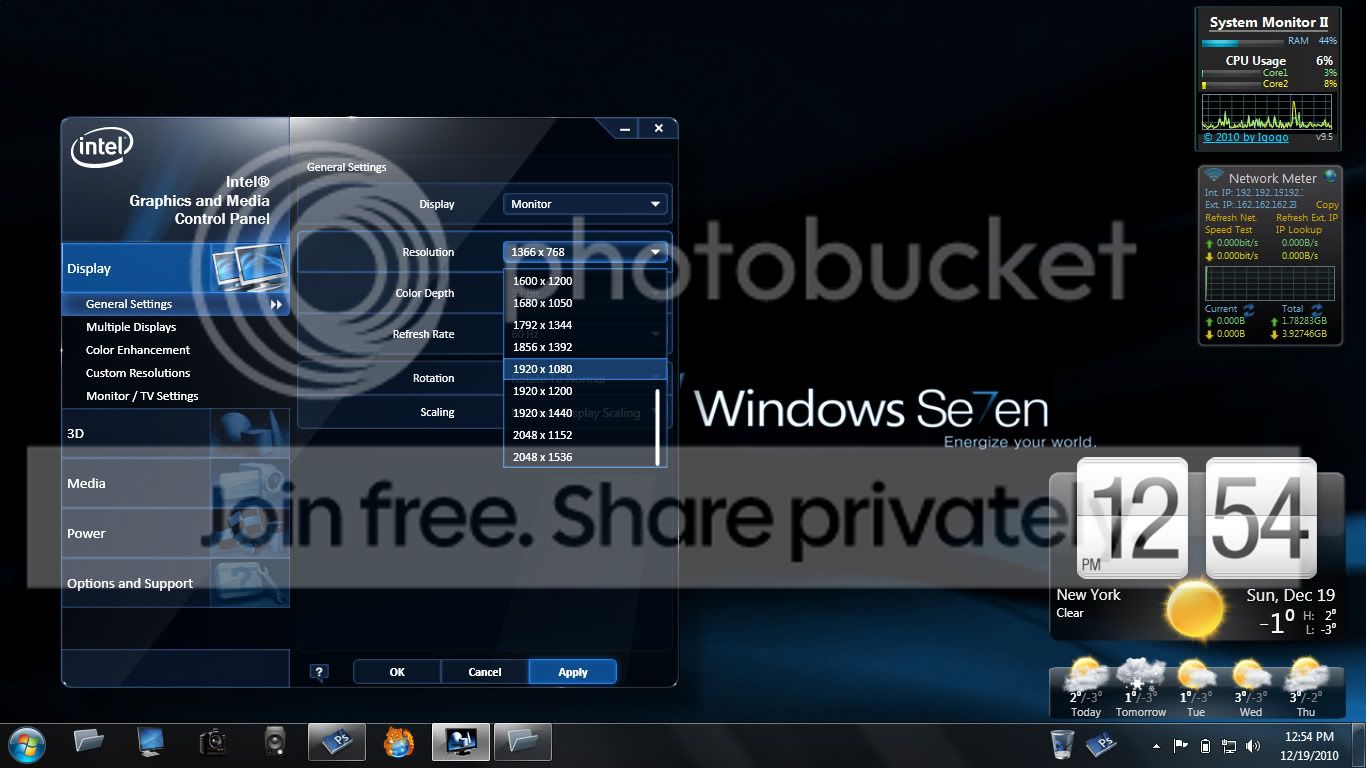
And with the laptop connected through VGA only, to the TV, I now have many more options for output including the 1920x1080 I am looking for (though the tv seems to be best at 1366x768)!
Last edited by Dick Jagger; 19 Dec 2010 at 02:41 AM..
| My System Specs | | System Manufacturer/Model Number Acer Aspire 4730Z OS Windows 7 Ultimate CPU Intel Pentium Dual CPU T3400 @ 2.16GHz Motherboard Acer Aspire 4730Z V1.22 GL40 Memory 4.0GB Dual-Channel DDR2 @ 332MHz Graphics Card Mobile Intel(R) 4 Series Express Chipset Family 1309 MB Sound Card Realtek High Definition Audio Monitor(s) Displays AOC 2795V Screen Resolution 1920 x 1080 Hard Drives 500GB Hitachi HTS545050B9A300 ATA Travelstar |
19 Dec 2010
|
#5 | | Windows 7 Ultimate AMD64 Sydney, Nova Scotia |
LCD screens have a fixed number of pixels. Ideally your screen resolution should match the number of vertical and horizontal pixels in the display. The manufacturer often refers to this as the displays native resolution. Its the one they recommend you use to get the best picture. You could use other resolutions but you may end up with black boarders or a distorted picture. More often than not the video card supplied with the laptop supports higher resolutions than the display thats built into it. VGA supports some very large screen resolutions so I wouldn't get to worked up about the VGA vs DVI thing. If all your laptop has is VGA out it doesn't mater anyway. It is what it is. Your only limited by what resolutions your video card supports. As long as the native resolution of the monitor you plan to use is among the list of those supported by the video card you are OK. | My System Specs | | Computer type PC/Desktop System Manufacturer/Model Number Home Built OS Windows 7 Ultimate AMD64 CPU AMD Phenom II X4 980 Black Edition Deneb 3.7GHz Motherboard Asus M4N68T-M V2 µATX Motherboard Memory 8GB 4GBx2 Kingston PC10600 DDR3 1333 Memory Graphics Card BFG NVIDIA Geforce 220GT 1 Gig DDR2 PCIe Sound Card VIA VT1708s High Definition Audio 8-channel Onboard Monitor(s) Displays 2 x 19" I-INC AG191D TFT Flat Panel Screen Resolution 1280x1024 x 2 Keyboard Logitech Internet 600 Mouse Logitech Wireless Trackman Wheel PSU Retail Plus 465 Watt Case Power Up Black ATX Mid-Tower Case Cooling Stock heatsink and fan Hard Drives 500 Gig WesternDigital SATA-300 Drive Internet Speed 80 Mbps Down 30 Mbps Up Antivirus Microsoft Security Essentials Browser Internet Explorer 10 Other Info HP DVD1040e Lightscribe - External USB2 |
26 Dec 2010
|
#6 | | |
Got the new monitor up and running from my old laptop... and it is really great. The biggest issue was getting the horizontal flickering to stop, which I found is due to a ground - fault loop. Simply unplugging the ac/power from the laptop solved the problem temporarily. And I now have the ac plug for the monitor plugged into a 3-into-2 adapter to eliminate the ground-prong. Any advice on color calibrating this giant monitor? Right now, it is on the default settings and it is very, very bright, and likely over-saturated. I have never done a simple calibration before, but I'm sure this monitor would benefit from it. Is there anything free out there that can give some better calibration for color? Thanks... | My System Specs | | System Manufacturer/Model Number Acer Aspire 4730Z OS Windows 7 Ultimate CPU Intel Pentium Dual CPU T3400 @ 2.16GHz Motherboard Acer Aspire 4730Z V1.22 GL40 Memory 4.0GB Dual-Channel DDR2 @ 332MHz Graphics Card Mobile Intel(R) 4 Series Express Chipset Family 1309 MB Sound Card Realtek High Definition Audio Monitor(s) Displays AOC 2795V Screen Resolution 1920 x 1080 Hard Drives 500GB Hitachi HTS545050B9A300 ATA Travelstar |
26 Dec 2010
|
#7 | | Windows 7 Ultimate AMD64 Sydney, Nova Scotia |
Type Display in to the search bar then click Display listed under Control Panel. In the upper left you should see a Calibrate color option. Might want to also try the Adjust Clear Type text option too. | My System Specs | | Computer type PC/Desktop System Manufacturer/Model Number Home Built OS Windows 7 Ultimate AMD64 CPU AMD Phenom II X4 980 Black Edition Deneb 3.7GHz Motherboard Asus M4N68T-M V2 µATX Motherboard Memory 8GB 4GBx2 Kingston PC10600 DDR3 1333 Memory Graphics Card BFG NVIDIA Geforce 220GT 1 Gig DDR2 PCIe Sound Card VIA VT1708s High Definition Audio 8-channel Onboard Monitor(s) Displays 2 x 19" I-INC AG191D TFT Flat Panel Screen Resolution 1280x1024 x 2 Keyboard Logitech Internet 600 Mouse Logitech Wireless Trackman Wheel PSU Retail Plus 465 Watt Case Power Up Black ATX Mid-Tower Case Cooling Stock heatsink and fan Hard Drives 500 Gig WesternDigital SATA-300 Drive Internet Speed 80 Mbps Down 30 Mbps Up Antivirus Microsoft Security Essentials Browser Internet Explorer 10 Other Info HP DVD1040e Lightscribe - External USB2 |
26 Dec 2010
|
#8 | | |
Thanks - I just ran through the calibration tool, but I must say, it was difficult to make adjustments that looked better that the existing default setting, which I know can't be optimal as they come from the factory. I wonder if there is a calibration file produced by Adobe, Canon or similar that would already have the best configuration for a given monitor. Seem like that should come from the display manufacturer, though. | My System Specs | | System Manufacturer/Model Number Acer Aspire 4730Z OS Windows 7 Ultimate CPU Intel Pentium Dual CPU T3400 @ 2.16GHz Motherboard Acer Aspire 4730Z V1.22 GL40 Memory 4.0GB Dual-Channel DDR2 @ 332MHz Graphics Card Mobile Intel(R) 4 Series Express Chipset Family 1309 MB Sound Card Realtek High Definition Audio Monitor(s) Displays AOC 2795V Screen Resolution 1920 x 1080 Hard Drives 500GB Hitachi HTS545050B9A300 ATA Travelstar |
26 Dec 2010
|
#9 | | Windows 7 Ultimate AMD64 Sydney, Nova Scotia |
I've done the clear type text one. I'm partially color blind so I leave my color setup at factory defaults.  All I touch is the brightness. | My System Specs | | Computer type PC/Desktop System Manufacturer/Model Number Home Built OS Windows 7 Ultimate AMD64 CPU AMD Phenom II X4 980 Black Edition Deneb 3.7GHz Motherboard Asus M4N68T-M V2 µATX Motherboard Memory 8GB 4GBx2 Kingston PC10600 DDR3 1333 Memory Graphics Card BFG NVIDIA Geforce 220GT 1 Gig DDR2 PCIe Sound Card VIA VT1708s High Definition Audio 8-channel Onboard Monitor(s) Displays 2 x 19" I-INC AG191D TFT Flat Panel Screen Resolution 1280x1024 x 2 Keyboard Logitech Internet 600 Mouse Logitech Wireless Trackman Wheel PSU Retail Plus 465 Watt Case Power Up Black ATX Mid-Tower Case Cooling Stock heatsink and fan Hard Drives 500 Gig WesternDigital SATA-300 Drive Internet Speed 80 Mbps Down 30 Mbps Up Antivirus Microsoft Security Essentials Browser Internet Explorer 10 Other Info HP DVD1040e Lightscribe - External USB2 |
31 Dec 2010
|
#10 | | Windows 7 Ultimate 32 bit |
Jagger, did you update your driver in a way other than the automatic driver updater provided on Intel's website? I'm having trouble making a new external monitor display its native 1600x900 resolution. Intel's website tells me I have latest driver (version 8.15.10.1930) but it looks like you have a newer one from the screenshot you posted. I suppose this could be because I have a different video card (Intel Mobile(R) 965 express chipset). But I figured if that particular update worked for you, I might as well give it a shot since I think I've tried about every other option.
Thanks! | My System Specs | | System Manufacturer/Model Number Toshiba Satelite A205-S5880 OS Windows 7 Ultimate 32 bit Graphics Card Intel Mobile 965 Chipset Monitor(s) Displays LG W2040 Adding an external display - questions problems? All times are GMT -5. The time now is 09:58 AM. | |