| Windows 7: DA:O and other games, black screens with sound |
01 Feb 2011
|
#1 | | |
DA:O and other games, black screens with sound the games work but my problems is that for instince in DA:O i will create a new character or just get in and its just black, i hear the sound, but its just black, i cant controll the character, there is nothing there, in some cases i will get video for a few seconds but that is it really. my drivers and cc are up to date. i am using an ati hd5770 1gb. the version is not in steam but the only other game ive noticed problems with which are more extencive is in darksiders which i did get from steam, help is appreciated, ty | My System Specs |
| System Manufacturer/Model Number was an hp, now is modified to mostly an NZXT corsair OS windows 7 home premium CPU amd phenom 2 black ed. 3.4ghz quad core Motherboard AMD am3 24fsb Memory 10 gb DDR3 Graphics Card ATI Radeon 6970 Monitor(s) Displays 3 1920x1080p 23" monitors (eyefinity display) Screen Resolution 5770x1080 Keyboard logitech g15 Mouse cyborg rat7 Case NZXT Phantom Cooling fan Hard Drives 1 750 gb HP 7500 rpm Internet Speed 24434kbps download rate |
02 Feb 2011
|
#2 | | Windows7 Ultimate 64 bit Charleston |
I had same problem with DAO. I uninstalled Physx that was installed with game and downloaded newer version and that fixed my problem. | My System Specs | | System Manufacturer/Model Number Dell 8300 OS Windows7 Ultimate 64 bit CPU I7-2600 Motherboard Dell Memory 8GB Graphics Card XFX 6870 Sound Card Onboard Monitor(s) Displays Dell ST2410 Screen Resolution 1920x1080 Keyboard G15 Mouse G500 PSU Corsair 650TX Case Dell 8300 Cooling Stock Hard Drives Seagate 1TB Internet Speed 6000/768 |
02 Feb 2011
|
#3 | | |

Quote: Originally Posted by kalas72 I had same problem with DAO. I uninstalled Physx that was installed with game and downloaded newer version and that fixed my problem. i cant for some reason un install it, it is not in my add remove progs list and there are some exes in the file location but i dont know which one would be un install or how to get riddof it. anny suggestions on how i can get riddof it? | My System Specs | | System Manufacturer/Model Number was an hp, now is modified to mostly an NZXT corsair OS windows 7 home premium CPU amd phenom 2 black ed. 3.4ghz quad core Motherboard AMD am3 24fsb Memory 10 gb DDR3 Graphics Card ATI Radeon 6970 Monitor(s) Displays 3 1920x1080p 23" monitors (eyefinity display) Screen Resolution 5770x1080 Keyboard logitech g15 Mouse cyborg rat7 Case NZXT Phantom Cooling fan Hard Drives 1 750 gb HP 7500 rpm Internet Speed 24434kbps download rate |
02 Feb 2011
|
#4 | | Windows 7 Ultimate x64 SP1 Hampton VA |
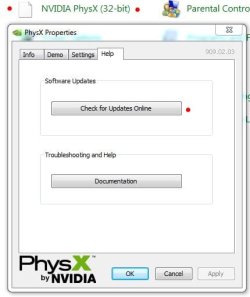
Because it's under "A" for AGEIA PhysX under Programs and Features (Add/Remove). Anyways it's not used since you have an ATI card - it's an Nvidia thing and usually gets installed with a lot of EA games in case you did have an Nvidia card.
Anyhow you shouldn't have to remove it to get the game to run. I played Dragon Age: Origins just fine with it installed and never had an issue. Again, you don't need it, and it can be removed but I left it installed and had no issues.
Two things you might want to do it update your video card drivers, and also update your DirectX files - Download details: DirectX End-User Runtimes (June 2010)
If you continue to have issues, have a look here - Tips on Troubleshooting Game Issues
Good luck. | My System Specs | | Computer type PC/Desktop System Manufacturer/Model Number Built by me OS Windows 7 Ultimate x64 SP1 CPU Intel Core i7-950 (3.06GHz) OC to 3.8GHz Motherboard Gigabyte GA-X58A-UD5 rev 1, F6 Bios Memory 12 gig Corsair DDR3 Dominator GT Memory (3X 4GB) Graphics Card AMD Radeon HD6950 2gig (Sapphire) Sound Card X-Fi Titanium Fatality Pro Monitor(s) Displays HP ZR22w 22" LCD Monitor Screen Resolution 1920 x 1080 Keyboard Logitech Wireless Wave Mouse Logitech Performance MX PSU Antec Signature - SG-850 Case Cooler Master HAF X Cooling Noctua NH-C12P SE14 Hard Drives Primary - OCZ Vertex 4 SSD (256GB). Storage - OCZ Vertex 2 SSD (120GB) & 2TB WD Caviar Black. Internet Speed High Speed Cable Other Info Memory Timings - 1600MHz @ 8-8-8-20-1T @ 1.640 volts |
02 Feb 2011
|
#5 | | |

Quote: Originally Posted by sygnus21 Because it's under "A" for AGEIA PhysX under Programs and Features (Add/Remove). Anyways it's not used since you have an ATI card - it's an Nvidia thing and usually gets installed with a lot of EA games in case you did have an Nvidia card.
Anyhow you shouldn't have to remove it to get the game to run. I played Dragon Age: Origins just fine with it installed and never had an issue. Again, you don't need it, and it can be removed but I left it installed and had no issues.
Two things you might want to do it update your video card drivers, and also update your DirectX files - Download details: DirectX End-User Runtimes (June 2010)
If you continue to have issues, have a look here - Tips on Troubleshooting Game Issues
Good luck. since i do not need it can i completely get ridof it or is it better to just update? | My System Specs | | System Manufacturer/Model Number was an hp, now is modified to mostly an NZXT corsair OS windows 7 home premium CPU amd phenom 2 black ed. 3.4ghz quad core Motherboard AMD am3 24fsb Memory 10 gb DDR3 Graphics Card ATI Radeon 6970 Monitor(s) Displays 3 1920x1080p 23" monitors (eyefinity display) Screen Resolution 5770x1080 Keyboard logitech g15 Mouse cyborg rat7 Case NZXT Phantom Cooling fan Hard Drives 1 750 gb HP 7500 rpm Internet Speed 24434kbps download rate |
02 Feb 2011
|
#6 | | Windows 7 Ultimate x64 SP1 Hampton VA |
You can get rid of it if you want since you have no Nvidia card.
I just did a reinstall of my OS, installed Dead Space 2 and it installed PhysX as well. I just left it as it's not taking up much space. I too only have an ATI card.
Again, it won't hurt to uninstall it. | My System Specs | | Computer type PC/Desktop System Manufacturer/Model Number Built by me OS Windows 7 Ultimate x64 SP1 CPU Intel Core i7-950 (3.06GHz) OC to 3.8GHz Motherboard Gigabyte GA-X58A-UD5 rev 1, F6 Bios Memory 12 gig Corsair DDR3 Dominator GT Memory (3X 4GB) Graphics Card AMD Radeon HD6950 2gig (Sapphire) Sound Card X-Fi Titanium Fatality Pro Monitor(s) Displays HP ZR22w 22" LCD Monitor Screen Resolution 1920 x 1080 Keyboard Logitech Wireless Wave Mouse Logitech Performance MX PSU Antec Signature - SG-850 Case Cooler Master HAF X Cooling Noctua NH-C12P SE14 Hard Drives Primary - OCZ Vertex 4 SSD (256GB). Storage - OCZ Vertex 2 SSD (120GB) & 2TB WD Caviar Black. Internet Speed High Speed Cable Other Info Memory Timings - 1600MHz @ 8-8-8-20-1T @ 1.640 volts |
02 Feb 2011
|
#7 | | |
PhysX is required to be installed for Dragon Age to function. Even if you have an AMD/ATI graphics card. In this case PhysX works solely as a library like DirectX but is computed via the CPU instead of a dedicated processor like it woud if you had an Nvidia graphics card with PhysX support. Mass Effect 2 requires it as well. | My System Specs | | System Manufacturer/Model Number Alienware Aurora ALX R4 OS Windows 7 x64 (SP1) CPU Intel Core i7-3930K (3.2GHz, Turbo 4GHz) Motherboard Alienware Aurora-R4 x79 Memory 4x Samsung 4GB PC3-12800 DDR3 (16GB 1600MHz) Graphics Card Nvidia Geforce GTX 690 (Stock) Sound Card RealTek Integrated Audio Monitor(s) Displays Dell UltraSharp U3011 Screen Resolution 2560x1600 Other Info Dell Inspiron Mini 10v (Intel Atom N270 1.6 GHz; 1GB; Windows 7 Ultimate) |
02 Feb 2011
|
#8 | | |

Quote: Originally Posted by logicearth PhysX is required to be installed for Dragon Age to function. Even if you have an AMD/ATI graphics card. In this case PhysX works solely as a library like DirectX but is computed via the CPU instead of a dedicated processor like it woud if you had an Nvidia graphics card with PhysX support. Mass Effect 2 requires it as well. why do they require PhysX, i thought direct x was requierd. thats why when you put the disc in they have a button that sais install DirectX | My System Specs | | System Manufacturer/Model Number was an hp, now is modified to mostly an NZXT corsair OS windows 7 home premium CPU amd phenom 2 black ed. 3.4ghz quad core Motherboard AMD am3 24fsb Memory 10 gb DDR3 Graphics Card ATI Radeon 6970 Monitor(s) Displays 3 1920x1080p 23" monitors (eyefinity display) Screen Resolution 5770x1080 Keyboard logitech g15 Mouse cyborg rat7 Case NZXT Phantom Cooling fan Hard Drives 1 750 gb HP 7500 rpm Internet Speed 24434kbps download rate |
02 Feb 2011
|
#9 | | Windows 7 Ultimate x64 SP1 Hampton VA |

Quote: Originally Posted by logicearth PhysX is required to be installed for Dragon Age to function. Even if you have an AMD/ATI graphics card. In this case PhysX works solely as a library like DirectX but is computed via the CPU instead of a dedicated processor like it woud if you had an Nvidia graphics card with PhysX support. Mass Effect 2 requires it as well. Are you sure? You have a link to this. I ask not as a challenge but to learn something. I really didn't know this and assumed it was strictly for Nvidia cards. Also, you are given the option to not install it. At least I got that with Dead Space 2.
I'll reinstall Dragon Age again since I reinstalled my OS and see If I get the option to decline installing PhysX and post back.
PS I can see it being needed for Nvidia cards, but ATI cards don't use it.
Thanks. | My System Specs | | Computer type PC/Desktop System Manufacturer/Model Number Built by me OS Windows 7 Ultimate x64 SP1 CPU Intel Core i7-950 (3.06GHz) OC to 3.8GHz Motherboard Gigabyte GA-X58A-UD5 rev 1, F6 Bios Memory 12 gig Corsair DDR3 Dominator GT Memory (3X 4GB) Graphics Card AMD Radeon HD6950 2gig (Sapphire) Sound Card X-Fi Titanium Fatality Pro Monitor(s) Displays HP ZR22w 22" LCD Monitor Screen Resolution 1920 x 1080 Keyboard Logitech Wireless Wave Mouse Logitech Performance MX PSU Antec Signature - SG-850 Case Cooler Master HAF X Cooling Noctua NH-C12P SE14 Hard Drives Primary - OCZ Vertex 4 SSD (256GB). Storage - OCZ Vertex 2 SSD (120GB) & 2TB WD Caviar Black. Internet Speed High Speed Cable Other Info Memory Timings - 1600MHz @ 8-8-8-20-1T @ 1.640 volts |
02 Feb 2011
|
#10 | | Windows 7 Home Premium 64bit Southern Ohio |
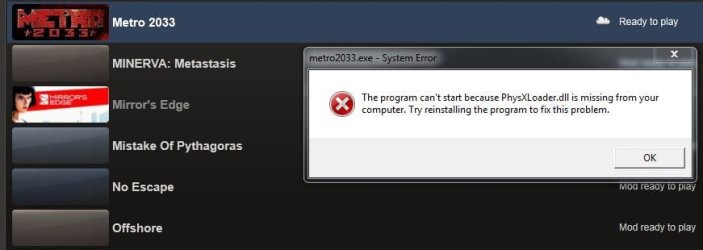
Not sure about DA, but my Mirrors Edge game would not run when I uninstalled Phys-X.
Got an error about the physx dll missing.
I re-installed it, and never bothered with it again.
I would assume that its the same with other games that install it as well.
Im not sure about this either, but I do remember trying to remove it and Mirrors Edge complaining about it. | My System Specs | | System Manufacturer/Model Number Custom (Self Build) OS Windows 7 Home Premium 64bit CPU Intel Core i7 2700k Motherboard eVGA P67 SLI Memory 8GB Mushkin Redline Ridgebacks @1866 Graphics Card EVGA GTX570 SC Sound Card XiFi Titanium HD Monitor(s) Displays LG W2453V Screen Resolution 1920x1080 Keyboard Saitek Cyborg PSU Seasonic x750 Case Corsair 600T SE White Cooling eVGA Superclocked CPU Cooler Hard Drives Intel 320 80GB -- Intel X25-V 40GB --WD Black 1TB x2 -- WD Blue 640GB Antivirus Kaspersky Browser IE Other Info LG BD/DVD DA:O and other games, black screens with sound problems? All times are GMT -5. The time now is 03:21 PM. | |