Windows 7 Forums


Windows 7: Installed Drivers & Now Have Problem

04 Apr 2011   #1

Windows 7 Pro 64bit
 
 
Installed Drivers & Now Have Problem

I went to NVIDIA's site to update my driver.

It required that I download Java in order to detect, I did this. Then it detected that I needed to download approx 132 MB update, I did this. Install went fine, and then I started having a problem. When my computer is sitting idle (no programs running) the CPU % used spikes every 2-3 seconds between 0 and 40-60%. If I open up a browser, it goes up to 70-90%.

This happened immediately after I downloaded Java and updated the driver. I have no idea what happened (and I'm honestly not too familiar with Windows 7).

I went ahead and searched for Windows updates and downloaded all of them.


Thoughts? Suggestions?

Anything would be appreciated.
My System SpecsSystem Spec

04 Apr 2011   #2

Windows 7 x64
Houston


We need to wipe out the nvidia drivers and install them fresh from scratch while the antivirus is disabled, or on snooze.

First manually download the latest nvidia driver for your card. I could tell you which one that was if I knew what card you had, you just filled in nvidia though.


to remove them, do not use the normal uinstall, use driver sweeper instead.
Guru3D - Driver Sweeper (Setup) download from Guru3D.com
My System SpecsSystem Spec
04 Apr 2011   #3

Windows 7 Pro 64bit
 
 
Re

My card is: GeForce 8800 GT
My System SpecsSystem Spec
.


04 Apr 2011   #4

Windows 7 x64
Houston


You want this driver then.
NVIDIA DRIVERS 266.58 WHQL
My System SpecsSystem Spec
04 Apr 2011   #5

Windows 7 Pro 64bit


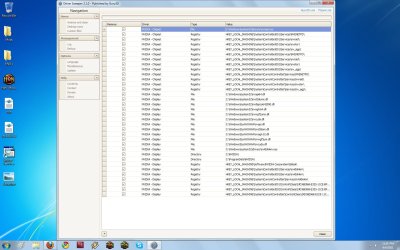
Installed Drivers & Now Have Problem-boo.jpg

I selected the different NVIDIA options in that sweep program and then hit analyse.

What to do next?
My System SpecsSystem Spec
04 Apr 2011   #6

Windows 7 x64
Houston


Limit this to only display stuff for the moment, we'll leave the chipset for the moment.
So untick all chipset items and then wipe the drivers for the display.
My System SpecsSystem Spec
04 Apr 2011   #7

Windows 7 Pro 64bit


I wiped display drivers and rebooted. I did a CPU check there, and there were no spikes; also, when I booted up a browser the CPU was not jumping to 90% at any point. AKA the problem seemed to go away.

I reinstalled driver from that link, and now the problem is back with all the same symptoms.

What is next?
My System SpecsSystem Spec
05 Apr 2011   #8

Windows 7 x64
Houston


Exactly what process is all the cpu time being used up in?
My System SpecsSystem Spec
Reply

 Installed Drivers & Now Have Problem problems?


Thread Tools


Similar help and support threads for: Installed Drivers & Now Have Problem
Thread Forum
How to tell which drivers are installed Drivers
Two HD drivers installed Sound & Audio
Drivers installed with every logon Drivers
New WIN 7 Install PCI Bus 3 Drivers no installed Drivers
installed XP now have no drivers. Drivers


All times are GMT -5. The time now is 02:06 PM.


Seven Forums Android App Seven Forums IOS App Follow us on Facebook

Windows 7 Forums is an independent web site and has not been authorized,
sponsored, or otherwise approved by Microsoft Corporation.
"Windows 7" and related materials are trademarks of Microsoft Corp.
© Designer Media Ltd
  

1 2 3 4 5 6 7 8 9 10 11 12 13 14 15 16 17 18 19 20 21 22 23 24 25 26 27 28 29 30 31 32