Windows 7 Forums Search
Welcome to Windows 7 Forums. Our forum is dedicated to helping you find solutions with any problems, errors or issues you are experiencing with Windows 7. The Windows 7 forum also covers news and updates and has an extensive Windows 7 tutorial section that covers a wide range of tips and tricks.


Windows 7 - Aero Effects/Transparency Help

 
07-08-2009   #1


Windows 7 RC 7100


Aero Effects/Transparency Help

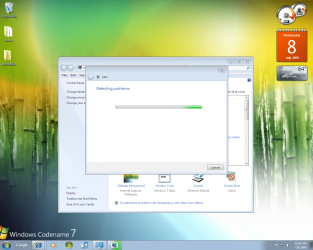
Hello I need help with my aero on my computer! My Aero Snap and Shake work perfectly but my transparecy and peek do not work at all. So I have no transparecy what so ever. Is there some sort of hack that can force windows to display these features? PLEASE HELP!!!! My OP is
Windows 7 RC 7100.
~~~~~~~~~~~~ERROR MESSAGE!~~~~~~~~~~~~
The current video card may support Aero with a driver that is compliant with the Windows Display Driver Model (WDDM). Contact the manufacturer of your computer or video card for a WDDM-compatible driver.

PIC OF DESKTOP IN ATTACHED FILES


Attached Thumbnails
Aero Effects/Transparency Help-new.png  
My System SpecsSystem Spec
07-09-2009   #2


Windows 7 Ultimate 32bit SP1


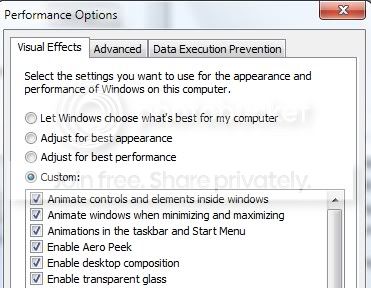
Make sure that they are checked in "Performance Options"
My System SpecsSystem Spec
07-09-2009   #3


7600x64 RTM


Where can u access Performance Options?
My System SpecsSystem Spec
.


07-09-2009   #4


Win 7


Quote   Quote: Originally Posted by spliff View Post
Where can u access Performance Options?
type it in the start menu.


Quote   Quote: Originally Posted by Muffinz413 View Post
Because there is no WDDM driver for your graphics processor.

From http://www.intel.com/support/graphic...s-023606.htm#3

Intel will provide support for WDDM drivers beginning with the Intel® 945 Express chipset family and beyond. See question 5 below for a detailed explanation of WDDM support on Intel® 915 Express chipset-based platforms. However, Windows Vista is supported on the Intel® 865G, 915G Express desktop chipsets and 852/855GM mobile chipsets running XPDM (XP Display Driver Model) driver included on the Windows Vista install media. Windows Vista will install on these platforms, but advanced features such as Windows Aero will not be enabled as XPDM drivers do not support Windows AERO.

Last edited by YupYup; 07-10-2009 at 05:21 PM..
My System SpecsSystem Spec
07-10-2009   #5
DJG


OOOPSIE!

I clicked on Spliff's system instead of Muffinz413's! I thought he had a Radeon card, but he just has a generic adapter, so Yup Yup may be right! Never mind!


An easy way to access the performance options is to go to the WEI screen from System Properties and click on Adjust Visual Effects on the top left corner.

Last edited by DJG; 07-10-2009 at 10:10 PM..
My System SpecsSystem Spec
07-10-2009   #6


7264x64/7260x86


Specs of the system?
My System SpecsSystem Spec
07-10-2009   #7


Win 7


Quote   Quote: Originally Posted by DJG View Post
Catalyst 9.6 definitely is WDDM 1.1! I'm running it.

An easy way to access the performance options is to go to the WEI screen from System Properties and click on Adjust Visual Effects on the top left corner.
Yes it is, my comment about not having WDDM drivers was towards Muffinz413 i corrected my post to make that clear.
My System SpecsSystem Spec
07-10-2009   #8
DJG


Quote   Quote: Originally Posted by copernicus View Post
Specs of the system?
Click on "My System Specs" ...
My System SpecsSystem Spec
07-10-2009   #9
DJG


Quote   Quote: Originally Posted by YupYup View Post
Yes it is, my comment about not having WDDM drivers was towards Muffinz413 i corrected my post to make that clear.
OOOPSIE!

I clicked on Spliff's system instead of Muffinz413's! I thought he had a Radeon card, but he just has a generic adapter, so Yup Yup may be right!
My System SpecsSystem Spec
Reply

 Aero Effects/Transparency Help problems?


Thread Tools


Similar Threads for: Aero Effects/Transparency Help
Thread Forum
aero transparency problem Themes and Styles
Aero transparency problem Customization
aero effect and transparency General Discussion
I want the Aero border with no transparency! Customization
aero transparency Graphic Cards


All times are GMT -5. The time now is 07:10 AM.


Windows 7 Forums is an independent web site and has not been authorized,
sponsored, or otherwise approved by Microsoft Corporation.
"Windows 7" and related materials are trademarks of Microsoft Corp.
© Designer Media Ltd
  

1 2 3 4 5 6 7 8 9 10 11 12 13 14 15 16 17 18 19 20 21 22 23 24 25 26 27 28 29 30