Windows 7 Forums Search
Welcome to Windows 7 Forums. Our forum is dedicated to helping you find solutions with any problems, errors or issues you are experiencing with Windows 7. The Windows 7 forum also covers news and updates and has an extensive Windows 7 tutorial section that covers a wide range of tips and tricks.


Windows 7 - ATI Graphics Problem

 
04-28-2011   #1


Windows 7 Home Premium 64bit


ATI Graphics Problem

Hi Guys!

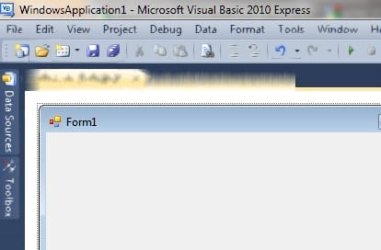
I have this weird graphics problem where sometimes programs look like ink(the pictures will help to show you what I mean)

Ive only noticed it on iTunes, Visual Basic 2010 and a screen capture software

Ive also made a Video on youtube to show you what happen on iTunes.

YouTube - Weird ATI or Windows 7 Display Problem

It looks like when water runs on ink and it smuges.

Im using a an ATI Sapphire HD5770 graphics card (not overclocked)

Any solutions or fixes?

Thanks in advance!

Attached Thumbnails
ATI Graphics Problem-blurry-itunes.jpg   ATI Graphics Problem-blurry.jpg  
My System SpecsSystem Spec
04-28-2011   #2


Windows 7 Ultimate x64


Hey DevilSniper, looks like you've come to the right place.

As it goes, I'm running the same graphics card in my machine and have never run into this type of problem before.

So we have several options. The most likely cause is that you installed the drivers improperly. To begin with, I'd like you to uninstall and reinstall the latest drivers.

http://sites.amd.com/us/game/downloads/Pages/radeon_win7-64.aspx

This is the latest drivers for your version of Windows (from your sig's information), please download that.

Next download this.

Guru3D - Driver Sweeper

This is Driver Sweeper. Now most of the time, general registry sweepers are rather nasty, but this one is designed for only video drivers, so should be alright.

Uninstall the Catalyst Suite that is already installed on you computer, then restart and run Driver Sweeper. After that you'll need to restart and let it do its things, follow the instructions till its complete, then reinstall the catalyst drivers. Report back if or not this helped.

Thanks!
My System SpecsSystem Spec
04-28-2011   #3


Win 7 Ultimate x64


Assuming you are using catalyst 11.2 or newer, open the Catalyst Control Center, click on Gaming and then on 3D Application Settings and look for Morphological Anti-Aliasing (MLAA) and if it is enabled, set it to disabled. That should fix things.
My System SpecsSystem Spec
.


04-28-2011   #4


Windows 7 Ultimate x64


Or you can do as Stormy says, as he seems familiar with the issue.
My System SpecsSystem Spec
04-29-2011   #5


Windows 7 Home Premium 64bit


Thank you for the quick, and very helpful advice Zen and Stormy!
I have unticked Morphological Anti-Aliasing and it worked!

Thank you very much!
My System SpecsSystem Spec
06-20-2011   #6


windows 7 Pro x64


I had the exact same issue - and switching off morphological anti-aliasing also did the trick for me.

Thanks a million Stormy - that was going to get nasty because although itunes was still sort of usable - dbvisualizer was completely unusable.
My System SpecsSystem Spec
12-26-2011   #7


Windows 7 Ultimate x64


Just to confirm I had the same issue and disabling morphological filtering under Game settings did the trick for me.

Catalyst 11.12
My System SpecsSystem Spec
Reply

 ATI Graphics Problem problems?


Thread Tools


Similar Threads for: ATI Graphics Problem
Thread Forum
problem with graphics Gaming
Graphics Problem FF6 and FF7 Browsers & Mail
BIG GRAPHICS PROBLEM!!! Graphic Cards
Graphics Problem?? General Discussion
Graphics Problem Graphic Cards


All times are GMT -5. The time now is 07:11 AM.


Windows 7 Forums is an independent web site and has not been authorized,
sponsored, or otherwise approved by Microsoft Corporation.
"Windows 7" and related materials are trademarks of Microsoft Corp.
© Designer Media Ltd
  

1 2 3 4 5 6 7 8 9 10 11 12 13 14 15 16 17 18 19 20 21 22 23 24 25 26 27 28 29 30