Windows 7 Forums


Windows 7: nvidia control panel

21 May 2011   #1

Windows 7 Professional 64bit
 
 
nvidia control panel

Good Day to all....

Had a question...
the nvidia control panel when i try to open the desk top part of the control panel it crashs the program... I am try to run my daul screens at two different res. But apparently i need to do it through Nvidia control panel ?????? Is there a fix to stop the desktop portion of the nvidia control panel from crashing it self????? Thanx in advance ....

My System SpecsSystem Spec

21 May 2011   #2

Microsoft Windows 7 Ultimate: x64 (SP1)
Denmark


Hello Kodiak420!

The Nvidia Control Panel follows with your Graphic Driver. Try reinstalling your Driver by using Nvidia Uninstaller (uninstall from your control panel as we know!)

warning   Warning
Your resolution will change after you restarted your computer, it's all normal because Windows 7 is using the default driver


Tip   Tip
If you want to clean leftover files use the popular software, Driver Sweeper

Drivers - Clean Left over Files after Uninstalling

If you don't want to uninstall your driver, i'm sure there's some members having other suggestions for you!
Hope this helps.
My System SpecsSystem Spec
21 May 2011   #3

Windows 7 Professional 64bit


Quote   Quote: Originally Posted by FredeGail View Post
Hello Kodiak420!

The Nvidia Control Panel follows with your Graphic Driver. Try reinstalling your Driver by using Nvidia Uninstaller (uninstall from your control panel as we know!)

warning   Warning
Your resolution will change after you restarted your computer, it's all normal because Windows 7 is using the default driver


Tip   Tip
If you want to clean leftover files use the popular software, Driver Sweeper

Drivers - Clean Left over Files after Uninstalling

If you don't want to uninstall your driver, i'm sure there's some members having other suggestions for you!
Hope this helps.
When i updated the latest driver (the 270.61 i think don,t qote) I did a complete uninstall then i ran driver sweeper to make sure of it all being gone. then installed.

SO i'm hopeing that i dont need to do all that again.... but thanx fredegail for the input.....
My System SpecsSystem Spec
.


21 May 2011   #4

Windows7 Pro 64bit SP-1; Windows XP Pro 32bit
Grafton,IL


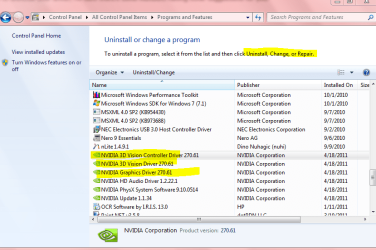
That is it. I just went to Control Panel> Programs and Features. The only option when you highlight and right click is uninstall- no repair option. Some software will have repair. It seems a rarity anymore.
See pic below.

The same if you go to Device Manager. Rollback or delete. No repair.

Mike
Attached Thumbnails
nvidia control panel-nvidia.png  
My System SpecsSystem Spec
21 May 2011   #5

Windows 7 Professional 64bit


Quote   Quote: Originally Posted by Hopalong X View Post
That is it. I just went to Control Panel> Programs and Features. The only option when you highlight and right click is uninstall- no repair option. Some software will have repair. It seems a rarity anymore.
See pic below.

The same if you go to Device Manager. Rollback or delete. No repair.

Mike
well thats the same as minenvidia control panel-capture-12.png I guess i am going to uninstall, sweep again.. but now..
My System SpecsSystem Spec
21 May 2011   #6

Windows 7 Home Premium 64bit
Southern Ohio


I think the dual display needs to be setup in Nvidias control panels.

You should be able to just re-install the drivers, and check "Perform a clean Install"


I would unplug 1 monitor for the time being.
Once you get the driver and control panel working, then reconnect it, and set it up in the control panel.
My System SpecsSystem Spec
21 May 2011   #7

Windows 8 Pro
Standish, Lancashire, England


You can set the resolutions on each monitor from display properties with no need to go anywhere near the nvidia control panel.
My System SpecsSystem Spec
21 May 2011   #8

Windows 7 Professional 64bit


Quote   Quote: Originally Posted by z3r010 View Post
You can set the resolutions on each monitor from display properties with no need to go anywhere near the nvidia control panel.
CAN I RUN 2 window task bars TASK BARS
My System SpecsSystem Spec
21 May 2011   #9

Windows 8 Pro
Standish, Lancashire, England


Nope, for that you need a 3rd party app like ultramon.
My System SpecsSystem Spec
21 May 2011   #10

Windows 7 Professional 64bit


Quote   Quote: Originally Posted by Wishmaster View Post
I think the dual display needs to be setup in Nvidias control panels.

You should be able to just re-install the drivers, and check "Perform a clean Install"


I would unplug 1 monitor for the time being.
Once you get the driver and control panel working, then reconnect it, and set it up in the control panel.
Thanx wishmaster you saved the day again... thanx
My System SpecsSystem Spec
Reply

 nvidia control panel problems?


Thread Tools


Similar help and support threads for: nvidia control panel
Thread Forum
nVidia Control Panel help please! Graphic Cards
nVidia Control Panel Graphic Cards
Nvidia Control Panel won't Install Drivers
NVIDIA control panel help. Graphic Cards
Nvidia Control Panel Graphic Cards


All times are GMT -5. The time now is 07:14 AM.


Seven Forums Android App Seven Forums IOS App Follow us on Facebook

Windows 7 Forums is an independent web site and has not been authorized,
sponsored, or otherwise approved by Microsoft Corporation.
"Windows 7" and related materials are trademarks of Microsoft Corp.
© Designer Media Ltd
  

1 2 3 4 5 6 7 8 9 10 11 12 13 14 15 16 17 18 19 20 21 22 23 24 25 26 27 28 29 30 31 32