Windows 7 Forums Search
Welcome to Windows 7 Forums. Our forum is dedicated to helping you find solutions with any problems, errors or issues you are experiencing with Windows 7. The Windows 7 forum also covers news and updates and has an extensive Windows 7 tutorial section that covers a wide range of tips and tricks.


Windows 7 - 'Not enough Free Resources'

 
05-31-2011   #1
RiD


Windows 7 Home Premium 64bit


'Not enough Free Resources'

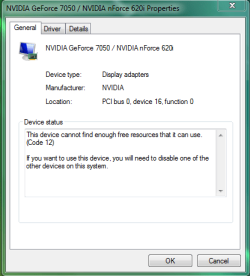
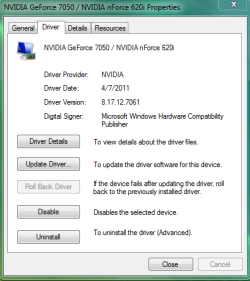
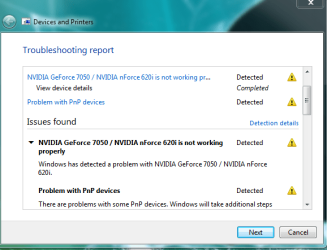
I just got a new monitor (Dell S2409W) And then noticed these errors on my graphics card panel. I'm not sure if this happened before I got the monitor but this is when i first noticed it. What do i do?

Attached Thumbnails
'Not enough Free Resources'-problem.png   'Not enough Free Resources'-problem2.png   'Not enough Free Resources'-problem3.png  
My System SpecsSystem Spec
05-31-2011   #2


Win 7 Ultimate x64


Need to sort something first. Are you using the onboard video as shown in those screen shots, or are you using the Geforce 210 listed in your specs? If it is the 210 then the fix for what you posted is to go into the bios and disable the onboard video.
My System SpecsSystem Spec
05-31-2011   #3
RiD


Windows 7 Home Premium 64bit


Um.. i DO have the 7050 it came with my computer... as for the nForce? i dunno. i swear when I put my 2nd one in it was a GeForce 210 (hence my specs) can you help me figure out what graphics car i have if it didnt come with my computer? I cant remember what it was.

Last edited by RiD; 05-31-2011 at 09:38 PM..
My System SpecsSystem Spec
.


05-31-2011   #4


Win 7 Ultimate x64


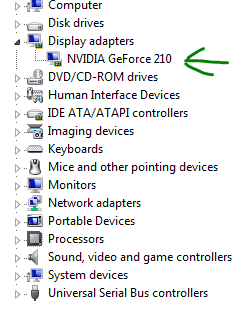
The 7050 is onboard video, it is not a card. This is the Geforce 210,

Every PC needs good graphics.

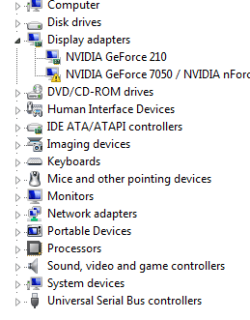
Do you have both showing in Device Manager?

This is an example of a computer with onboard video (#1) as well as a video card (#2),

'Not enough Free Resources'-h55.jpg

If your monitor is connected to #2 then you need to go into the bios and disable it.
My System SpecsSystem Spec
05-31-2011   #5
RiD


Windows 7 Home Premium 64bit


Well, on mine, there is only one blue input to put it in, and thats the same one my last monitor was in... So will I have to go into the bios and disable it? And HOW do i get into the Bios? I have an Emachines. Please go more in depth, im a newb.
Attached Thumbnails
'Not enough Free Resources'-problem4.png   'Not enough Free Resources'-probkem5.png  

Last edited by RiD; 06-01-2011 at 10:49 AM..
My System SpecsSystem Spec
06-01-2011   #6


Windows 7 Ultimate x64 SP1


Good monitor, I have the same one

ahh, you don't need to worry RiD, you are using hybrid SLI, but your computer cannot handle it, you need to reboot your computer and load the bios, from there you need to go into integrated pheripherals and look for onboard GPU, disable it and that error will disappear along with the extra card.

Edit:

the nForce 7050 is the chipset of your computer, the drivers are loaded by default once you disable your onboard graphics card, you don't need to worry about that.
My System SpecsSystem Spec
06-01-2011   #7
RiD


Windows 7 Home Premium 64bit


Fixed, Thanks!
My System SpecsSystem Spec
06-01-2011   #8


Win 7 Ultimate x64


Delete or F2 likely. Start tapping one of them shortly after hitting the power button.
My System SpecsSystem Spec
06-01-2011   #9
RiD


Windows 7 Home Premium 64bit


Quote   Quote: Originally Posted by stormy13 View Post
Delete or F2 likely. Start tapping one of them shortly after hitting the power button.
It was Delete. Thanks. So it should look like this?
Attached Images
 
My System SpecsSystem Spec
06-01-2011   #10


Windows 7 Ultimate x64 SP1


correct, sorted
My System SpecsSystem Spec
Reply

 'Not enough Free Resources' problems?


Thread Tools


Similar Threads for: 'Not enough Free Resources'
Thread Forum
Windows 7 UNIX Free Resources Available for Download. News
Intel PRO/Wireless cannot find free resources Network & Sharing
not enough free resources?? (2nd video card) Graphic Cards


All times are GMT -5. The time now is 07:14 AM.


Windows 7 Forums is an independent web site and has not been authorized,
sponsored, or otherwise approved by Microsoft Corporation.
"Windows 7" and related materials are trademarks of Microsoft Corp.
© Designer Media Ltd
  

1 2 3 4 5 6 7 8 9 10 11 12 13 14 15 16 17 18 19 20 21 22 23 24 25 26 27 28 29 30