| Windows 7: trouble with hdmi that's plugged in my computer to tv |
12 Jun 2011
|
#1 | | |
trouble with hdmi that's plugged in my computer to tv Hello, I plugged in my hdmi cord into my computer that goes to tv, but all I get is: "no signal". How can I get it to work on windows 7 Ultimate 64 bit. | My System Specs |
| System Manufacturer/Model Number Gigabyte Technology Co., Ltd/ H55M-S2H OS Windows 7 Ultimate x64 CPU Intel Core i5 650 Motherboard Gigabyte Technology Co., Ltd Memory DDR3 Dual Channel: 4096/ NB Frequency: 2400.3 MHz Graphics Card NVIDIA GeForce 9600 GT Sound Card High Definition Audio Device Monitor(s) Displays CALYPSO CLP-32LC1 TV PSU 550 Case not sure Cooling Intel cooling fan Hard Drives - Maxtor 6E030L0 [Hard drive] (30.75 GB) -- drive 0, s/n E190ADSE, rev NAR61590, SMART Status: Healthy
- ST3320613AS [Hard drive] (320.07 GB) -- drive 1, s/n 9SZ6PJV8, rev CC2J, SMART Status: Healthy |
12 Jun 2011
|
#2 | | Windows 7 Ultimate x64 Utah |
First make sure your display is outputting to your TV, especially if you have another connection to the card already. Next, make sure you have the TV in the correct mode to receive from your computer, generally called PC mode. | My System Specs | | System Manufacturer/Model Number Zen Productions OS Windows 7 Ultimate x64 CPU Intel i7-860 Motherboard Gigabyte GA-P55A-UD4P Memory Corsair Dominator 1600Mhz, 8-8-8-24 1.65v 2x2GB Graphics Card ATI Radeon 5770 HD Sound Card Intel High Definition Sound Monitor(s) Displays Samsung P2570HD Screen Resolution 1920x1080 Keyboard Logitech G110 Mouse Logitech MX Revolution PSU Corsair CMPSU-750HX 750W Case Antec p183 Cooling Corsair H50 Water Cooler Hard Drives Western Digital Caviar Black 500gb Internet Speed 768 mb/s |
12 Jun 2011
|
#3 | | |
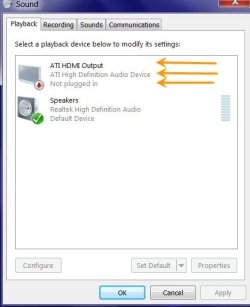
Right click on the Speaker icon in the System Tray, Click on the Playback devices and check whether HDMI output is selected as the default device in the Playback tab.
Of course you have to select the correct HDMI input on the TV.
i am not familiar with Intel processors and nvidia graphics, but generally if you are not using the onboard/on processor graphics, you may have to enter the bios and change to PCI/PCIe graphics.
Last edited by Ponmayilal; 12 Jun 2011 at 09:41 PM..
| My System Specs | | System Manufacturer/Model Number self-assembled OS Windows 7 Ultimate 32bit CPU AMD Phenom II X3 720 Processor Motherboard Gigabyte GA-MA78GM-S2H Revision 1.0 Memory Transcend DDR2 (PC2 6400) 4 X 1GB Graphics Card Integrated + ATI Radeon 4550 Sound Card Integrated Realtek ALC 889A Monitor(s) Displays DELL 1704 FPT Screen Resolution 1280 x 1024 Keyboard Microsoft - wired Mouse Microsoft - wired PSU Coolermaster 400 W Case Zebronics Cube Cooling stock Hard Drives Western Digital Caviar SE16 250 GB x2 in RAID 0 Internet Speed ADSL 256-512Kbps |
13 Jun 2011
|
#4 | | |
all I have on my sound in control panel is:
Speakers
Realtek High Defininition Audio
Default Device
Realtek Digital Output
Realtek High Definition Audio
Ready | My System Specs | | System Manufacturer/Model Number Gigabyte Technology Co., Ltd/ H55M-S2H OS Windows 7 Ultimate x64 CPU Intel Core i5 650 Motherboard Gigabyte Technology Co., Ltd Memory DDR3 Dual Channel: 4096/ NB Frequency: 2400.3 MHz Graphics Card NVIDIA GeForce 9600 GT Sound Card High Definition Audio Device Monitor(s) Displays CALYPSO CLP-32LC1 TV PSU 550 Case not sure Cooling Intel cooling fan Hard Drives - Maxtor 6E030L0 [Hard drive] (30.75 GB) -- drive 0, s/n E190ADSE, rev NAR61590, SMART Status: Healthy
- ST3320613AS [Hard drive] (320.07 GB) -- drive 1, s/n 9SZ6PJV8, rev CC2J, SMART Status: Healthy |
13 Jun 2011
|
#5 | | 7 Ultimate x64 California |
Graphics Card NVIDIA GeForce 9600 GT
9600 GT doesn't pass through the audio, you'll need an optical cable. | My System Specs | | OS 7 Ultimate x64 CPU i5-2500k Motherboard Asus P8P67 Pro Memory 8GB G.Skill Ripjaws X F3-12800CL7D-8GBXH 1866MHz 8-9-8-24 Graphics Card EVGA GTX 570 SC Sound Card X-Fi Titanium Fatality Monitor(s) Displays Samsung S27A550H 27" LED Screen Resolution 1920x1080 Keyboard MS Natural Elite 4000 Ergonomic Mouse Logitech G500 PSU PC Power & Cooling Silencer 760 Case Lian Li Lancool K62 Cooling Thermalright Venomous X Black/Scythe S-Flex/Shin-Etsu X23 Hard Drives OCZ Vertex 3 120GB.
1TB Samsung F3.
2TB Samsung F4. Internet Speed 6MB/768 Other Info Logitech Z-5500 505 watts.
D-Link DGL-4500.
Tripp-Lite Smart Pro 1500. |
13 Jun 2011
|
#6 | | |
the hdmi cable is plugged into the mother board | My System Specs | | System Manufacturer/Model Number Gigabyte Technology Co., Ltd/ H55M-S2H OS Windows 7 Ultimate x64 CPU Intel Core i5 650 Motherboard Gigabyte Technology Co., Ltd Memory DDR3 Dual Channel: 4096/ NB Frequency: 2400.3 MHz Graphics Card NVIDIA GeForce 9600 GT Sound Card High Definition Audio Device Monitor(s) Displays CALYPSO CLP-32LC1 TV PSU 550 Case not sure Cooling Intel cooling fan Hard Drives - Maxtor 6E030L0 [Hard drive] (30.75 GB) -- drive 0, s/n E190ADSE, rev NAR61590, SMART Status: Healthy
- ST3320613AS [Hard drive] (320.07 GB) -- drive 1, s/n 9SZ6PJV8, rev CC2J, SMART Status: Healthy |
13 Jun 2011
|
#7 | | 7 Ultimate x64 California |

Quote: Originally Posted by 10alpla1 the hdmi cable is plugged into the mother board Did you enable the onboard graphics in the bios? If not, there's your problem.
You can either use the onboard graphics chip, or you can use your graphics card; but you can't use a mix and match of both. If you want to use the onboard video, then you'll have to enable it in the bios. If you want to use your graphics card, then you'll have to also use an optical cable, which you attach right below your hdmi port. http://www.gigabyte.com/fileupload/p.../3310/1361.jpg | My System Specs | | OS 7 Ultimate x64 CPU i5-2500k Motherboard Asus P8P67 Pro Memory 8GB G.Skill Ripjaws X F3-12800CL7D-8GBXH 1866MHz 8-9-8-24 Graphics Card EVGA GTX 570 SC Sound Card X-Fi Titanium Fatality Monitor(s) Displays Samsung S27A550H 27" LED Screen Resolution 1920x1080 Keyboard MS Natural Elite 4000 Ergonomic Mouse Logitech G500 PSU PC Power & Cooling Silencer 760 Case Lian Li Lancool K62 Cooling Thermalright Venomous X Black/Scythe S-Flex/Shin-Etsu X23 Hard Drives OCZ Vertex 3 120GB.
1TB Samsung F3.
2TB Samsung F4. Internet Speed 6MB/768 Other Info Logitech Z-5500 505 watts.
D-Link DGL-4500.
Tripp-Lite Smart Pro 1500. |
13 Jun 2011
|
#8 | | |
Usually in the BIOS the onboard graphics will be the default selection.
There may also be a setting in the bios to select VGA/DVI or HDMI out. Check your motherboard manual and set the bios correctly and I prexume your problem will be resolved.
If you need more help please let us know the exact Gigabyte motherboard (Is it GA-H55M-S2H? ) and also whether you are using the on-board HDMI out or the graphics card HDMI output. Then someone using that board, processor and graphics card can give you specific instructions on setting up the video and audio correctly. | My System Specs | | System Manufacturer/Model Number self-assembled OS Windows 7 Ultimate 32bit CPU AMD Phenom II X3 720 Processor Motherboard Gigabyte GA-MA78GM-S2H Revision 1.0 Memory Transcend DDR2 (PC2 6400) 4 X 1GB Graphics Card Integrated + ATI Radeon 4550 Sound Card Integrated Realtek ALC 889A Monitor(s) Displays DELL 1704 FPT Screen Resolution 1280 x 1024 Keyboard Microsoft - wired Mouse Microsoft - wired PSU Coolermaster 400 W Case Zebronics Cube Cooling stock Hard Drives Western Digital Caviar SE16 250 GB x2 in RAID 0 Internet Speed ADSL 256-512Kbps |
13 Jun 2011
|
#9 | | |
I have the gigabyte mother board: GA-H55M-S2H, and I am trying to use on-board HDMI out. In the bios I have video set to onboard, and that didn't work. Also, I went to the gigabyte website to download the drive that includes hdmi, and it still didn't work. | My System Specs | | System Manufacturer/Model Number Gigabyte Technology Co., Ltd/ H55M-S2H OS Windows 7 Ultimate x64 CPU Intel Core i5 650 Motherboard Gigabyte Technology Co., Ltd Memory DDR3 Dual Channel: 4096/ NB Frequency: 2400.3 MHz Graphics Card NVIDIA GeForce 9600 GT Sound Card High Definition Audio Device Monitor(s) Displays CALYPSO CLP-32LC1 TV PSU 550 Case not sure Cooling Intel cooling fan Hard Drives - Maxtor 6E030L0 [Hard drive] (30.75 GB) -- drive 0, s/n E190ADSE, rev NAR61590, SMART Status: Healthy
- ST3320613AS [Hard drive] (320.07 GB) -- drive 1, s/n 9SZ6PJV8, rev CC2J, SMART Status: Healthy |
13 Jun 2011
|
#10 | | 7 Ultimate x64 California |
Just to clarify, you enabled onboard video in the bios, then booted to Windows and installed the corresponding video drivers... right? Get it working on the machine first, then we'll get it to work on your TV. | My System Specs | | OS 7 Ultimate x64 CPU i5-2500k Motherboard Asus P8P67 Pro Memory 8GB G.Skill Ripjaws X F3-12800CL7D-8GBXH 1866MHz 8-9-8-24 Graphics Card EVGA GTX 570 SC Sound Card X-Fi Titanium Fatality Monitor(s) Displays Samsung S27A550H 27" LED Screen Resolution 1920x1080 Keyboard MS Natural Elite 4000 Ergonomic Mouse Logitech G500 PSU PC Power & Cooling Silencer 760 Case Lian Li Lancool K62 Cooling Thermalright Venomous X Black/Scythe S-Flex/Shin-Etsu X23 Hard Drives OCZ Vertex 3 120GB.
1TB Samsung F3.
2TB Samsung F4. Internet Speed 6MB/768 Other Info Logitech Z-5500 505 watts.
D-Link DGL-4500.
Tripp-Lite Smart Pro 1500. trouble with hdmi that's plugged in my computer to tv problems? All times are GMT -5. The time now is 05:14 PM. | |