Windows 7 Forums


Windows 7: Is my graphics card going bad?

28 Jun 2011   #1

Windows 7 profesional
 
 
Is my graphics card going bad?

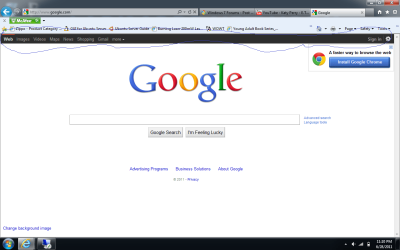
Hi all, I have a Windows 7 Pro HP machine. And I want to know if my graphics card is going bad. I've only had the laptop for a few years and I don't know what's wrong with it. Every time I hover over certain things the alternative text is black. Also it is on some webpages. Here's some screen shots.

Attached Thumbnails
Is my graphics card going bad?-google.png   Is my graphics card going bad?-show-desktop.png   Is my graphics card going bad?-start.png  
My System SpecsSystem Spec

28 Jun 2011   #2

Windows 7 Ultimate SP1 (64-bit)
Valencia, VE.


Hello there.

Have you updated the graphics card driver recently? i really don't think it's the card going bad, when a card goes bad, you'll see artifacts on the screen, dots, lines (horizontal and vertical) that appear randomly.. bad colors and stuff.. try to go back to Windows 7 default theme and see if this happens again.. and check if you have the latest drivers for your Laptop.

Cheers.

EDIT: the google black bar is a test from Google, it also happens on youtube, i guess they're trying out some black theme for their websites. That was what i read somewhere, i can't remember right now. but the bar is not part of your problem... so i'd discard that
My System SpecsSystem Spec
28 Jun 2011   #3

Windows 7 profesional


Yeah I tried updating the driver and I already have the current driver. I tried going back to the
Windows 7 theme and it still did the same thing. As long as I know my graphics card isn't going bad then i'm fine. I'd like to know what this is though.
My System SpecsSystem Spec
.


28 Jun 2011   #4

Windows 7 Ultimate SP1 (64-bit)
Valencia, VE.


You could perform an SFC to check if all windows' files are OK. here's a more detailed guide:

SFC /SCANNOW Command - System File Checker

But i'm 99% that it isn't a graphics card problem, so.. take a deep breath, and relax.
My System SpecsSystem Spec
29 Jun 2011   #5

Win7 Ultimate SP1 x64 / Windows 8 Pro / Android
Mauritius


Quote   Quote: Originally Posted by jhansen965 View Post
Hi all, I have a Windows 7 Pro HP machine. And I want to know if my graphics card is going bad. I've only had the laptop for a few years and I don't know what's wrong with it. Every time I hover over certain things the alternative text is black. Also it is on some webpages. Here's some screen shots.
This is perfectly normal, Google overhauled most of its online services.
The visual glitch may be due to the 'power saving features' of your laptop. The best you can do it to update your graphic driver
My System SpecsSystem Spec
29 Jun 2011   #6

Windows Seven Home Premium AMD64
Alaska


Another suggestion: Switch browser.

Internet Explorer has problems -- use Firefox or Google Chrome instead.
My System SpecsSystem Spec
Reply

 Is my graphics card going bad? problems?


Thread Tools


Similar help and support threads for: Is my graphics card going bad?
Thread Forum
Solved ASUS GT240 graphics card "ERROR CAN NOT FIND GRAPHICS CARD" Graphic Cards
play high graphics games without graphics card Gaming
Graphics Card/Onboard Graphics for Media Centre PC Graphic Cards


All times are GMT -5. The time now is 09:29 PM.


Seven Forums Android App Seven Forums IOS App Follow us on Facebook

Windows 7 Forums is an independent web site and has not been authorized,
sponsored, or otherwise approved by Microsoft Corporation.
"Windows 7" and related materials are trademarks of Microsoft Corp.
© Designer Media Ltd
  

1 2 3 4 5 6 7 8 9 10 11 12 13 14 15 16 17 18 19 20 21 22 23 24 25 26 27 28 29 30 31 32