Windows 7 Forums


Windows 7: Screen resolution issue

03 Jul 2011   #1

WINDOWS 7 ULTIMATE 64-BiT
 
 
Screen resolution issue

i Have a 17" CRT SAMSUNG MONITOR.
&
an Onboard ATI 4250 HD GRAPHICS {motherBoard inbuilt}.

i Just installed the graphics card driver & the issue of screen resolution came.

Before installing the driver, Windows 7 generic display driver was used & it supported various resolutions, at that time i was using 1152x864

i Liked that resolution.

But after installing the driver i cant see that resolution in the properties & i have to use 1024x768 which is no good compared to the previously i was using.

Can anyOne pls. help me out how can i enable & use that resolution once again ???

My System SpecsSystem Spec

03 Jul 2011   #2

Windows 7 Home Premium 64bit
New York


What's the exact model number of your monitor?

I'm fairly certain however that you're being limited to 1024 x 768 (a common resolution for 17-inchers) because it's being read directly from the display; it's maximum reported resolution. The actual terminology begets me at the moment, but that's basically it.
My System SpecsSystem Spec
03 Jul 2011   #3

WINDOWS 7 ULTIMATE 64-BiT


Quote   Quote: Originally Posted by Terronium 12 View Post
What's the exact model number of your monitor?

I'm fairly certain however that you're being limited to 1024 x 768 (a common resolution for 17-inchers) because it's being read directly from the display; it's maximum reported resolution. The actual terminology begets me at the moment, but that's basically it.
the maximum supported is :


But it is not showing that which it was showing before installing graphic drivers
My System SpecsSystem Spec
.


03 Jul 2011   #4

Windows 7 Home Premium 64bit
New York


Oh I see what your problem is now.

If you want the resolution you had before, go into CCC and find the 'Desktop Management' tab, click on properties (Desktop Properties) and you should see two columns: "Basic" and "HDTV". Hit up the former and the resolution should be there.

If not, you can click on the 'My Digital Flat Panels' tab, and create the resolution.

EDIT: No, scratch all of that. I just messed around with the slider you're showing and it should be directly below 1280 x 720. Try that.
My System SpecsSystem Spec
03 Jul 2011   #5

WINDOWS 7 ULTIMATE 64-BiT


Quote   Quote: Originally Posted by Terronium 12 View Post
Oh I see what your problem is now.

If you want the resolution you had before, go into CCC and find the 'Desktop Management' tab, click on properties (Desktop Properties) and you should see two columns: "Basic" and "HDTV". Hit up the former and the resolution should be there.

If not, you can click on the 'My Digital Flat Panels' tab, and create the resolution.

EDIT: No, scratch all of that. I just messed around with the slider you're showing and it should be directly below 1280 x 720. Try that.


i Dont have CCC & all the other panes u mentioned after that arent also present.
i have AMD VISION ENGINE CONTROL CENTER & in this there arent any of the panes to create custom resolution.

i tried to slide the slider but there are only 2 & nothing in between them.
My System SpecsSystem Spec
03 Jul 2011   #6

Win 7 Ultimate x64
Etobicoke, Ontario


Quote:
i Dont have CCC
Quote:
i have AMD VISION ENGINE CONTROL CENTER
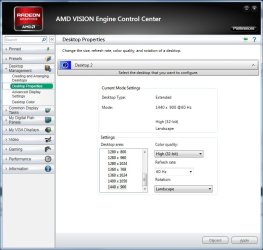
Same thing with a new name. This is where the resolution settings are,

Screen resolution issue-ccc.jpg
My System SpecsSystem Spec
Reply

 Screen resolution issue problems?


Thread Tools


Similar help and support threads for: Screen resolution issue
Thread Forum
Screen resolution issue Graphic Cards
Resolution Stretch fit screen issue. Graphic Cards
Peculiar screen resolution issue Graphic Cards
ATI RADEON HD4670 Screen Resolution Issue Graphic Cards
Screen Resolution Issue Graphic Cards


All times are GMT -5. The time now is 03:51 AM.


Seven Forums Android App Seven Forums IOS App Follow us on Facebook

Windows 7 Forums is an independent web site and has not been authorized,
sponsored, or otherwise approved by Microsoft Corporation.
"Windows 7" and related materials are trademarks of Microsoft Corp.
© Designer Media Ltd
  

1 2 3 4 5 6 7 8 9 10 11 12 13 14 15 16 17 18 19 20 21 22 23 24 25 26 27 28 29 30 31 32