Windows 7 Forums


Windows 7: Dual Monitors?

18 Jul 2011   #1

Windows 7 Professional 32 bit
 
 
Dual Monitors?

I have dual monitors installed on a computer at work. I have been trying to get the monitors to work together. The right monitor is working like a dream and the other one just sits there with no picture. The computer will find the monitor thats not working but the computer cannot identify it. All that I have been trying to do is extend the screen to both monitors for use. I have tried switching cables, switching video cards and nothing really seems to work. My next guess was to go into the registry, but figured i would see if I could get a reply faster here. Any help with this will be greatly appreciated.

My System SpecsSystem Spec

18 Jul 2011   #2

Win 7 Ultimate x64
Etobicoke, Ontario


Would help to know the make and model of the monitors, how they are each connected, and to what video card they are connected to.
My System SpecsSystem Spec
18 Jul 2011   #3

Windows 7 Professional 32 bit


Both monitors are I-Inc monitors and they are both connected using a dvi cable. The video cards are ATI Radeon HD 5800 Series.
My System SpecsSystem Spec
.


18 Jul 2011   #4

Windows 7 Ultimate 64
Southern California


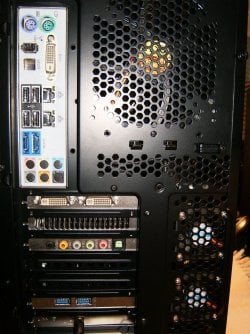
The connections to both monitors must usually be made via the GPU card connectors and not the mobo and one of the GPU connectors please double check to see how you have connected yours.
Dual Monitors?-hpim0942.jpg
Note the dual dvi on the card and one on the mobo as shown.
Double check in the bios if the GPU card is the default device and then connect both to the GPU outs then double check the powercord and on buttons and report back.
My System SpecsSystem Spec
18 Jul 2011   #5

Windows 7 Professional 32 bit


Im sorry, but there are dual video cards also being used in this computer.
My System SpecsSystem Spec
18 Jul 2011   #6

Windows 7 Ultimate 64
Southern California


Please list you components and please take a couple of pictures of the rear mobo connections, Thanks.
My System SpecsSystem Spec
18 Jul 2011   #7

Windows 7 Professional 32 bit


And they are both ATI Radeon HD 5800 Series
My System SpecsSystem Spec
18 Jul 2011   #8

Windows 7 Professional 32 bit


Sorry but there is no camera at my disposal. But I will list my components for you.
My System SpecsSystem Spec
18 Jul 2011   #9

Windows 7 Ultimate 64
Southern California


What company on earth besides CAD design / Stock trading work would provide a computer with Crossfired or SLI GPU cards?
My System SpecsSystem Spec
18 Jul 2011   #10

Windows 7 Professional 32 bit


2- I-Inc Monitors
2- R5850 Twin Frozr II Video Cards
Crosshair IV Formula Motherboard
Amd 890 FX/Sb850 Chipset
Windows 7 64x
My System SpecsSystem Spec
Reply

 Dual Monitors? problems?


Thread Tools


Similar help and support threads for: Dual Monitors?
Thread Forum
dual monitors / dual programs set up Graphic Cards
dual graphics cards, dual monitors, ati crossfireX Graphic Cards
Dual monitors General Discussion
dual monitors Graphic Cards
Dual monitors Graphic Cards


All times are GMT -5. The time now is 04:26 AM.


Windows 7 Forums is an independent web site and has not been authorized,
sponsored, or otherwise approved by Microsoft Corporation.
"Windows 7" and related materials are trademarks of Microsoft Corp.
© Designer Media Ltd