| Windows 7: Samsung Syncmaster B2030 - no option to set resolution to 1600 x 900 |
27 Jul 2011
|
#11 | | Win 7 Ultimate x64 Etobicoke, Ontario |
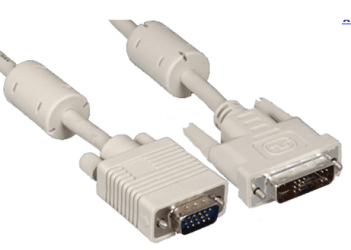
May or may not help but have you tried the monitor driver from Samsung? Samsung | My System Specs |
| System Manufacturer/Model Number Me OS Win 7 Ultimate x64 CPU Phenom II x4 955 @ 4 GHz. Motherboard Asus M5A97 EVO Memory 2x2 GB Kingston HyperX DDR3 1600 Graphics Card Sapphire HD 6850 Sound Card Xonar DGX w/ Logitech X-530 Monitor(s) Displays Acer S232HL Abid Screen Resolution 1920x1080 Keyboard Logitech Wave Mouse Logitech G5 v2 PSU Antec Earthwatts 650W Green Case Antec Three Hundred Cooling Cooler Master 212 EVO Hard Drives 120 GB OCZ Vertex 3
500 GB Seagate 7200.12 Internet Speed 24000/1000 |
27 Jul 2011
|
#12 | | W7 64bit Rural Upstate NY, USA |
I found this forum thread that has information on installing a more capable driver from the chipset manufacturer instead of the dell approved one. Dell apparently does not support this mode in all it's machines and quite a few people have the same problem. There's an excellent chance the installation technique will work across different dell models. Lattitude D620 1600X900 resolution doesn't show up for my monitor - Laptop Video Forum - Laptop - Dell Community | My System Specs | | System Manufacturer/Model Number self built OS W7 64bit CPU AMD Phenom II X4 975 Black Edition @3.9GHz Motherboard ASUS Crosshair IV Formula AMD 890FX AM3 Memory 8GB Corsair Vengeance 8GB PC15000 DDR3 1866MHz CL9 Graphics Card ASUS ENGTX 460 1GB DDR5 Sound Card ...On MB nvidia Monitor(s) Displays ..Samsung T260 Screen Resolution 1440 x 900 Keyboard walmart Mouse Kensington Expert Mouse "gods own trackball" PSU 750 W Case minitower, it's got a cool spider design on the front Cooling all the fans i can cram in, water cooled cpu Hard Drives 2x WD Caviar 320GB SATA-3G HD 7200/16MB/SATA-6G Raid 1 Internet Speed 30 Mb/s |
27 Jul 2011
|
#13 | | Windows 7 Professional 32bit |
is having it at an incorrect resolution damaging the monitor? | My System Specs | | System Manufacturer/Model Number Dell Optiplex 390 OS Windows 7 Professional 32bit CPU Intel(R) Core(TM) i3-2100 CPU @ 3.10Ghz (x4) Motherboard ACPI x86-based PC Memory 4.00GB (3.16 Usable) Graphics Card Intel(R) HD Graphics Family Sound Card Conexant HD Audio Monitor(s) Displays SyncMaster B2030 (Digital) |
27 Jul 2011
|
#14 | | W7 64bit Rural Upstate NY, USA |

Quote: Originally Posted by leonsegal is having it at an incorrect resolution damaging the monitor? I would have though so..but a quick google indicates lcd monitors aren't damaged..but you shouldn't be getting a picture either with a setting over your monitors specs. | My System Specs | | System Manufacturer/Model Number self built OS W7 64bit CPU AMD Phenom II X4 975 Black Edition @3.9GHz Motherboard ASUS Crosshair IV Formula AMD 890FX AM3 Memory 8GB Corsair Vengeance 8GB PC15000 DDR3 1866MHz CL9 Graphics Card ASUS ENGTX 460 1GB DDR5 Sound Card ...On MB nvidia Monitor(s) Displays ..Samsung T260 Screen Resolution 1440 x 900 Keyboard walmart Mouse Kensington Expert Mouse "gods own trackball" PSU 750 W Case minitower, it's got a cool spider design on the front Cooling all the fans i can cram in, water cooled cpu Hard Drives 2x WD Caviar 320GB SATA-3G HD 7200/16MB/SATA-6G Raid 1 Internet Speed 30 Mb/s |
27 Jul 2011
|
#15 | | Windows 7 Home Premium 64 bit Illinois |
Something seems to be out of whack.
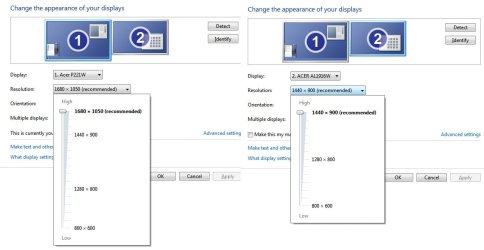
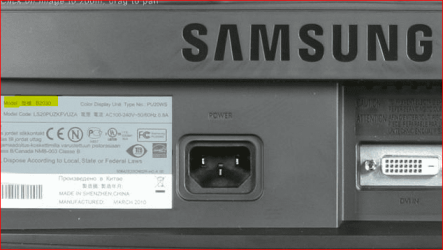
Device manager shows B2030, Windows display manager shows SMB2230.
The SMB2230 supports up to 1920 x 1080 maximum.
Which monitor is it?
Do you have the SMB2230, but installed B2030 driver? | My System Specs | | System Manufacturer/Model Number Self-built OS Windows 7 Home Premium 64 bit CPU Intel Core i7-3770 Motherboard MSI Z77A-G45 Memory G.SKILL 8GB (2 x 4GB) DDR3 F3-10666CL9D-8GBNT Graphics Card Sapphire ATI Radeon HD 6670 Sound Card On-Board Realtek Monitor(s) Displays Samsung SyncMaster P2370HD, Dell 1703FPT Screen Resolution 1920 x 1080, 1280 x 1024 Keyboard Logitech K270 Mouse Logitech M705 PSU SeaSonic M12II SS-500GM Case Lian Li PC-9F Cooling Zalman CNPS9900ALED Hard Drives Samsung HD103SJ Internet Speed 16 Mbps Other Info Bose Companion 2 Multimedia Speakers |
27 Jul 2011
|
#16 | | Windows 7 Ultimate x64 SP1 Cheshire, United Kingdom |
is it at all possible that the resolution and driver are correct?
SMB2230 could be the correct model, but with all PC components, sometimes they use the nearest rounded model to show that the software is installed eg/ i have a WINTV HVR 67XX capture card, but my installation driver says WINTV HVR 1100 DVBT. SMB2230 = SyncMaster B2230 | My System Specs | | Computer type PC/Desktop System Manufacturer/Model Number Custom Build OS Windows 7 Ultimate x64 SP1 CPU Intel Q6600 @ 2.6Ghz Motherboard Evga NF78-CK-132-A 3-Way SLI Memory 4Gb DDR2 Corsair Dominator @ 800Mhz 5-5-5-15 Graphics Card EVGA 560 GTX SC FTW 1GB Sound Card Realtek HD 7.1 Audio, Plantronics GameCom780 7.1 Headset Monitor(s) Displays Dell S2409W 16:9, HDMi, DVI & VGA Screen Resolution 1920 x 1080 Keyboard Logitech generic keyboard Mouse Razor Lachesis Banshee V2 Blue, 4000DPI PSU Xigmatek 750W Quad sli quad core 80% eff Case Antec 900 Gaming Case Cooling Zalman CNPS9700-NT NVIDIA Tritium Hard Drives Samsung 7200rpm 250Gb SATA
Samsung 7200rpm 750Gb SATA
WD 7200rpm 1TB SCSI SATA Internet Speed 120Mb Virgin Media Fibre Optic Other Info Wireless Gaming Receiver for Windows, Wireless Xbox 360 Pad, Wireless Xbox 360 Les Paul Guitar |
27 Jul 2011
|
#17 | | Windows 7 Home Premium 64 bit Illinois |

Quote: Originally Posted by MrNeeds is it at all possible that the resolution and driver are correct?
SMB2230 could be the correct model, but with all PC components, sometimes they use the nearest rounded model to show that the software is installed eg/ i have a WINTV HVR 67XX capture card, but my installation driver says WINTV HVR 1100 DVBT. SMB2230 = SyncMaster B2230
I understand that, but he referenced two different monitors with his original pics......B2030 and B2230. He either has a 20 inch or a 22 inch monitor. | My System Specs | | System Manufacturer/Model Number Self-built OS Windows 7 Home Premium 64 bit CPU Intel Core i7-3770 Motherboard MSI Z77A-G45 Memory G.SKILL 8GB (2 x 4GB) DDR3 F3-10666CL9D-8GBNT Graphics Card Sapphire ATI Radeon HD 6670 Sound Card On-Board Realtek Monitor(s) Displays Samsung SyncMaster P2370HD, Dell 1703FPT Screen Resolution 1920 x 1080, 1280 x 1024 Keyboard Logitech K270 Mouse Logitech M705 PSU SeaSonic M12II SS-500GM Case Lian Li PC-9F Cooling Zalman CNPS9900ALED Hard Drives Samsung HD103SJ Internet Speed 16 Mbps Other Info Bose Companion 2 Multimedia Speakers |
27 Jul 2011
|
#18 | | W7 64bit Rural Upstate NY, USA |
unlikely the exact monitor model is relevant to this problem. video modes are a function of graphics card chipset implementation and driver.
heck..i ran this t260 under vista for 3 years and it listed as 'generic monitor' but all the modes were available. | My System Specs | | System Manufacturer/Model Number self built OS W7 64bit CPU AMD Phenom II X4 975 Black Edition @3.9GHz Motherboard ASUS Crosshair IV Formula AMD 890FX AM3 Memory 8GB Corsair Vengeance 8GB PC15000 DDR3 1866MHz CL9 Graphics Card ASUS ENGTX 460 1GB DDR5 Sound Card ...On MB nvidia Monitor(s) Displays ..Samsung T260 Screen Resolution 1440 x 900 Keyboard walmart Mouse Kensington Expert Mouse "gods own trackball" PSU 750 W Case minitower, it's got a cool spider design on the front Cooling all the fans i can cram in, water cooled cpu Hard Drives 2x WD Caviar 320GB SATA-3G HD 7200/16MB/SATA-6G Raid 1 Internet Speed 30 Mb/s |
27 Jul 2011
|
#19 | | Win 7 Ultimate x64 Etobicoke, Ontario |

Quote: Originally Posted by Magron unlikely the exact monitor model is relevant to this problem. Actually it is very relevant. His computer thinks it has two different monitors connected,
1 - B2030 which is a 20" monitor with a native resolution of 1600x900
2 - SMB2230 (or likely B2230) which is a 22" monitor with a native resolution of 1920x1080
of which the 1st shouldn't be able to even run at the higher resolution.
leonsegal let's see if we can't at least get Windows to detect the correct monitor. Start with setting Device Manager to show hidden and disconnected/ghost devices, Device Manager : Hidden Devices
Under monitors right click and delete/remove any that are showing, and also tick the box to remove any software/driver. If there is more than one don't restart until all are removed. Once restarted hopefully that will force Windows to detect and install the monitor correctly. If not then install the monitor driver from Samsung I posted earlier. | My System Specs | | System Manufacturer/Model Number Me OS Win 7 Ultimate x64 CPU Phenom II x4 955 @ 4 GHz. Motherboard Asus M5A97 EVO Memory 2x2 GB Kingston HyperX DDR3 1600 Graphics Card Sapphire HD 6850 Sound Card Xonar DGX w/ Logitech X-530 Monitor(s) Displays Acer S232HL Abid Screen Resolution 1920x1080 Keyboard Logitech Wave Mouse Logitech G5 v2 PSU Antec Earthwatts 650W Green Case Antec Three Hundred Cooling Cooler Master 212 EVO Hard Drives 120 GB OCZ Vertex 3
500 GB Seagate 7200.12 Internet Speed 24000/1000 |
27 Jul 2011
|
#20 | | Windows 7 Ultimate X64 SP1 Mt. Crumpit/Whoville |
It has been reported that Samsung and MS to not play well together, I have a Samsung P2570HD and took a bit to get thing right. I uninstalled the Samsung driver and used the generic PnP monitor driver to get my resolution, well, resolved. Incorrect res setting won't harm a LCD, but could on the old CRTs.
If you have nVIDIA graphics you may need to change/update the driver. NVIDIA Driver Downloads - Advanced Search Their driver have cause a few issues, try the 270.61.
EDIT: I just checked your specs, you have a very similar GFX card to mine. | My System Specs | | Computer type PC/Desktop System Manufacturer/Model Number Home Built Desktop By DataTech OS Windows 7 Ultimate X64 SP1 CPU Intel i5-2550K, Differing ~4.4-4.8GHz No built in GPU Motherboard ASUS P8Z68-V PRO/GEN3 Memory 16GB G.Skill Sniper 2133MHz 4x4GB Graphics Card ASUS ENGTX460 DirectCU/2DI/1GD5 GeForce GTX 460 Sound Card Onboard Realtek 5-1 Monitor(s) Displays Samsung P2570HD Screen Resolution 1920x1080 Keyboard Old, beat-up Dell USB From 10 yrs Ago Mouse Gigabyte m6900 wired PSU Corsair HX650W Case Inwin Dragon Rider Cooling Hyper 212 EVO w/two Noctua fans, push-pull, @1300 RPM Hard Drives Crucial M4 128GB for OS, 750GB Seagate MomentusXT for data, 500GB Seagate Constellation for storage Internet Speed 8-19 Mbs down, 3-4 Mbs up Comcast Cable Antivirus Norton Internet Security Browser IE 9, Opera when needed Other Info 4 case fans, LG BluRay-RE, ASUS DVD-RW, Mr. Fusion power generator with flux capacitor, 1.21 gigawatts. Samsung Syncmaster B2030 - no option to set resolution to 1600 x 900 problems? All times are GMT -5. The time now is 05:27 AM. | |