Windows 7 Forums Search
Welcome to Windows 7 Forums. Our forum is dedicated to helping you find solutions with any problems, errors or issues you are experiencing with Windows 7. The Windows 7 forum also covers news and updates and has an extensive Windows 7 tutorial section that covers a wide range of tips and tricks.


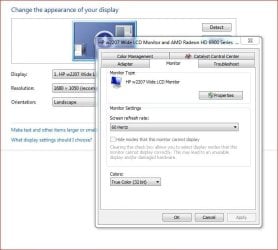
Windows 7 - 59Hz

 
10-15-2009   #221


Windows 7 Professional x64


Quote   Quote: Originally Posted by Deanos View Post
Been a while since I posted on this comment...

As you mentioned above, I have exactly the same problem...
Select 60, just reverts back to 59! REALLY IRRITATING!!!

I suppose we will just have to get used to it until Win 7 eventually takes over from XP (I recon a year or 2!) then, only then will this problem eventually be resolved with service pack 4 or something!

BUT, I have run into 2 other problems which I think are sort of related here, and I hope other might be experiencing it too....

Firstly, the aspect ratio thing...
I usually set the nVidia aspect ratio to "use NVIDIA scaling with fixed-aspect ratio". If I run something with a 4:3 ratio, the screen should display it as that and not stretch it.
Now, when I select this, and hit apply, it confirms the change, then just reverts back to using the monitors built in scaling?!?!?! WTF?????

Secondly, When I play games, watch a movie or basically do anything in full screen and something that is very bright comes on, the monitor blanks out for a few seconds. For example, with the new game Castle Wolfenstien. When this was released, I rushed out and bought (waiting for ages for it! Awesome game!). Now, when ever there is an explosion or something bright on the screen, and you are looking in that direction, the screen will blank out!
This is VERY irritating....

From what I have sort of worked out is that it might have something to, possibly, with DirectX and the drivers, but I am not sure...

Anybody else having this problem?

P.S. Sorry for trying to change the subject here, but these could be related somehow?!?!
Weird - sounds like a dynamic contrast setting, or something like that. Which card do you have? What is the make/model of your monitor? Plz give more info on your rig. Thanks!

My System SpecsSystem Spec
10-16-2009   #222


Windows 7 64-Bit


Thanks for the reply omnimodis78.

I am running 2 XFX 8800GTS 512mb in SLi and I have an HP w2207 22" LCD.

Anything else you might need?
My System SpecsSystem Spec
10-19-2009   #223


win 7


HI ALL,

THIS IS A SOLUTION FOR NVIDIA CARDS, AND IT WORKS GREAT.

After frustrating countless hours, I found a fix that works like a charmmmm.

- Go to Nvidia Control Panel
- Go to Add resolution
- Create Custom Resolution
- Click on Timing
- Click on Manual
- Set refresh rate to 60.001 Hz
- Press Apply, and Have funnnn
My System SpecsSystem Spec
.


10-19-2009   #224


Windows 7 Professional 64-bit


Quote   Quote: Originally Posted by jimmyt1988 View Post
HI ALL,

THIS IS A SOLUTION FOR NVIDIA CARDS, AND IT WORKS GREAT.

After frustrating countless hours, I found a fix that works like a charmmmm.

- Go to Nvidia Control Panel
- Go to Add resolution
- Create Custom Resolution
- Click on Timing
- Click on Manual
- Set refresh rate to 60.001 Hz
- Press Apply, and Have funnnn

wow! that actually worked! Thanks!
My System SpecsSystem Spec
10-19-2009   #225


Windows 7 64-Bit


Nope, doesn't work for me!

Tell me that 60,001 is out of range!

Can only set between 58,000 and 60,000?!?!?
My System SpecsSystem Spec
10-20-2009   #226


Windows 7 64-bit


Quote   Quote: Originally Posted by jimmyt1988 View Post
HI ALL,

THIS IS A SOLUTION FOR NVIDIA CARDS, AND IT WORKS GREAT.

After frustrating countless hours, I found a fix that works like a charmmmm.

- Go to Nvidia Control Panel
- Go to Add resolution
- Create Custom Resolution
- Click on Timing
- Click on Manual
- Set refresh rate to 60.001 Hz
- Press Apply, and Have funnnn
Doesn't work for me either.

Same problem as Deanos.
If I type in 60.001 the apply box is greyed out.
Nvidia control panel states range is 58.000 to 60.000.
My System SpecsSystem Spec
10-20-2009   #227


windows 7, windows XP, Ubuntu


59hz was preventing my HDTV from working with VGA at 1920x1080. RapidShare: 1-CLICK Web hosting - Easy Filehosting fixed it. Virustotal says not a virus, and I grabbed it from this topic.
My System SpecsSystem Spec
10-20-2009   #228


Windows 7 Professional x64


Quote   Quote: Originally Posted by jimmyt1988 View Post
HI ALL,

THIS IS A SOLUTION FOR NVIDIA CARDS, AND IT WORKS GREAT.

After frustrating countless hours, I found a fix that works like a charmmmm.

- Go to Nvidia Control Panel
- Go to Add resolution
- Create Custom Resolution
- Click on Timing
- Click on Manual
- Set refresh rate to 60.001 Hz
- Press Apply, and Have funnnn
Wow that worked

Thanks alot, I'd give you a big hug if I could
My System SpecsSystem Spec
10-20-2009   #229


Vista Ultimate SP2/Windows 7 Ultimate SP1/x64/XP SP3 x86 in VM


Quote   Quote: Originally Posted by jimmyt1988 View Post
HI ALL,

THIS IS A SOLUTION FOR NVIDIA CARDS, AND IT WORKS GREAT.

After frustrating countless hours, I found a fix that works like a charmmmm.

- Go to Nvidia Control Panel
- Go to Add resolution
- Create Custom Resolution
- Click on Timing
- Click on Manual
- Set refresh rate to 60.001 Hz
- Press Apply, and Have funnnn
It worked for me after a lot of fiddling, thanks very much. I can't believe that this would work after all the attempts I'd already made. There must be something magic about that .001...!

It's a but fiddley getting it to take expecially if one already has custom resolutions. Best to delete any that are close or equivalent and to change the actual resolution temporarily to something less. Then the new custom resolution takes like a dream.
My System SpecsSystem Spec
10-20-2009   #230


Windows 7 Professional x64


Amazing - it works! Easy to do too! Thanks jimmyt1988! Time for you to apply at nVidia or Microsoft, your pick...
My System SpecsSystem Spec
Reply

 59Hz problems?


Thread Tools


Similar Threads for: 59Hz
Thread Forum
59Hz instead of 60Hz !!! Graphic Cards
LCD Native Resolution, EDID and 59Hz issues Graphic Cards
59hz and 60hz? Are They Obviously Different? Graphic Cards
Windows 7 insists on resetting my T260 to 59hz Graphic Cards
Refresh rate won't go above 59hz Graphic Cards


All times are GMT -5. The time now is 07:19 AM.


Windows 7 Forums is an independent web site and has not been authorized,
sponsored, or otherwise approved by Microsoft Corporation.
"Windows 7" and related materials are trademarks of Microsoft Corp.
© Designer Media Ltd
  

1 2 3 4 5 6 7 8 9 10 11 12 13 14 15 16 17 18 19 20 21 22 23 24 25 26 27 28 29 30